

ChatGPT now includes a virtual try-on feature that lets you see how a garment will look on you before you buy it. The new tool, launched by OpenAI, aims to reduce the uncertainty of online clothes shopping by generating a realistic preview using your own photos.
What Is ChatGPT's Virtual Try-On?
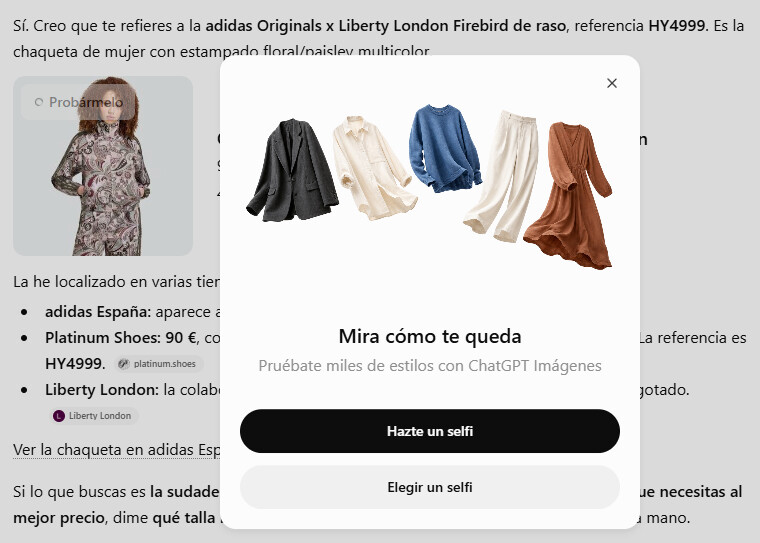
The virtual try-on is part of two new shopping features added to ChatGPT. The first is the ability to visualize a piece of clothing on your body; the second lets you save favorite products for later. Both are designed to make the chatbot a more useful shopping assistant.
Find Original, High-end Home Decor that spark conversation at Grand Goldman Shop.
According to OpenAI, the feature is available directly within the chat interface. When you search for a garment, a "Try it on" button appears over the product image. Clicking it prompts you to upload a selfie and, optionally, a full-body photo.
How to Use the Virtual Try-On Feature
Using the virtual try-on is straightforward. Start by searching for a piece of clothing in ChatGPT. Once the results appear, tap the "Try it on" button on the image. You'll be asked to upload a selfie and, if you want a more accurate preview, a full-body photo.
If you change your mind about the photos, you can update them anytime under Settings > Personalization > Reference Photos. This gives you control over the images used for the simulation.
You're not limited to items found in ChatGPT's search results. You can also upload an image of a garment from another store—or even a screenshot—and ask ChatGPT to try it on you. That flexibility means you can preview almost any piece of clothing you find online.
How It Works Behind the Scenes
Once your photos are uploaded, ChatGPT uses its image generation model, ChatGPT Images 2.5, to create the final preview. The model combines your photo with the garment image to produce a realistic simulation of how the clothes would look on you.
OpenAI has not disclosed the exact technical details, but the result is intended to be a helpful visual guide rather than a perfect representation. The quality of the output depends on the clarity of your photos and the garment image.
Key Benefits of ChatGPT's Virtual Try-On
- Reduces guesswork: See how a garment might fit and look before purchasing.
- Saves time and money: Fewer returns means less hassle and lower shipping costs.
- Works with any store: Upload images from other retailers or screenshots.
- Easy to use: Integrated into ChatGPT's chat interface with simple prompts.
- Customizable: Update your reference photos anytime in settings.
Limitations and What to Watch For
While the feature is promising, it's not flawless. The generated image is a simulation, so it may not perfectly capture fabric drape, texture, or fit. Lighting and photo quality also affect accuracy.
Additionally, the virtual try-on currently only generates a static image—you can't see how the garment moves or feels. And since it relies on AI, there may be occasional artifacts or unrealistic results. Context on how this played out before sits in ChatGPT Virtual Try-On: See How Clothes Fit Before Buying. A companion piece, Amazon Pushes Back as Data Center Opposition Grows, approaches the same subject from another angle.
OpenAI is likely to improve the model over time, but for now, treat the preview as a helpful guide rather than a guarantee. The background to this story is set out in Ai Video: latest articles. A related thread runs through AI-Guided Robot Dog Patrols Vineyards in Extremadura.
Comparison: Traditional Online Shopping vs. ChatGPT Virtual Try-On
| Aspect | Traditional Online Shopping | ChatGPT Virtual Try-On |
|---|---|---|
| Fit Visualization | None—rely on size charts | AI-generated preview on your body |
| Return Risk | High due to fit uncertainty | Reduced with visual preview |
| Store Compatibility | Limited to each retailer | Works with any uploaded image |
| Ease of Use | Standard checkout process | Simple chat-based interaction |
What This Means for Online Shoppers
For consumers, the virtual try-on could significantly improve the online shopping experience. It addresses one of the biggest pain points: not being able to try on clothes before buying. By providing a visual preview, ChatGPT helps you make more informed decisions. Earlier coverage in Spain's September Electricity Price Hike Explained: Red Eléctrica Adjustment shows how the argument developed. A closer look at the same subject appears in Apple's October 28 Event: New MacBook Pro With Touchscreen.
Retailers might also benefit from fewer returns and higher customer satisfaction. However, the feature's reliance on user-uploaded photos raises privacy considerations. OpenAI states that reference photos are stored securely and can be managed in settings. Anyone following the wider picture can start with iPhone Duo 2TB at €76.50/Month: Movistar's Convenient Payment Plan. The same theme surfaces in Telefónica, Deutsche Telekom, Orange, Vodafone Unite for Starlink Alternative, which takes a different angle.
FAQ
How do I access the virtual try-on feature in ChatGPT?
Search for a garment in ChatGPT and click the "Try it on" button that appears over the image. You'll be prompted to upload a selfie and optionally a full-body photo. The feature is available within the chat interface.
Can I use the virtual try-on with clothes from any store?
Yes, you can upload an image of a garment from another store or even a screenshot. ChatGPT will use that image to generate the try-on preview, so you're not limited to products in its search results.
How accurate is the virtual try-on?
The accuracy depends on the quality of your photos and the garment image. While it provides a helpful visual guide, it may not perfectly capture fabric drape, texture, or fit. Treat it as a simulation rather than a guarantee.
Can I change the photos I uploaded for the virtual try-on?
Yes, you can update your reference photos anytime by going to Settings > Personalization > Reference Photos. This allows you to manage which images are used for the simulation.
Browse the Shop
 Acacia frida deluxe solid wood bed frame |
Bedroom bench |
Bed chest drawers |
Lingerie dresser |
Frame base |
Mirror with jewelry storage |
30 Bathroom Vanity |
Memory foam queen mattress |
Mattresses for back pain |
Nightstand set of 2 |
Grand Goldman Shop |
Civil Lawyer
Deutschland Trikot WM 2026
Acacia frida deluxe solid wood bed frame |
Bedroom bench |
Bed chest drawers |
Lingerie dresser |
Frame base |
Mirror with jewelry storage |
30 Bathroom Vanity |
Memory foam queen mattress |
Mattresses for back pain |
Nightstand set of 2 |
Grand Goldman Shop |
Civil Lawyer
Deutschland Trikot WM 2026










