

Meta AI has launched a new feature that allows any user to create images using other people's faces without permission, using Instagram photos as a reference. This opens the door to all kinds of abuse and unethical uses, as the feature can use your profile picture or any photos you've posted as a reference.
We'll briefly explain how this feature is used and how these images are generated. Then, we'll tell you the two methods you can use to prevent others from creating images with your face. Permission is enabled by default, but it can be disabled.
Find Original Home Decor sparking conversation at Grand Goldman Shop.

How Meta AI Generates Images With Your Face
Anyone using the Meta AI website or app can now ask it to generate photos of other people. You simply use a prompt where you request it to do so, mentioning the user by their account name. For example, if Goldman Media were a person, we could ask it to make photos of @Goldman Media doing whatever we want.

By default, Meta AI will use the user's profile picture as a reference for its composition. But you can also ask it to use photos from their feed as a reference, and any scenario or action. In short, you can create images of a person doing whatever you want without them having control over what you do.
This raises serious privacy and consent concerns. The feature is opt-out, meaning your images are available for AI generation unless you take action. Meta has not publicly detailed the full extent of the feature, but the default setting is clear: your face can be used by others.
Two Ways to Prevent Meta AI From Using Your Face
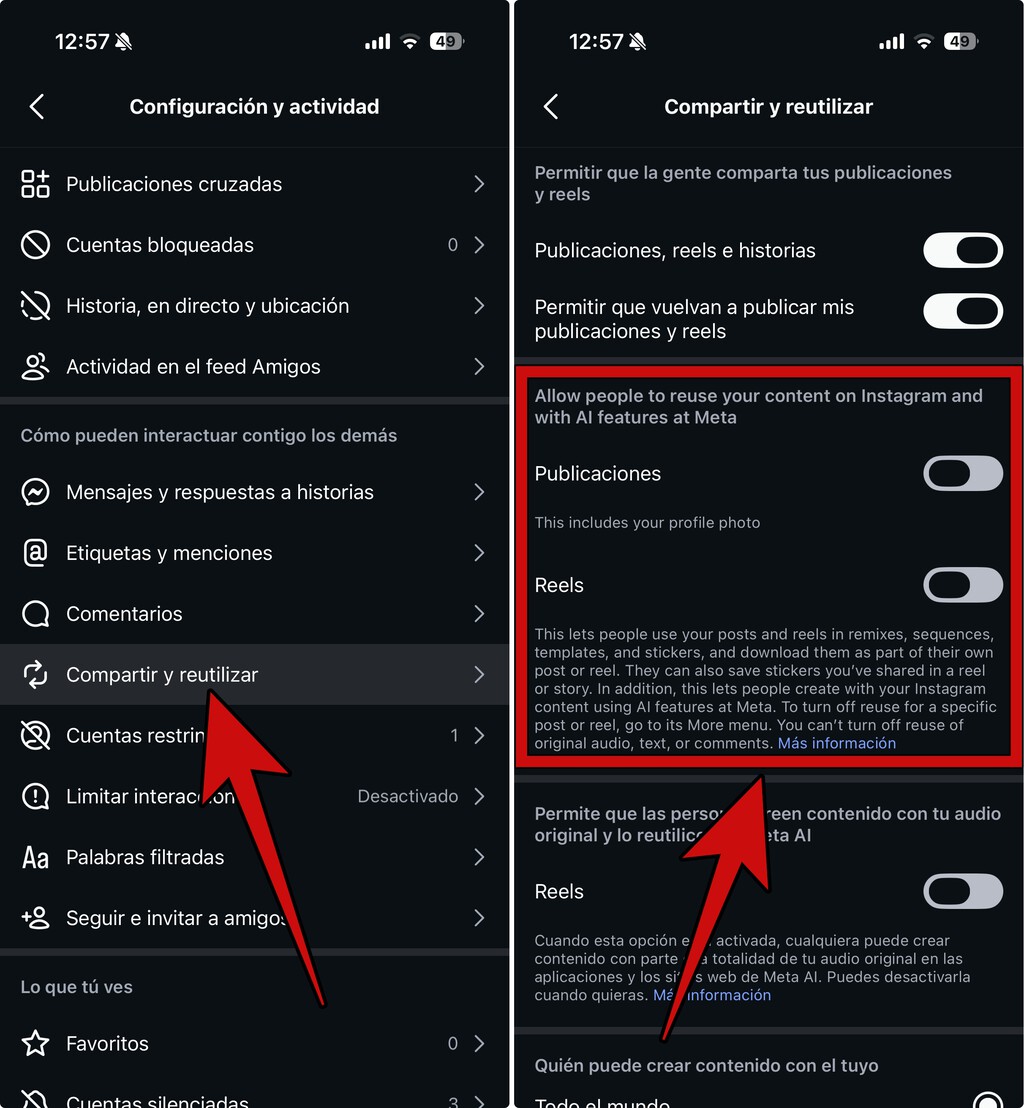
There are two ways you can prevent Meta AI from accessing your photos to create images. The first is to disable the permissions that Instagram has enabled by default. The second is to adjust your Meta AI settings directly. Both methods are straightforward but require you to be proactive.
Method 1: Disable Instagram Permissions
Instagram has a setting that allows your photos to be used for AI training and generation. To disable it, go to your Instagram settings, navigate to the privacy or ads section, and turn off the option that allows your data to be used for AI. The exact wording may vary, but look for terms like "AI" or "data sharing."
Keep in mind that even if you disable this, Meta may still use your public photos in some ways. However, it's a crucial step to limit exposure. Review your Instagram privacy settings regularly, as Meta often changes them.
Method 2: Adjust Meta AI Settings
Meta AI has its own settings that control how your data is used. In the Meta AI app or website, look for a privacy or data settings section. There, you should find an option to prevent your images from being used as references for AI-generated content. Turn it off.
Again, this is an opt-out process. You need to actively disable it. Meta may not make it obvious, so dig into the settings. If you can't find it, check Meta's help center for the latest instructions.
Why This Matters for Your Privacy
This feature is a reminder that our digital identities are increasingly used by AI systems without explicit consent. The ability to generate images of anyone doing anything is a powerful tool that can be misused for harassment, defamation, or fraud. While Meta may have safeguards, the default settings prioritize engagement over privacy.
It's not just about you—it's about everyone. If you have friends or family on Instagram, their faces are also at risk. Share this information with them so they can protect themselves too. The background to this story is set out in Meta Scraps AI Image Tagging Feature After Privacy Backlash. A related thread runs through Meta Smart Glasses Privacy Flaw Records Chats Without Permission. Earlier coverage in Pikachu PFP: 36 Profile Pictures for Every Kind of Fan — Explained shows how the argument developed.
What to Watch Next
Meta is likely to face regulatory scrutiny over this feature, especially in regions with strict privacy laws like the EU. The company may also introduce more controls as backlash grows. For now, the best defense is to be informed and take action. A closer look at the same subject appears in Man Sells Wife’s Antique Tea Set Without Permission, She Sells His Xbox To Buy It Back. Anyone following the wider picture can start with Republican Senator Fires Aide Over Nazi Profile Picture. The same theme surfaces in Can the landlord enter the house without permission?, which takes a different angle.
Stay tuned for updates on how Meta AI evolves. As AI becomes more integrated into social media, the line between public and private will continue to blur. Your vigilance is your best protection. Context on how this played out before sits in AI-Generated Images: Expert Answers on Photography Ethics. A companion piece, AI-Generated Images: Why Photojournalism Ethics Matter Now, approaches the same subject from another angle.
FAQ
Can anyone really create images of me using Meta AI?
Yes, if your Instagram profile is public and you haven't opted out, any Meta AI user can generate images of you by mentioning your username. The AI uses your profile picture or feed photos as a reference. This is enabled by default, so you must actively disable it to prevent it.
How do I know if my images have been used?
Meta does not currently notify users when their images are used to generate content. You would have to manually check if someone has created images of you, which is impractical. This lack of transparency is a major concern. Advocacy groups are pushing for better disclosure.
Does disabling Instagram permissions completely stop Meta AI from using my face?
Disabling Instagram permissions is a key step, but it may not be foolproof. Meta AI has its own settings that also need to be adjusted. Additionally, Meta's terms of service may allow some use of public data. For maximum protection, use both methods and consider making your profile private.
What can I do if someone creates a harmful image of me?
If someone generates a harmful image, report it to Meta immediately. You can also seek legal advice, as creating defamatory or harassing content may violate laws. Document the evidence and contact platforms where the image is shared. Support from advocacy groups can also help.
Browse the Shop
 Acacia frida deluxe solid wood bed frame |
Bedroom bench |
Bed chest drawers |
Lingerie dresser |
Frame base |
Mirror with jewelry storage |
30 Bathroom Vanity |
Memory foam queen mattress |
Mattresses for back pain |
Nightstand set of 2 |
Grand Goldman Shop |
Civil Lawyer
Deutschland Trikot WM 2026







