

PHP2Shell is a critical vulnerability affecting PHP, the programming language that powers a huge portion of the web, including WordPress, Wikipedia, government websites, and many online stores. This week, two critical flaws were discovered in PHP, and it's worth checking that your site is not vulnerable and that all necessary patches have been applied.
The PHP project released an emergency security patch on Wednesday, October 21. It fixes two vulnerabilities, registered as CVE-2026-109618 and CVE-2026-109619, both rated critical and both allowing remote code execution. An attacker exploiting these vulnerabilities could run their own commands on a server using PHP, gaining control and/or accessing sensitive information. The flaws have been dubbed "PHP2Shell".
Find Original, High-end Home Decor that spark conversation at Grand Goldman Shop.
What Is PHP2Shell and Why Is It Critical?
PHP2Shell refers to two critical vulnerabilities in PHP that permit remote code execution (RCE). RCE is one of the most severe types of security flaws because it lets an attacker execute arbitrary commands on a server. This means they could install malware, steal data, or pivot to other systems.
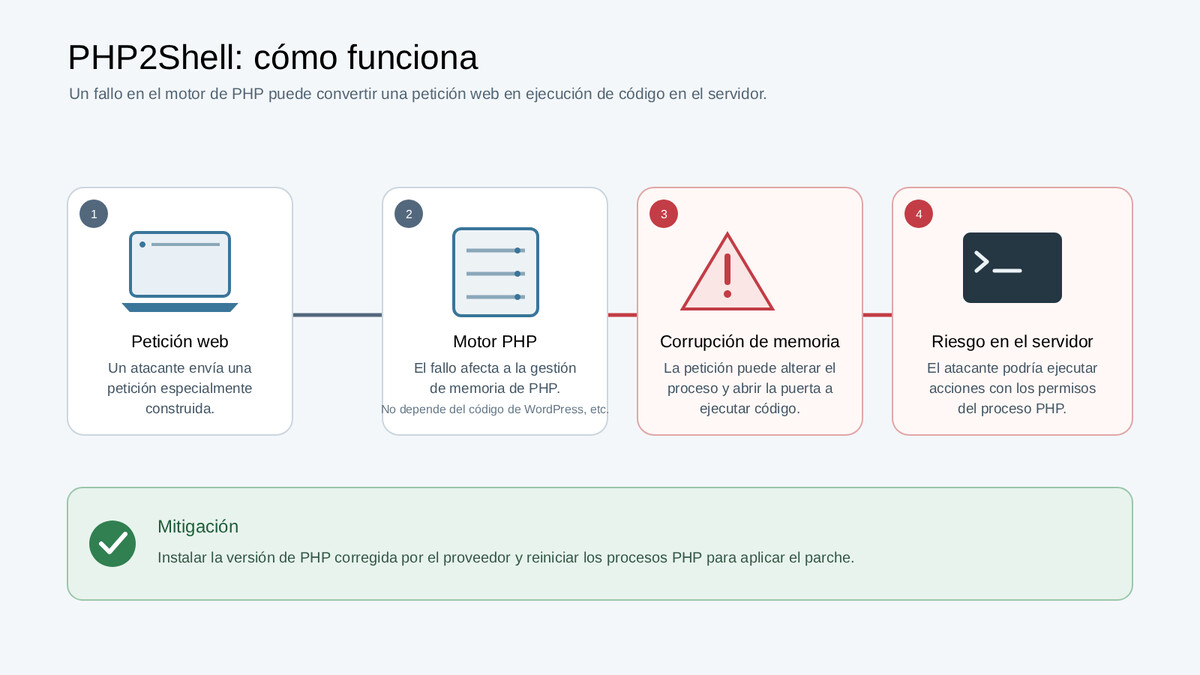
According to cybersecurity firm Qualys, the vulnerabilities can be exploited without logging in, which underscores the urgency. Cloudflare has also reported attacks that exploited this vulnerability hours before the patch was published, and researchers had confirmed remote code execution against Magento 2.4.9 (an open-source e-commerce platform) and ten other PHP applications. Now that details are public, the risk of widespread exploitation increases.
Who Is Affected by PHP2Shell?
Any website running on PHP could be at risk, especially if it hasn't been updated with the latest security patches. This includes popular content management systems like WordPress, e-commerce platforms like Magento, and custom-built PHP applications.
Government websites and large organizations are also potential targets, as they often rely on PHP. The broad adoption of PHP makes this vulnerability particularly dangerous because a single exploit could affect millions of sites.
How to Check If Your Website Is Vulnerable
To determine if your site is vulnerable, you need to check the PHP version it runs. The vulnerabilities affect specific versions of PHP; patched versions have been released. You can check your PHP version through your hosting control panel or by running a simple script.
If you use a CMS like WordPress, check for updates and install them immediately. For custom applications, contact your developer or hosting provider to confirm the PHP version and apply the patch.
- Check your PHP version: Ensure it is updated to the latest patched release.
- Update your CMS and plugins: WordPress, Magento, and other platforms may have released security updates.
- Monitor for suspicious activity: Look for unusual logins or file changes.
- Apply the patch immediately: Don't delay; exploits are already in the wild.
- Use a web application firewall (WAF): Services like Cloudflare can help block attacks.
Technical Details of CVE-2026-109618 and CVE-2026-109619
Both vulnerabilities are critical and allow remote code execution. CVE-2026-109618 and CVE-2026-109619 have been patched in the latest PHP release. The PHP project urges all users to upgrade to the patched versions immediately. Context on how this played out before sits in PHP2Shell Critical Vulnerability: How to Check If Your Website Is Secure.
Qualys researchers noted that the flaws can be exploited without authentication, making them especially dangerous. Cloudflare observed attacks exploiting these vulnerabilities before the patch was available, indicating that attackers are actively scanning for vulnerable systems. The background to this story is set out in How to Check if Your Website Is Affected by the PHP Vulnerability. A related thread runs through Technology: latest articles.
| Vulnerability | Type | Severity | Patch Status |
|---|---|---|---|
| CVE-2026-109618 | Remote Code Execution | Critical | Patched |
| CVE-2026-109619 | Remote Code Execution | Critical | Patched |
What to Do If Your Site Is Vulnerable
If you discover that your site is running a vulnerable version of PHP, update immediately. If you cannot update right away, consider temporarily taking the site offline or using a WAF to block exploits. Earlier coverage in AI Exposes Old PHP Flaws, Raising Urgent Security Concerns shows how the argument developed. A closer look at the same subject appears in Vivo Snap Screen: The Accessory That Solves the Foldable Dilemma.
After patching, monitor your logs for any signs of compromise. Attackers may have already exploited the vulnerability, so look for unusual outbound connections, new admin users, or modified files. Anyone following the wider picture can start with Qualcomm Snapdragon 8 Elite Gen 6 vs Extreme: What You Need to Know. The same theme surfaces in PHP Code Flaw Triggers Global Exploit Attempts: What Website Owners, which takes a different angle.
FAQ
What is PHP2Shell?
PHP2Shell is the name given to two critical vulnerabilities in PHP, CVE-2026-109618 and CVE-2026-109619, that allow remote code execution. Attackers can exploit them without authentication.
How do I know if my website is affected?
Check your PHP version and ensure it is updated to the latest patched release. If you use a CMS like WordPress, install all available updates. Contact your hosting provider if unsure.
Is there a patch available?
Yes, the PHP project released an emergency patch on October 21. Update to the latest version immediately to protect your site.
What are the signs of exploitation?
Look for unusual logins, new files, or outbound connections. Review server logs for suspicious activity. If you suspect compromise, take immediate action.
Staying informed about critical vulnerabilities like PHP2Shell is essential for maintaining a secure website. Regularly updating your software and monitoring for threats can help prevent future attacks.
Browse the Shop
 Acacia frida deluxe solid wood bed frame |
Bedroom bench |
Bed chest drawers |
Lingerie dresser |
Frame base |
Mirror with jewelry storage |
30 Bathroom Vanity |
Memory foam queen mattress |
Mattresses for back pain |
Nightstand set of 2 |
Grand Goldman Shop |
Civil Lawyer
Deutschland Trikot WM 2026
Acacia frida deluxe solid wood bed frame |
Bedroom bench |
Bed chest drawers |
Lingerie dresser |
Frame base |
Mirror with jewelry storage |
30 Bathroom Vanity |
Memory foam queen mattress |
Mattresses for back pain |
Nightstand set of 2 |
Grand Goldman Shop |
Civil Lawyer
Deutschland Trikot WM 2026










