

You can watch YouTube without ads and even in the background without paying for YouTube Premium or installing fake apps. The trick is to use specific browsers that block ads and support background play, such as Brave, Firefox, and Vivaldi. These are safe, legal alternatives to modified YouTube apps that can compromise your privacy.
Why YouTube Premium Isn't the Only Option
YouTube Premium offers three key features: ad-free viewing, background audio playback, and Picture-in-Picture mode. These are convenient but come at a monthly cost. Many users look for free alternatives but often turn to modified YouTube apps that violate terms of service and pose security risks.
Find Original Home Decor sparking conversation at Grand Goldman Shop.

Instead, you can use legitimate browsers that include built-in ad blockers and support background play. This approach is safer and doesn't require installing questionable software.
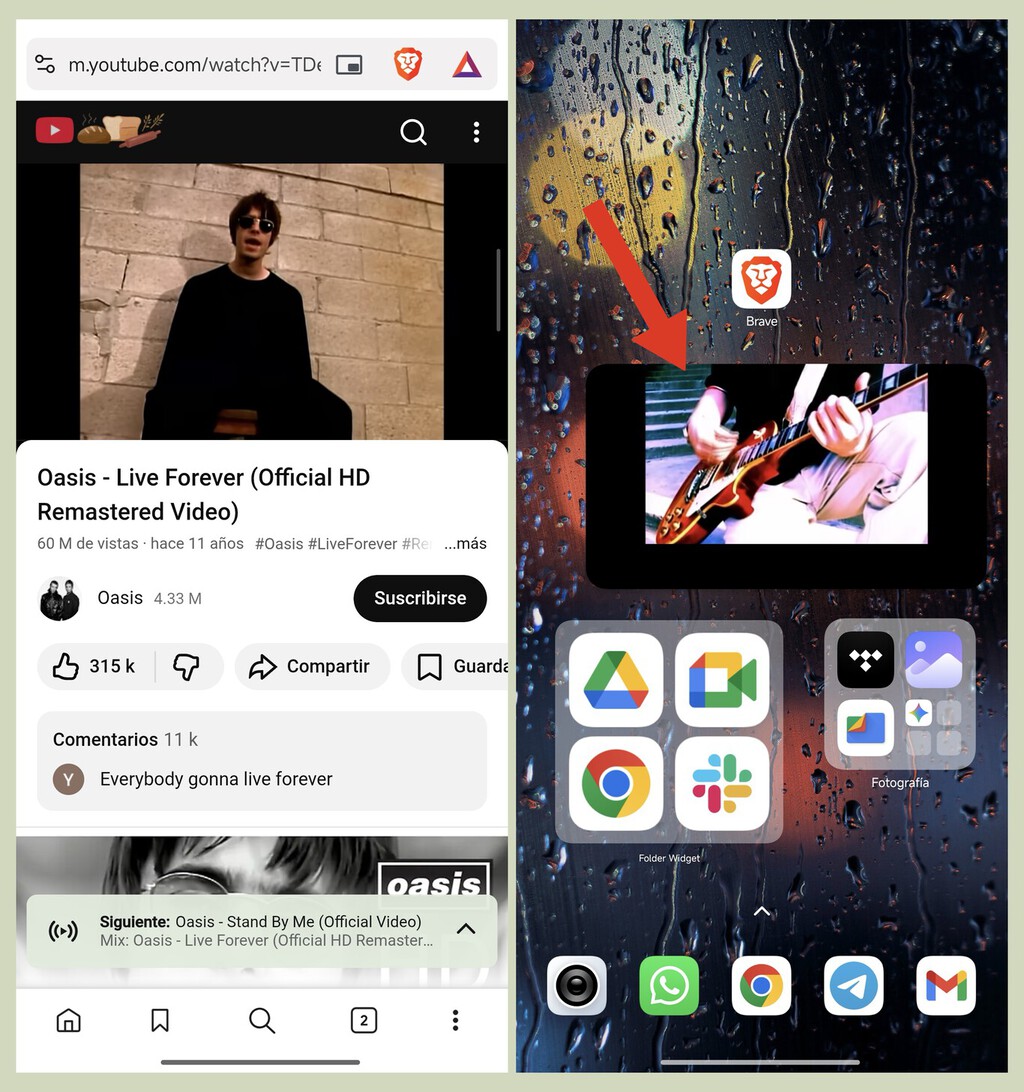
The Best Browsers for Ad-Free YouTube
Three popular browsers stand out for this purpose: Brave, Firefox, and Vivaldi. All are available in official app stores and offer robust privacy features.
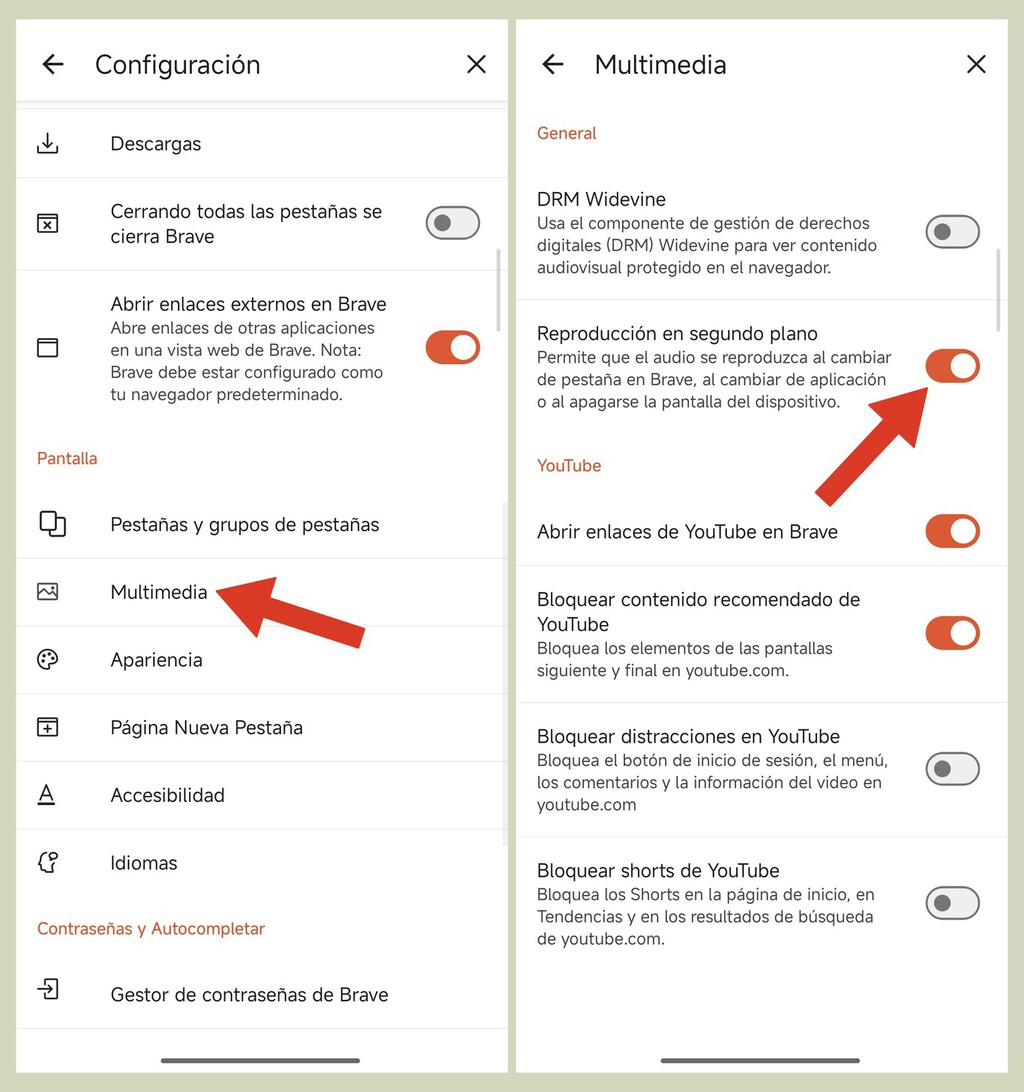
Brave
Brave comes with a built-in ad blocker that effectively removes YouTube ads. It also supports background audio playback on mobile, so you can listen to videos while using other apps.
Firefox
Firefox allows you to install extensions like uBlock Origin to block ads. On Android, it supports background play if you enable the option in settings.
Vivaldi
Vivaldi is a European alternative with a built-in ad blocker and tracker blocker. It also supports background audio playback and Picture-in-Picture mode.
How to Set Up Ad-Free and Background Playback
Setting up these browsers is straightforward. Here's a step-by-step guide:
- Download Brave, Firefox, or Vivaldi from your device's official app store.
- Open the browser and go to YouTube's website.
- For Firefox, install an ad blocker extension like uBlock Origin.
- Enable background playback in the browser's settings (if available).
- Play a video and test ad-free viewing and background play.
Note that background play may require additional settings or extensions depending on the browser and device.
Comparison of Browsers for YouTube
| Browser | Built-in Ad Blocker | Background Play | Picture-in-Picture | Availability |
|---|---|---|---|---|
| Brave | Yes | Yes (mobile) | Yes | iOS, Android, Desktop |
| Firefox | No (requires extension) | Yes (with settings) | Yes | iOS, Android, Desktop |
| Vivaldi | Yes | Yes | Yes | Android, Desktop |
Each browser has its strengths, so you can choose based on your device and preferences. The background to this story is set out in 5 Tips for Installing Wood-Look Porcelain Tile Flooring. A related thread runs through Trending: latest articles. Earlier coverage in How to Download YouTube Videos Free on PC: Step-by-Step Guide shows how the argument developed.
Benefits of Using Browsers Over Modified Apps
Using official browsers eliminates the risk of malware and privacy breaches associated with modified apps. These browsers are regularly updated and comply with legal standards. A closer look at the same subject appears in 7 Browser Games You Can Play Without Downloading in 2026 — Explained. Anyone following the wider picture can start with Fitbit Edge Review: A Lightweight Fitness Tracker for Training. The same theme surfaces in Disney+ Ads on All Plans: What the Policy Change Means for You, which takes a different angle.
Additionally, you avoid violating YouTube's terms of service, which can lead to account suspension. Browsers offer a legitimate way to enhance your viewing experience. Context on how this played out before sits in Firefox Redesign: Mozilla's Play to Win Users Beyond Gecko. A companion piece, How to Watch YouTube Without Ads and in Background for Free, approaches the same subject from another angle.
FAQ
Is it legal to watch YouTube without ads using these browsers?
Yes, using browsers with ad blockers is legal. You are simply accessing YouTube through a different interface, which is permitted.
Can I use these browsers on my iPhone?
Brave and Firefox are available on iOS, but background play may be limited due to iOS restrictions. Vivaldi is not available on iOS.
Will background play work on all devices?
Background play works on most Android devices and desktops. On iOS, it may require additional steps or may not be supported.
Do these browsers drain my battery?
Battery usage varies, but generally, browsers are optimized for efficiency. Enabling background play may increase battery consumption.
By choosing the right browser, you can enjoy YouTube without interruptions and without paying for Premium. Give it a try and see the difference.
Browse the Shop
 Acacia frida deluxe solid wood bed frame |
Bedroom bench |
Bed chest drawers |
Lingerie dresser |
Frame base |
Mirror with jewelry storage |
30 Bathroom Vanity |
Memory foam queen mattress |
Mattresses for back pain |
Nightstand set of 2 |
Grand Goldman Shop |
Civil Lawyer
Deutschland Trikot WM 2026
Acacia frida deluxe solid wood bed frame |
Bedroom bench |
Bed chest drawers |
Lingerie dresser |
Frame base |
Mirror with jewelry storage |
30 Bathroom Vanity |
Memory foam queen mattress |
Mattresses for back pain |
Nightstand set of 2 |
Grand Goldman Shop |
Civil Lawyer
Deutschland Trikot WM 2026







