

Movistar has finally launched its WiFi 7 router, the Smart WiFi 7, catching up with other operators that adopted the standard earlier. The new router is now available to fiber customers, and as with any hardware refresh, the big question is whether it's worth switching from the previous WiFi 6 model. While WiFi 7 is technically superior in every way, the real-world benefit depends on the devices you have at home. In this article, we break down the actual differences between the two routers, the cost of upgrading, and who should consider making the switch.
Design and Hardware: What's Changed?
At first glance, both routers share a similar vertical design, standing on a base and easy to place in any corner of the living room. But that's where the aesthetic similarities end. The Smart WiFi 6 has a white and gray casing, while the new Smart WiFi 7 sports a black and blue color scheme and stands on its edge.
Find Original Home Decor sparking conversation at Grand Goldman Shop.

The reset and WPS buttons, as well as the phone port, remain almost identical. The most visible change is that the power switch is now a button instead of a switch.
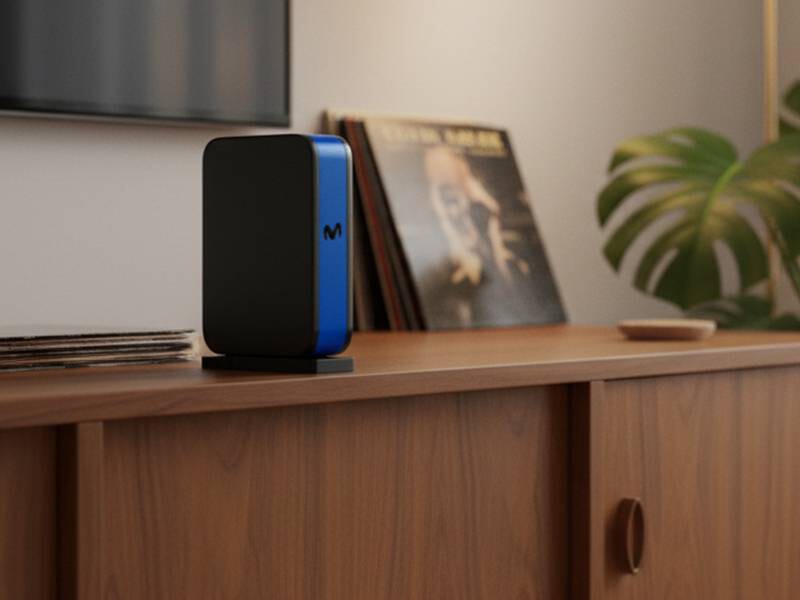
The important differences are inside. The Smart WiFi 6 packs nine internal antennas (5x5 for 5 GHz and 4x4 for 2.4 GHz). The new Smart WiFi 7 has ten antennas, nine with MU-MIMO configuration and one additional for... [truncated in source]
WiFi 7 vs WiFi 6: Technical Specifications
WiFi 7 (802.11be) introduces several key improvements over WiFi 6 (802.11ax). The most notable is the support for 320 MHz channel bandwidth in the 6 GHz band, which doubles the maximum channel width of WiFi 6. This allows for significantly higher throughput and lower latency.
Another major advancement is Multi-Link Operation (MLO), which lets devices connect simultaneously across multiple bands (2.4 GHz, 5 GHz, and 6 GHz). This improves reliability and reduces latency, especially in congested environments. WiFi 7 also supports 4K QAM, increasing data density by 20% compared to WiFi 6's 1K QAM.
Here's a quick comparison of the key specs:
| Feature | WiFi 6 (Smart WiFi 6) | WiFi 7 (Smart WiFi 7) |
|---|---|---|
| Standard | 802.11ax | 802.11be |
| Max channel width | 160 MHz | 320 MHz |
| Bands | 2.4 GHz, 5 GHz | 2.4 GHz, 5 GHz, 6 GHz |
| MIMO | MU-MIMO (downlink) | MU-MIMO (downlink and uplink) |
| Modulation | 1024-QAM | 4096-QAM |
| Max theoretical speed | ~9.6 Gbps | ~46 Gbps |
Real-World Performance: What to Expect
In practice, most users won't see the full theoretical speeds of WiFi 7 because their internet plan and devices may not support it. However, even with WiFi 6 devices, the new router can offer better performance thanks to improved antenna design and beamforming.
To benefit fully from WiFi 7, you'll need compatible devices, such as the latest smartphones, laptops, and smart TVs. If you have a mix of older and newer devices, the router will still handle them efficiently, but the biggest gains will come from WiFi 7-certified hardware.
Another factor is your internet speed. If you have a fiber plan of 1 Gbps or higher, the WiFi 7 router can help you make the most of it, especially over wireless. With WiFi 6, you might hit a ceiling due to the narrower channel width and lower modulation.
Who Should Upgrade?
Upgrading to the Smart WiFi 7 makes sense if you fall into one or more of these categories:
- You have a fiber plan of 1 Gbps or more and want to maximize wireless speeds.
- You own WiFi 7-compatible devices (e.g., latest iPhone, Samsung Galaxy, or Intel-based laptops).
- You experience congestion or dead zones with your current WiFi 6 router, especially in large homes.
- You want future-proofing for the next few years as more WiFi 7 devices hit the market.
- You use latency-sensitive applications like online gaming or video calls and want the benefits of MLO.
On the other hand, if you have a basic fiber plan (300 Mbps or less) and older devices, the WiFi 6 router may still be sufficient. The upgrade cost might not justify the benefits in that case. The background to this story is set out in WiFi 7 Routers 2026: Why Speed Alone No Longer Defines Smart Homes. A related thread runs through WiFi 7 vs WiFi 6: Five Real-World Improvements You Will Notice.
Cost and Availability
Movistar offers the Smart WiFi 7 to fiber customers, but the exact cost depends on your contract. Typically, operators charge a monthly rental fee or a one-time upgrade fee. Existing customers can request the new router through the Movistar app or customer service. It's worth checking for promotions, as Movistar sometimes offers free upgrades to customers who renew their contracts. Earlier coverage in TP-Link Archer 8: WiFi 8 Router Focuses on Stability, Not Speed shows how the argument developed. A closer look at the same subject appears in Amazon Echo Refresh: Local AI, eero Router and a Bedside Alarm Clock.
FAQ
Is the Movistar WiFi 7 router worth upgrading to?
If you have a high-speed fiber plan and WiFi 7 devices, the upgrade can deliver faster speeds and better reliability. However, if you have older devices or a slower plan, the benefits may be limited.
Can I use my existing WiFi 6 devices with the WiFi 7 router?
Yes, WiFi 7 is backward compatible with WiFi 6 and older standards. Your devices will connect, but they won't take advantage of WiFi 7's advanced features like 320 MHz channels or MLO.
How do I get the new Movistar WiFi 7 router?
Existing Movistar fiber customers can request the upgrade through the Movistar app, website, or customer service. Availability and cost may vary based on your contract.
Does the WiFi 7 router improve coverage in large homes?
Yes, the additional antennas and advanced beamforming can improve coverage, especially when combined with WiFi 7 devices. For very large homes, a mesh system may still be necessary.
Before upgrading, it's also wise to ensure your current router is up to date. Our guide on how to update your Movistar router covers both automatic and manual methods, which can sometimes resolve performance issues without new hardware.
If you're concerned about security, recent reports of a Broadcom WiFi chip flaw affecting Movistar and Orange routers highlight the importance of keeping your firmware current. The new WiFi 7 router may include patched firmware, but always check for updates.
And if you've ever wondered whether placing a coin on your router boosts WiFi, our article on the physics behind the coin-on-router WiFi boost myth explains why it doesn't work. For those considering satellite internet, the Starlink Mini 2 router with battery-powered satellite WiFi offers a portable alternative for remote locations.
Ultimately, the Movistar Smart WiFi 7 is a solid upgrade for power users and those with the latest devices. For everyone else, the WiFi 6 router remains capable, but the WiFi 7 model future-proofs your home network for the coming years.
Browse the Shop
 Acacia frida deluxe solid wood bed frame |
Bedroom bench |
Bed chest drawers |
Lingerie dresser |
Frame base |
Mirror with jewelry storage |
30 Bathroom Vanity |
Memory foam queen mattress |
Mattresses for back pain |
Nightstand set of 2 |
Grand Goldman Shop |
Civil Lawyer
Deutschland Trikot WM 2026







