

Creating a paper cutout illustration from your photos is now possible with artificial intelligence. By using tools like ChatGPT or Gemini, you can transform ordinary images into beautiful, layered paper-style artworks. In this guide, we'll show you exactly how to do it, including the prompts to use and the differences between the two AI models.
What You Need to Get Started
Before you begin, make sure you have a photo you want to convert. It can be a portrait, a landscape, or even a pet photo. The AI will analyze the content and generate a paper cutout style illustration based on it. You'll also need access to either ChatGPT (with image generation capabilities) or Gemini.
Find Original Home Decor sparking conversation at Grand Goldman Shop.

The Prompt to Use
The key to a great result is a detailed prompt. Here's a long, descriptive prompt you can copy and paste into either AI. Feel free to modify it to suit your photo.

"Create a paper cutout illustration from this photo. Use a layered paper style with soft shadows and a muted color palette. Keep the main subject recognizable but simplify details into geometric shapes. The background should be a solid color or a simple pattern. Ensure the overall composition looks like a handcrafted paper art piece."

Simply upload your photo, paste the prompt, and wait a few seconds. The AI will generate the illustration.

ChatGPT vs. Gemini: Which One Is Better?
Both models can create paper cutout illustrations, but they have different strengths. Based on our tests, here's how they compare:
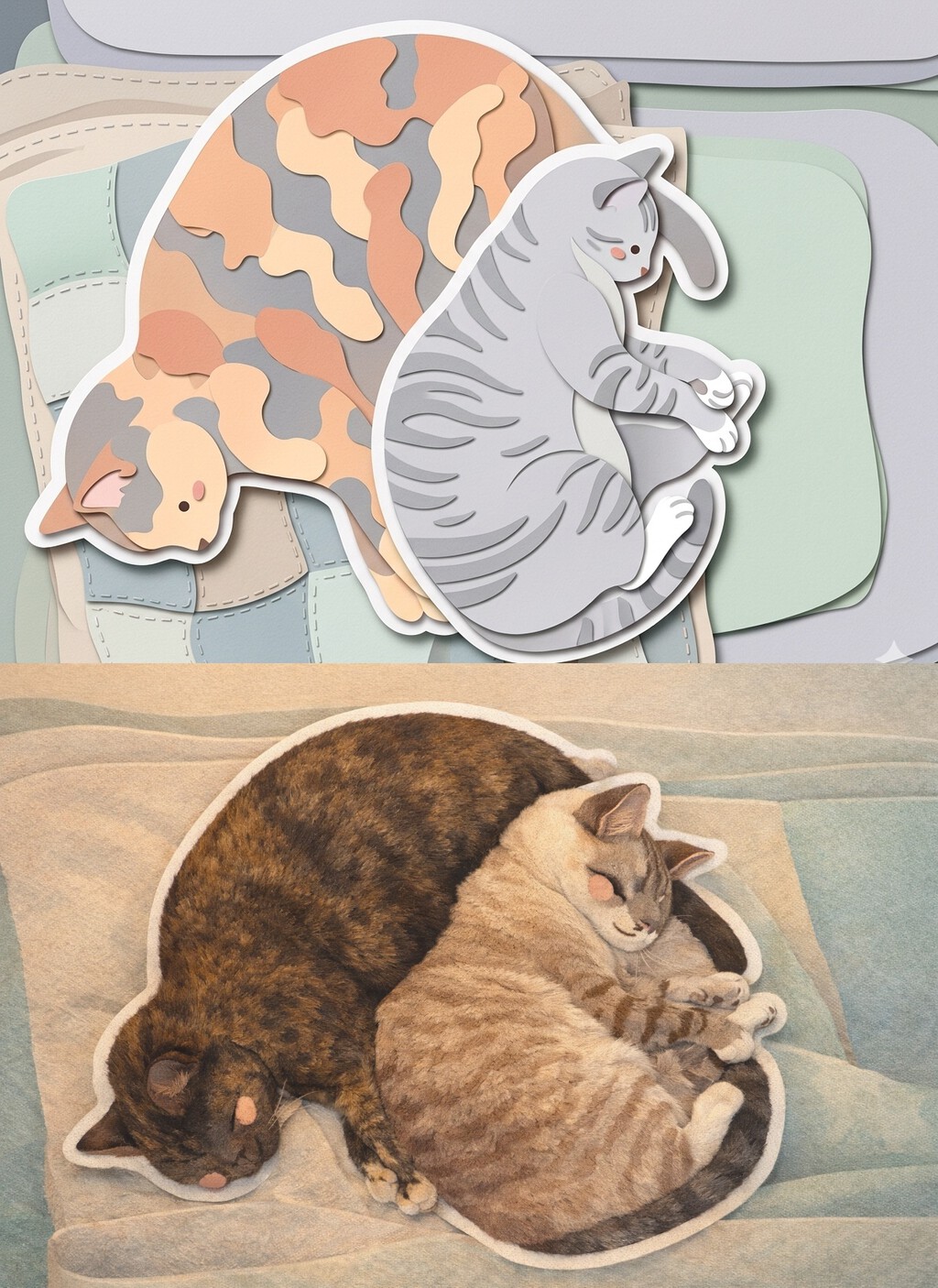
| Aspect | ChatGPT | Gemini |
|---|---|---|
| Paper cutout style | Good, but less refined | Excellent, very soft and schematic |
| Color accuracy | Captures colors and details well | May alter colors (e.g., animal fur) |
| Feature preservation | Better at keeping characteristic traits | Struggles with specific features |
| Overall aesthetic | More realistic | More artistic and stylized |
As you can see, Gemini excels at the paper cutout aesthetic, producing soft and beautiful images. However, it may not capture distinctive features accurately and can even change the color of animal fur. ChatGPT, on the other hand, preserves colors and details better but may not achieve the same level of paper-like refinement.
Step-by-Step Guide
1. Choose Your Photo
Select a high-quality photo with a clear subject. Avoid cluttered backgrounds for best results.
2. Copy the Prompt
Use the prompt provided above or customize it to your liking.
3. Upload and Generate
Upload your photo to ChatGPT or Gemini, paste the prompt, and submit. Wait a few seconds for the result.
4. Review and Refine
If you're not satisfied, tweak the prompt or try the other AI model. You can also ask for specific adjustments. The background to this story is set out in Create Paper Cutout Illustrations from Photos with AI.
Key Takeaways
- Paper cutout illustrations can be easily created from photos using AI.
- Use a detailed prompt to guide the AI toward the desired style.
- Gemini produces softer, more artistic results but may alter colors and features.
- ChatGPT preserves details better but may lack the paper texture.
- Experiment with both to see which suits your photo best.
FAQ
Can I use any photo for paper cutout illustration?
Yes, but photos with a clear subject and simple background work best. Complex scenes may result in cluttered illustrations.
Is the prompt customizable?
Absolutely. You can modify the prompt to change colors, style, or level of detail. The AI will follow your instructions.
Which AI model is better for paper cutout style?
Gemini tends to produce more refined paper cutout aesthetics, while ChatGPT is better at preserving original colors and details.
How long does it take to generate an illustration?
Typically, it takes just a few seconds after you submit the prompt and image.
While AI art is a fun and creative tool, it's also worth considering the broader implications of AI in business and finance. For instance, if you're curious about how to cotizar sin trabajar: cómo funciona el convenio especial con la Seguridad, that's a different but important topic. AI is reshaping many industries, and staying informed is key.
As you explore AI-generated art, you might also be interested in how AI is used in video production. Our AI video section covers the latest trends and tools. Additionally, if you're looking to monetize your creative skills, understanding business strategies can be beneficial.
For those interested in the technical side, learning about crypto and finance can provide insights into the digital economy. And if you're planning to showcase your AI art in a physical space, consider best boutique hotel venues for exhibitions. Finally, for a deeper dive into AI's impact on society, check out our elderly section, which discusses technology adoption across generations.
Browse the Shop
 Acacia frida deluxe solid wood bed frame |
Bedroom bench |
Bed chest drawers |
Lingerie dresser |
Frame base |
Mirror with jewelry storage |
30 Bathroom Vanity |
Memory foam queen mattress |
Mattresses for back pain |
Nightstand set of 2 |
Grand Goldman Shop |
Civil Lawyer
Deutschland Trikot WM 2026







