

Learning how to download TikTok videos on mobile and PC is essential if you want to keep your favorite content offline. TikTok remains a leading source of vertical videos, and while the app offers a built-in download option, there are also alternative methods to save videos without a watermark.
Why Download TikTok Videos?
Downloading TikTok videos lets you watch them without an internet connection, share them on other platforms, or keep them as references. Whether you're a content creator, marketer, or casual viewer, having offline access is convenient. Plus, some videos may be removed later, so downloading ensures you don't lose them.
Find Original Home Decor sparking conversation at Grand Goldman Shop.

Method 1: Download from the TikTok App (With Watermark)
The simplest way to download a TikTok video is directly from the app. However, the downloaded video will include a watermark showing the creator's username. Here's how to do it:
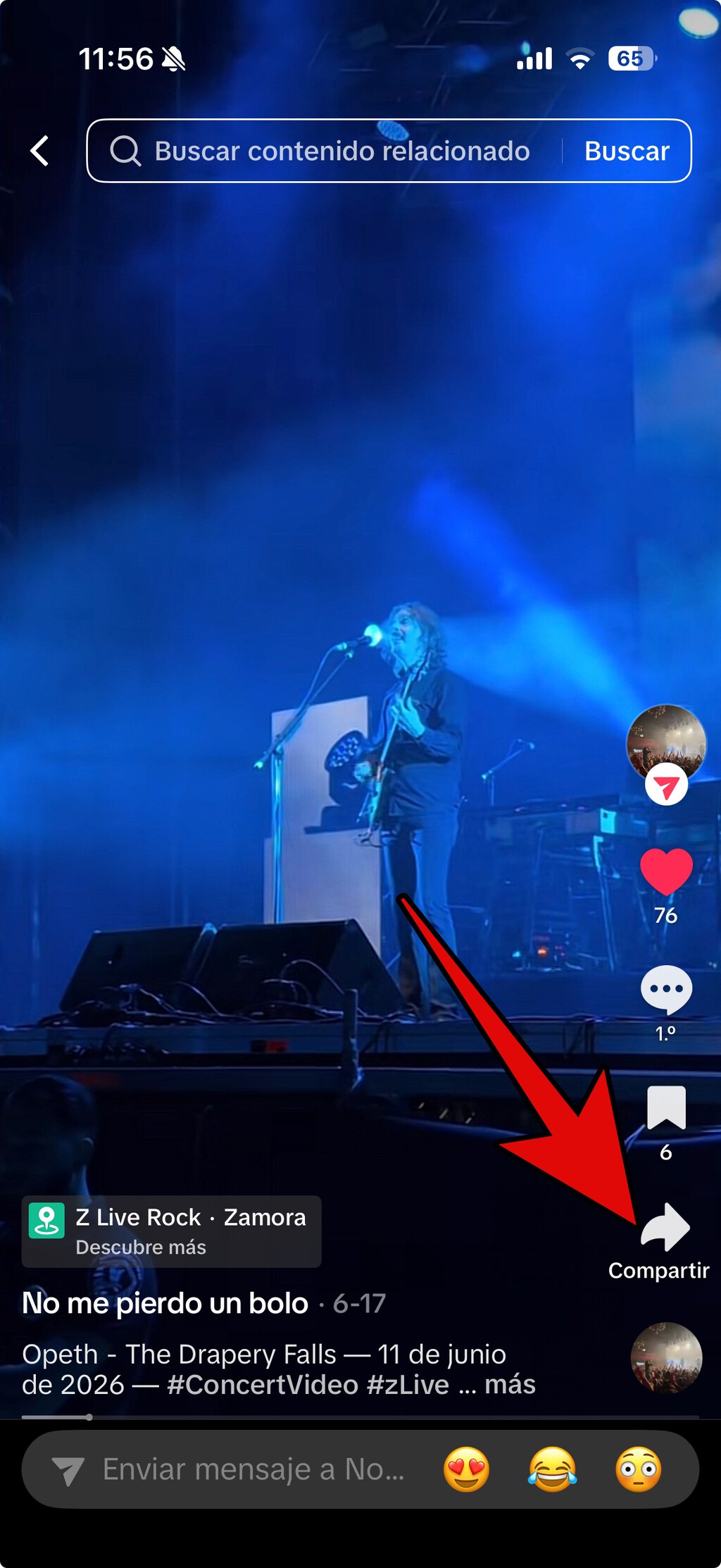
- Open the TikTok app and find the video you want to download.
- Tap the Share button on the right side of the screen.
- In the pop-up menu, select Download.
- The video will be saved to your phone's gallery with a watermark.
This method is quick and easy, but the watermark can be intrusive if you plan to repost the video elsewhere.
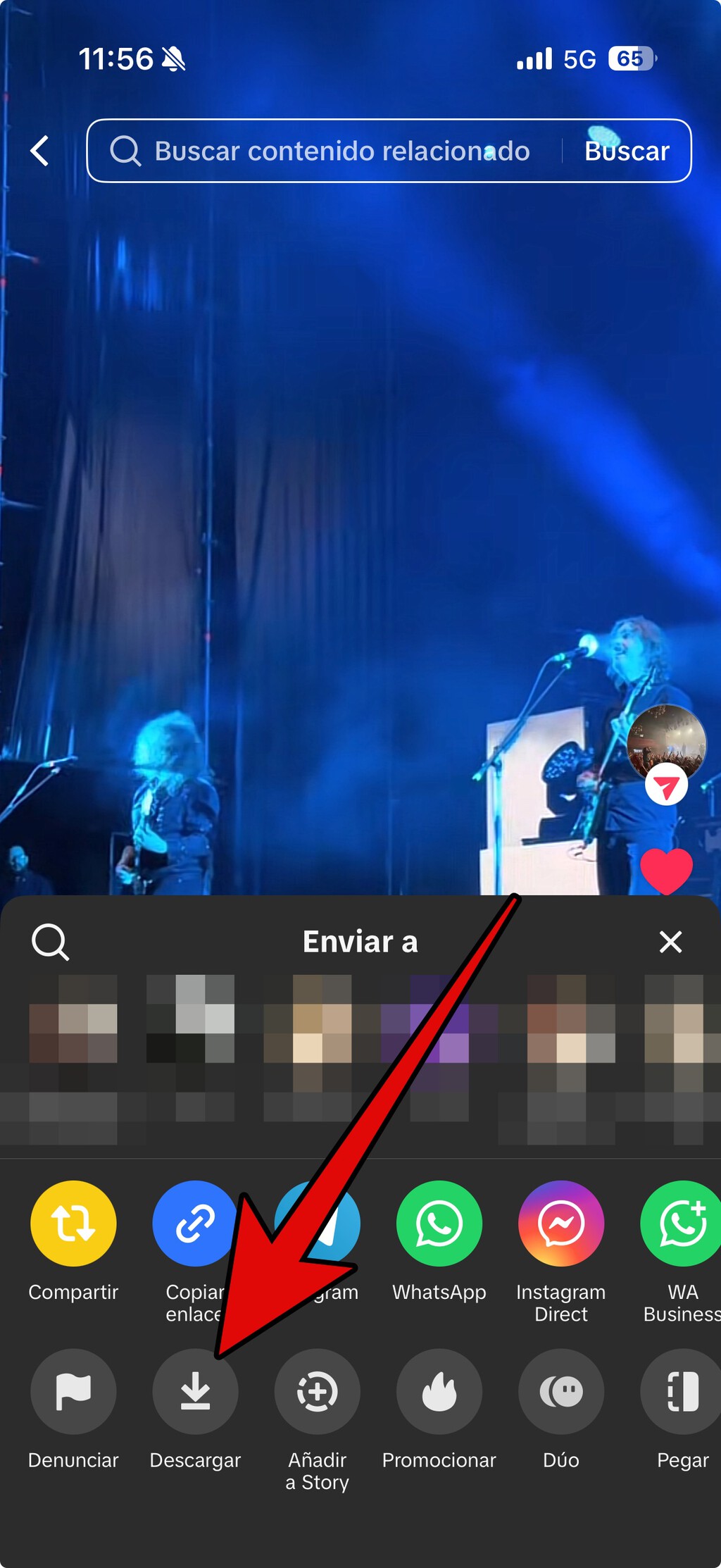
Method 2: Download from TikTok Web (With Watermark)
If you're on a computer, you can download TikTok videos via the web version. Again, the video will have a watermark. Follow these steps:
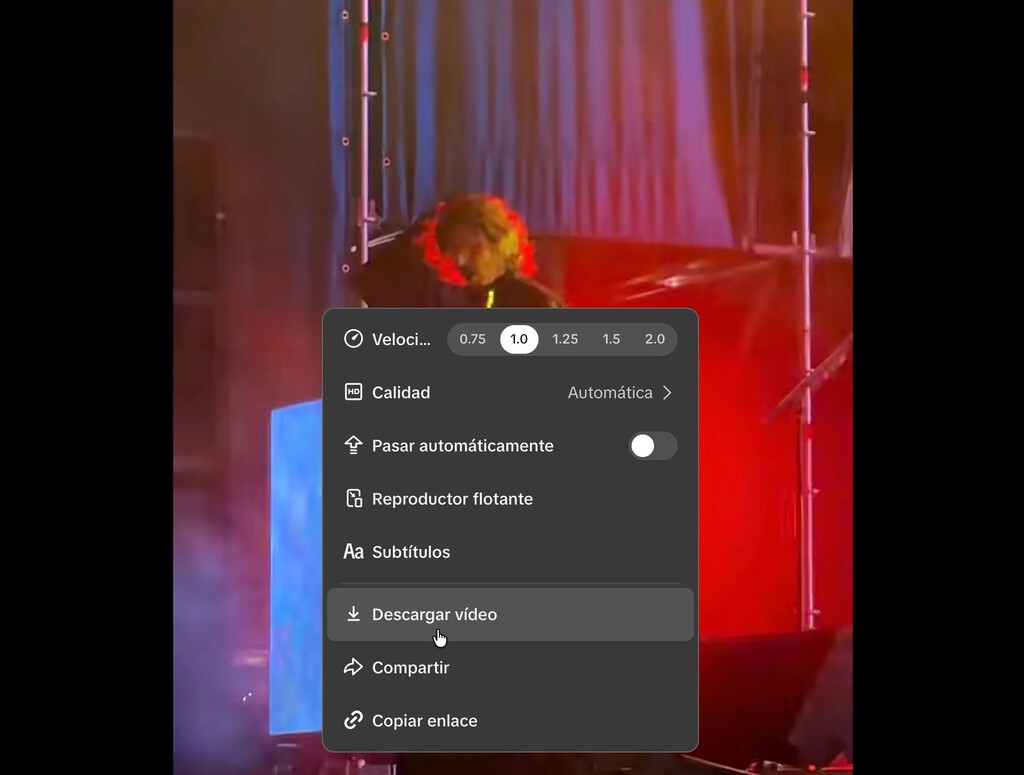
- Go to the TikTok website and open the video.
- Right-click on the video and select Save video as... (or similar option depending on your browser).
- Choose a destination folder and save the file.
This method works on most browsers, but the watermark remains. For a cleaner version, you'll need alternative tools.

Method 3: Use Third-Party Downloader Apps (Without Watermark)
To download TikTok videos without a watermark, you can use third-party apps or websites. These tools extract the video file directly from TikTok's servers, often removing the watermark. Popular options include SSSTikTok, SnapTik, and SaveTok. Here's a general process:
- Copy the link to the TikTok video (tap Share > Copy link).
- Open the downloader app or website and paste the link.
- Select the download option (usually without watermark).
- Save the video to your device.
Be cautious: some third-party sites may contain ads or malware. Use reputable ones and avoid granting unnecessary permissions.
Method 4: Use Online Downloader Websites (Without Watermark)
Online downloaders are convenient because they work on any device with a browser. Simply paste the video URL into the site and download. Many offer watermark-free downloads. However, reliability varies, and some may have pop-ups. Always use a trusted source and consider using an ad blocker. The background to this story is set out in 12 Best TikTok Download Sites You Should Try for 2026 (Full Guide). A related thread runs through 18 Best Free TikTok Download Tools in 2026: What Actually Works. Earlier coverage in Download Video From Instagram: 7 Simple Ways Most People Miss shows how the argument developed.
Comparison of Download Methods
| Method | Watermark | Device | Ease of Use |
|---|---|---|---|
| TikTok App | Yes | Mobile | Very easy |
| TikTok Web | Yes | PC/Mobile browser | Easy |
| Third-party apps | No | Mobile/PC | Moderate |
| Online downloaders | No | Any device | Easy |
Things to Consider Before Downloading
Before downloading any TikTok video, respect copyright and the creator's rights. Downloading for personal use is generally acceptable, but reposting without permission may violate platform policies and copyright laws. Also, be aware that third-party downloaders may not always work due to TikTok's updates. A closer look at the same subject appears in Gen Z BirdTok Trend: Why Birding Videos Are Taking Over TikTok. Anyone following the wider picture can start with How to Download Instagram Videos with CleverGet in 2026 Step by Step. The same theme surfaces in How to Download YouTube Videos Free on PC: Step-by-Step Guide, which takes a different angle.
Additionally, downloaded videos may vary in quality. The app and web methods typically provide the original quality, while third-party tools might compress the video. Always check the file before sharing. Context on how this played out before sits in Darth Vader TikTok Star Deal: Disney Partners with Short Video. A companion piece, What Does FYP Mean? The TikTok Slang Most People Get Wrong — Explained, approaches the same subject from another angle.
FAQ
Can I download TikTok videos without a watermark?
Yes, you can use third-party downloader apps or websites that remove the watermark. However, be cautious about security and always use reputable tools.
Is it legal to download TikTok videos?
Downloading for personal use is generally acceptable, but reposting or distributing without permission may infringe copyright. Always respect the creator's rights.
Why do some downloaded videos have no sound?
This can happen if the downloader fails to capture the audio track. Try a different tool or method, and ensure the video plays correctly before downloading.
Can I download TikTok videos on iPhone?
Yes, you can use the TikTok app's download feature or third-party apps from the App Store. For watermark-free downloads, online downloaders work well on Safari.
Browse the Shop
 Acacia frida deluxe solid wood bed frame |
Bedroom bench |
Bed chest drawers |
Lingerie dresser |
Frame base |
Mirror with jewelry storage |
30 Bathroom Vanity |
Memory foam queen mattress |
Mattresses for back pain |
Nightstand set of 2 |
Grand Goldman Shop |
Civil Lawyer
Deutschland Trikot WM 2026
Acacia frida deluxe solid wood bed frame |
Bedroom bench |
Bed chest drawers |
Lingerie dresser |
Frame base |
Mirror with jewelry storage |
30 Bathroom Vanity |
Memory foam queen mattress |
Mattresses for back pain |
Nightstand set of 2 |
Grand Goldman Shop |
Civil Lawyer
Deutschland Trikot WM 2026







