

Google has introduced a new feature called Pause Point in Android 17 that aims to break the cycle of infinite scrolling. The feature, announced alongside other updates like Gemini Intelligence, prompts users to pause for 10 seconds before opening distracting apps, asking "Why am I here?" This small interruption is designed to make us more mindful of our smartphone habits.
What Is Pause Point and How Does It Work?
Pause Point activates when you open an app that typically leads to endless scrolling, such as social media or video platforms. Instead of immediately showing the app's content, it displays a 10-second pause screen. During this time, you can take a breathing exercise or choose to open the app with a timer set for 5, 10, or 15 minutes. The goal is to create a moment of reflection before diving into the digital rabbit hole.
Find Original Home Decor sparking conversation at Grand Goldman Shop.

According to Google, this approach addresses the shortcomings of previous tools like Digital Wellbeing, which relied on timers and app blockers. Timers can be easily dismissed, and outright blocks can be impractical when you need an app for a legitimate purpose. Pause Point offers a middle ground by introducing friction without completely restricting access.
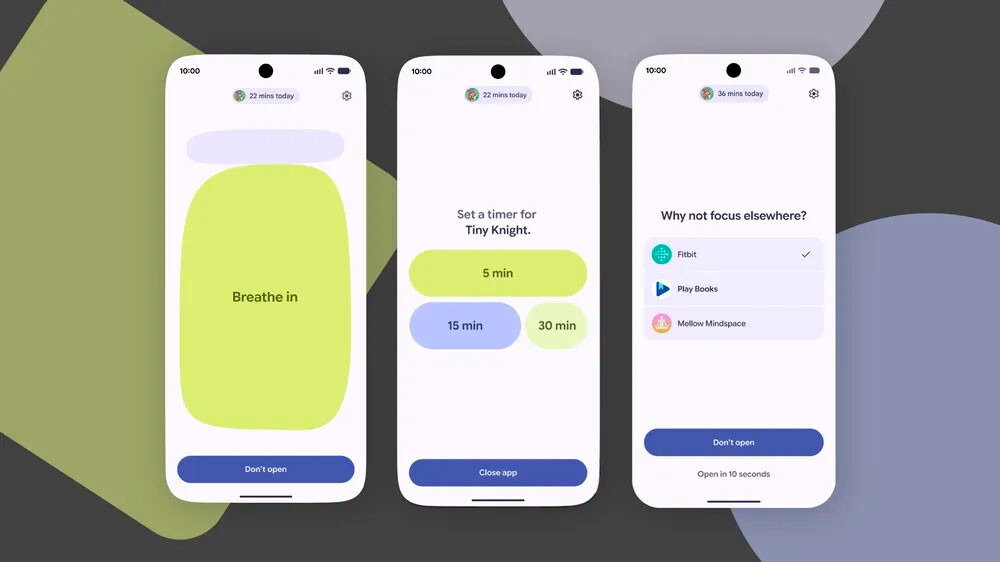
Why Pause Point Matters in the Age of Infinite Scroll
Infinite scroll is designed to keep us engaged for as long as possible, often at the expense of our time and attention. YouTube Shorts, TikTok, and Instagram Reels are prime examples of this addictive design pattern. Pause Point directly targets this by forcing a brief pause before you even see the first video or post. It's a simple yet powerful way to reclaim agency over your digital consumption.
The feature also reflects a growing awareness among tech companies about the need for ethical design. By prompting users to question their intent, Google is encouraging a more intentional relationship with technology. This could set a precedent for other platforms to follow suit.
How Pause Point Compares to Other Digital Wellbeing Tools
Pause Point is not the first attempt to curb excessive screen time, but it takes a different approach. Here's how it stacks up against existing features:
| Feature | Approach | Effectiveness |
|---|---|---|
| App Timers | Set a daily limit; sends a reminder when time is up | Moderate; easy to ignore or extend |
| App Blockers | Prevent access to selected apps entirely | High but inflexible; can be bypassed |
| Pause Point | 10-second pause with breathing exercise and optional timer | Promising; encourages mindfulness without full restriction |
While timers and blockers have their place, Pause Point's strength lies in its psychological approach. By interrupting the automatic habit loop, it gives users a chance to make a conscious choice.
Key Takeaways for Users
- Pause Point is a new Android 17 feature that interrupts infinite scrolling by forcing a 10-second pause.
- It prompts users to reflect on why they're opening a distracting app, with options to breathe or set a timer.
- The feature aims to address the limitations of traditional timers and blockers by adding friction without full restriction.
- It will be available on devices running Android 17, though exact rollout dates are yet to be confirmed.
- Pause Point represents a shift toward more mindful design in digital wellbeing tools.
The Challenges and Limitations of Pause Point
While Pause Point is a step in the right direction, it's not a silver bullet. Users can still choose to bypass the pause after 10 seconds, and the feature may not work for apps that are essential but also distracting (like messaging apps). Moreover, its effectiveness depends on the user's willingness to engage with the pause rather than tapping through it mindlessly. The background to this story is set out in Android 17: Complete List of New Features and Release Date. A related thread runs through Short-Form Video Editing Trend: No Breaths Allowed. Earlier coverage in Android 17 to Cap App RAM Usage, Boosting Budget Phones shows how the argument developed.
Google will need to refine the feature based on user feedback, perhaps by allowing customization of the pause duration or integrating it with broader digital wellbeing goals. As with any tool, its success hinges on how well it fits into people's lives. A closer look at the same subject appears in Android 17: Gemini AI, Quick Share and the Biggest Upgrades. Anyone following the wider picture can start with Villeret Quantième Complet GMT: Blancpain has redesigned its Complete GMT Calendar introduced in 2002. The same theme surfaces in Tokyo Offices Allow Shorts to Combat Extreme Heat, which takes a different angle.
What to Watch Next
As Android 17 rolls out, we'll be watching how users respond to Pause Point and whether other platforms adopt similar measures. The feature could also evolve to include more personalized interventions, such as detecting when you're stressed or tired and adjusting the pause accordingly. For now, it's a promising experiment in ethical design. Context on how this played out before sits in Android 17: Release Date, New Features, and What to Expect. A companion piece, Social Media Addiction and Loneliness: The Scroll Epidemic, approaches the same subject from another angle.
FAQ
What is Pause Point in Android 17?
Pause Point is a new feature in Android 17 that interrupts the opening of distracting apps with a 10-second pause. It asks users to reflect on why they're opening the app and offers options to take a breathing exercise or set a timer before proceeding.
How does Pause Point differ from Digital Wellbeing timers?
Unlike timers that send a reminder after a set period, Pause Point intervenes before you even start using the app. It creates a moment of mindfulness rather than relying on self-control after the fact.
Will Pause Point be available on all Android phones?
Pause Point will be part of Android 17, so it will be available on devices that receive the Android 17 update. Google has not yet announced which specific devices will get the update or when.
Can I customize Pause Point?
At launch, Pause Point offers a fixed 10-second pause with options to set a timer for 5, 10, or 15 minutes. It's unclear whether users will be able to adjust the pause duration or choose which apps trigger it, but future updates may add customization.
Browse the Shop
 Acacia frida deluxe solid wood bed frame |
Bedroom bench |
Bed chest drawers |
Lingerie dresser |
Frame base |
Mirror with jewelry storage |
30 Bathroom Vanity |
Memory foam queen mattress |
Mattresses for back pain |
Nightstand set of 2 |
Grand Goldman Shop |
Civil Lawyer
Deutschland Trikot WM 2026







