

WhatsApp message scheduling is now being tested in the Android beta, allowing users to prepare messages and choose when they are sent. The feature, spotted by WABetaInfo on October 12, appears in version 2.26.40.7 and marks a shift from the app's instant-send norm.
For many, the ability to schedule a message seems simple, but it changes a basic rule of the app: pressing send no longer means the message goes out immediately. This could affect how people communicate for birthdays, late-night thoughts, or time-sensitive replies.
Find Original, High-end Home Decor that spark conversation at Grand Goldman Shop.
How WhatsApp Message Scheduling Works
In the beta, users can write a message and then long-press the send button. A pop-up appears where they can select a date and time for delivery. The message is then queued and sent automatically at the chosen moment.
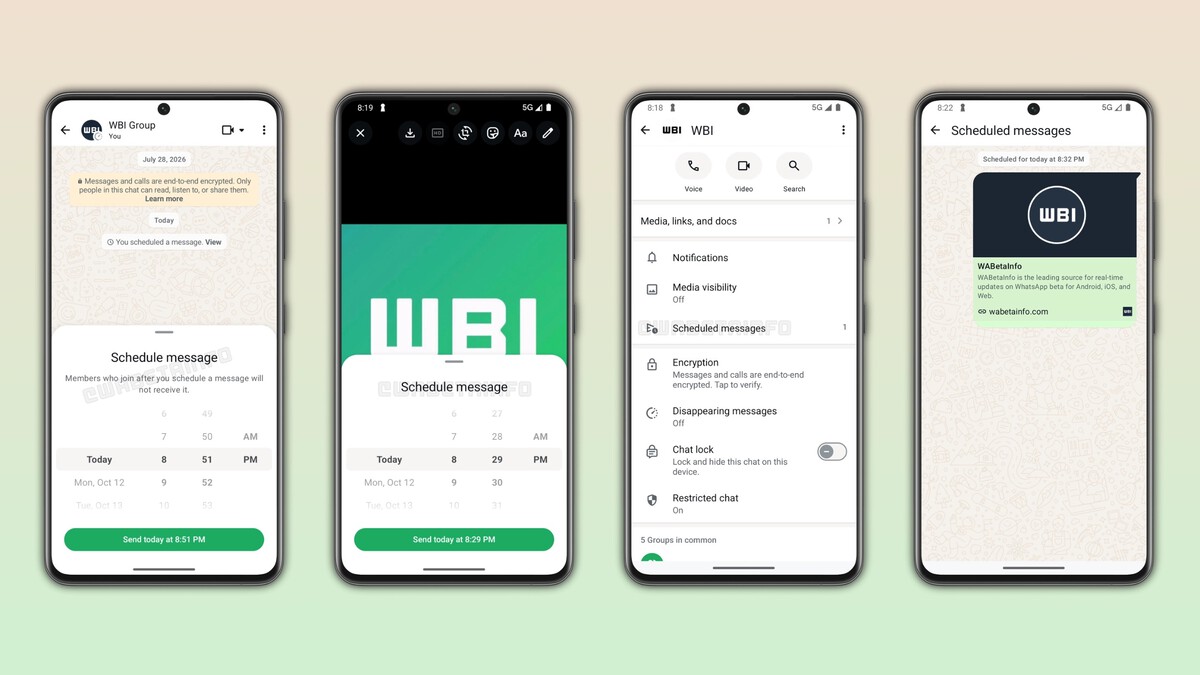
This approach keeps the scheduling option within the conversation, without needing to leave the chat or use external tools. It's designed to be intuitive and quick, fitting into the existing flow of messaging.
What Beta Testers Are Seeing
Some participants in the Android beta program already have access to the feature. It's not yet available to all users, and WhatsApp is also working on bringing it to iPhone. No official release date has been announced.
The feature has been in development for several months, and its appearance in beta suggests it's getting closer to a wider rollout. However, beta features can change or be delayed based on feedback and testing.
Why Message Scheduling Matters for Users
Scheduling messages addresses a common need: not always wanting to send a message at the moment it's written. People often remember things late at night, want to send birthday wishes at a specific time, or prefer to reply later without forgetting.
By allowing scheduled sends, WhatsApp reduces the pressure to act immediately and helps users manage their communication more deliberately. It also aligns with how people use other messaging and email platforms, where scheduling is already common.
- Convenience: Schedule messages for a specific time without setting reminders.
- Thoughtfulness: Send birthday or event messages exactly when they matter.
- Time management: Write replies when you think of them, but send later.
- Reduced anxiety: Avoid sending messages impulsively at odd hours.
- Cross-platform expectations: Matches features in email and other chat apps.
How Scheduling Compares to Other WhatsApp Features
WhatsApp has gradually added features that give users more control over their messages, such as delete for everyone, disappearing messages, and view once. Scheduling is another step in that direction, offering more flexibility in how and when communication happens.
Unlike disappearing messages, which focus on privacy, scheduling is about timing. It doesn't change the content or lifespan of the message but adds a layer of planning to the act of sending.
| Feature | Purpose | Availability |
|---|---|---|
| Message Scheduling | Set a future send time | Beta (Android) |
| Delete for Everyone | Remove sent messages | All users |
| Disappearing Messages | Auto-delete after set time | All users |
| View Once | Media disappears after viewing | All users |
What This Means for WhatsApp's Evolution
WhatsApp has long been a straightforward messaging app, but recent updates show a push toward more advanced features. Scheduling could appeal to business users who want to send messages during working hours or to individuals who prefer not to disturb others late at night.
It also raises questions about how scheduled messages are handled if the sender changes their mind. Will there be an option to cancel or edit a scheduled message? The beta may reveal more as testing continues.
Potential Impact on Conversations
If scheduling becomes widely available, conversations might become more asynchronous. People could send messages at times that suit them, not just when they're written, which could lead to more thoughtful exchanges. Context on how this played out before sits in WhatsApp Message Scheduling Beta: What It Means for Users. A companion piece, WhatsApp Vote Scam: How the Eliska Message Steals Your Account, approaches the same subject from another angle.
However, it might also create expectations: if someone schedules a message, the recipient might not know it was pre-planned. This could affect how immediate replies are perceived in personal and professional chats. The background to this story is set out in Why Turning Off WhatsApp Blue Ticks Is the New Power Move. A related thread runs through WhatsApp Blue Ticks: Reclaim Your Peace and Privacy Now.
When Will Message Scheduling Be Available?
There is no official release date for message scheduling. WhatsApp typically tests features in beta for weeks or months before rolling them out to all users. The iOS version is also in development, so a cross-platform launch is likely once testing is complete. Earlier coverage in Reclaiming Your Peace on WhatsApp: Turn Off Blue Ticks shows how the argument developed. A closer look at the same subject appears in Reclaim Your Peace on WhatsApp: Turn Off Blue Ticks Now.
Users interested in trying it can join the beta program on Android, but availability may vary by region and device. As with any beta feature, it may change before the final release. Anyone following the wider picture can start with Why I Finally Turned Off WhatsApp Blue Ticks – And You Should Too. The same theme surfaces in Technology: latest articles, which takes a different angle.
FAQ
What is WhatsApp message scheduling?
WhatsApp message scheduling is a beta feature that lets users set a date and time for a message to be sent automatically. It allows composing messages in advance without sending them immediately.
How do I schedule a message on WhatsApp?
In the beta, type your message, then long-press the send button. A pop-up will appear to choose the date and time. Confirm, and the message will be queued for that moment.
Is message scheduling available to everyone?
No, it is currently limited to some Android beta testers. WhatsApp is also working on an iPhone version, but no general release date has been announced.
Can I cancel a scheduled message?
The beta may allow canceling before the scheduled time, but details are not confirmed. Users should check the app for options once the feature is available.
Browse the Shop
 Acacia frida deluxe solid wood bed frame |
Bedroom bench |
Bed chest drawers |
Lingerie dresser |
Frame base |
Mirror with jewelry storage |
30 Bathroom Vanity |
Memory foam queen mattress |
Mattresses for back pain |
Nightstand set of 2 |
Grand Goldman Shop |
Civil Lawyer
Deutschland Trikot WM 2026
Acacia frida deluxe solid wood bed frame |
Bedroom bench |
Bed chest drawers |
Lingerie dresser |
Frame base |
Mirror with jewelry storage |
30 Bathroom Vanity |
Memory foam queen mattress |
Mattresses for back pain |
Nightstand set of 2 |
Grand Goldman Shop |
Civil Lawyer
Deutschland Trikot WM 2026







