

ClickFix malware detections have surged 108% between the second half of 2025 and the first half of 2026, according to ESET telemetry. The technique doesn't rely on a traditional malware payload alone—it convinces you to execute the malicious command yourself.
This is a social engineering attack, not a specific virus. Attackers exploit your automatic response to fake CAPTCHA or verification screens, turning a routine click into a system compromise.
Find Original, High-end Home Decor that spark conversation at Grand Goldman Shop.
What Is ClickFix and Why Is It So Effective?
ClickFix is a technique that tricks users into running malicious commands on their own computers. Instead of delivering a suspicious file, the attacker guides you through a fake verification process that ends with you pasting and executing a command.
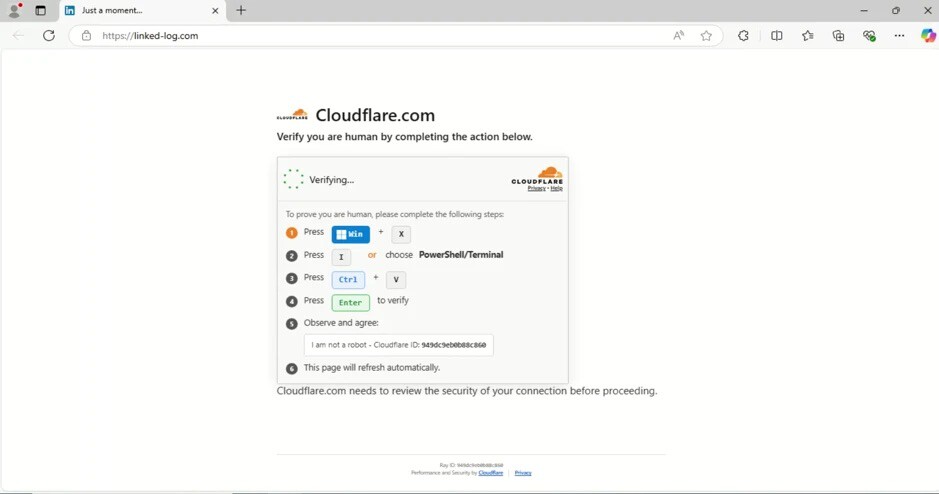
The method works because it hijacks a familiar routine. You visit a compromised legitimate website, see a "verify you are human" prompt (often mimicking Cloudflare), and follow the on-screen instructions without much thought.
That automatic compliance is the core of ClickFix's success. You become the final step in the infection chain, bypassing many security controls that might otherwise block a direct download.
How ClickFix Works Step by Step
The attack typically begins on a legitimate site that has been compromised. A fake CAPTCHA or verification overlay appears, asking you to prove you're human.
When you interact with the screen, certain variants copy a malicious command to your clipboard. The page then instructs you to open a terminal or run dialog and paste the command to "complete the verification."
Once executed, the command downloads and runs additional malware, giving attackers a foothold on your system. Because you initiated the action, it can be harder for security tools to detect.
- Fake CAPTCHA screens mimic trusted services like Cloudflare to lower suspicion.
- Clipboard hijacking silently replaces copied text with a malicious command.
- Manual execution tricks you into running the command yourself, bypassing some defenses.
- Cross-platform attacks target both Windows PCs and Macs.
- Rapid growth detections more than doubled in just six months.
Why ClickFix Is Gaining Ground on PC and Mac
ClickFix has found a formula that works across operating systems. The technique doesn't depend on a specific vulnerability, so it can be adapted to Windows, macOS, and even Linux with minimal changes.
Attackers are also refining their social engineering. The fake verification screens look increasingly authentic, and the instructions are simple enough that even cautious users might follow them.
Moreover, the approach leverages human psychology rather than technical exploits. As long as users are accustomed to completing quick checks without scrutiny, ClickFix will remain effective.
How ClickFix Compares to Traditional Malware
| Aspect | ClickFix | Traditional Malware |
|---|---|---|
| Delivery method | User manually runs command | Exploit kit or malicious download |
| Reliance on user | High—requires user action | Low—often automatic |
| Bypass of security controls | Can evade some automated blocks | Often detected by antivirus |
| Platforms affected | Windows, macOS, Linux | Varies by malware |
| Primary defense | User awareness | Antivirus and patching |
Who Is at Risk and What It Means for You
Anyone who browses the web is a potential target, but some groups face higher risk. Remote workers, IT administrators, and users who frequently encounter CAPTCHAs may be more likely to let their guard down.
For individuals, a successful ClickFix attack can lead to data theft, ransomware, or persistent backdoor access. For businesses, it can compromise entire networks if an employee runs the command on a work machine.
The growing detection numbers suggest that ClickFix is not a niche threat. It's becoming a mainstream attack vector that both home users and organizations need to address.
How to Protect Yourself from ClickFix
Defense starts with awareness. Never paste and run commands from a website, especially if you don't understand what they do. Legitimate services will not ask you to open a terminal to verify you're human.
Be skeptical of verification screens that appear on sites where you didn't expect them. If a CAPTCHA looks off or asks you to perform unusual steps, close the page.
Keep your operating system and software updated, and use reputable security software. While ClickFix can bypass some automated defenses, layered security still helps catch the resulting malware. The background to this story is set out in Oil Prices Surge Above $108 as Saudi Pipeline Attacks Ignite Supply. A related thread runs through Technology: latest articles. Earlier coverage in AI Cybersecurity Warning: Anthropic's Jason Clinton on Rising Threats shows how the argument developed.
What to Watch Next
ClickFix is likely to evolve as attackers refine their tactics. Expect more convincing fake verification screens and new variations that target different platforms. A closer look at the same subject appears in AI Safety Regulation: Why Global Action Can't Wait. Anyone following the wider picture can start with PHP2Shell Critical Vulnerability: How to Check If Your Website Is Secure. The same theme surfaces in Spain Pension Fraud: Man Ordered to Repay €9,240 After Colombia Trips, which takes a different angle.
Security researchers are monitoring the trend, and ESET's data shows no sign of slowing down. Staying informed about social engineering techniques is your best defense. Context on how this played out before sits in Spain's Tax Agency Forces Workers to Declare Tips as Income. A companion piece, MediaTek Dimensity 9600 Pro: 2nm Chip Brings On-Device AI to Phones, approaches the same subject from another angle.
FAQ
What exactly is ClickFix?
ClickFix is a social engineering technique that tricks you into manually executing a malicious command on your computer. It often uses fake CAPTCHA or verification screens to convince you to paste and run code, which then installs malware.
Does ClickFix affect Macs as well as PCs?
Yes, ClickFix is cross-platform and can target both Windows PCs and Macs. The technique relies on user action rather than a specific operating system vulnerability, so it can be adapted to different systems.
How can I avoid falling for ClickFix?
Never run commands from a website, especially if you don't understand them. Be wary of unexpected verification screens and always verify the legitimacy of a site before interacting with CAPTCHAs or prompts.
Why are ClickFix detections increasing so rapidly?
ClickFix is effective because it exploits human psychology and routine online behavior. Attackers are refining their fake verification screens, making them more convincing, and the technique works across multiple platforms, leading to a 108% increase in detections over six months.
Browse the Shop
 Acacia frida deluxe solid wood bed frame |
Bedroom bench |
Bed chest drawers |
Lingerie dresser |
Frame base |
Mirror with jewelry storage |
30 Bathroom Vanity |
Memory foam queen mattress |
Mattresses for back pain |
Nightstand set of 2 |
Grand Goldman Shop |
Civil Lawyer
Deutschland Trikot WM 2026
Acacia frida deluxe solid wood bed frame |
Bedroom bench |
Bed chest drawers |
Lingerie dresser |
Frame base |
Mirror with jewelry storage |
30 Bathroom Vanity |
Memory foam queen mattress |
Mattresses for back pain |
Nightstand set of 2 |
Grand Goldman Shop |
Civil Lawyer
Deutschland Trikot WM 2026







