

iOS 27 is here, and its headline feature is Siri AI—a rebuilt assistant powered by Apple Intelligence that finally aims to do more than set alarms. Announced at WWDC26, the update positions Siri as a context-aware helper that understands what's on your screen and acts inside apps.
But the release is bigger than just Siri. Apple has also refreshed the camera, photos, Liquid Glass design, and performance under the hood. Here's what actually changed and what it means for you.
Find Original Home Decor sparking conversation at Grand Goldman Shop.

What's New in iOS 27: Siri AI Takes Center Stage
After years of playing catch-up, Apple used WWDC26 to show a far more ambitious Siri. The assistant now leans on Apple Intelligence to grasp personal context, recognize images, and take actions within apps. It also pulls in up-to-date web knowledge and holds more natural, multi-turn conversations.
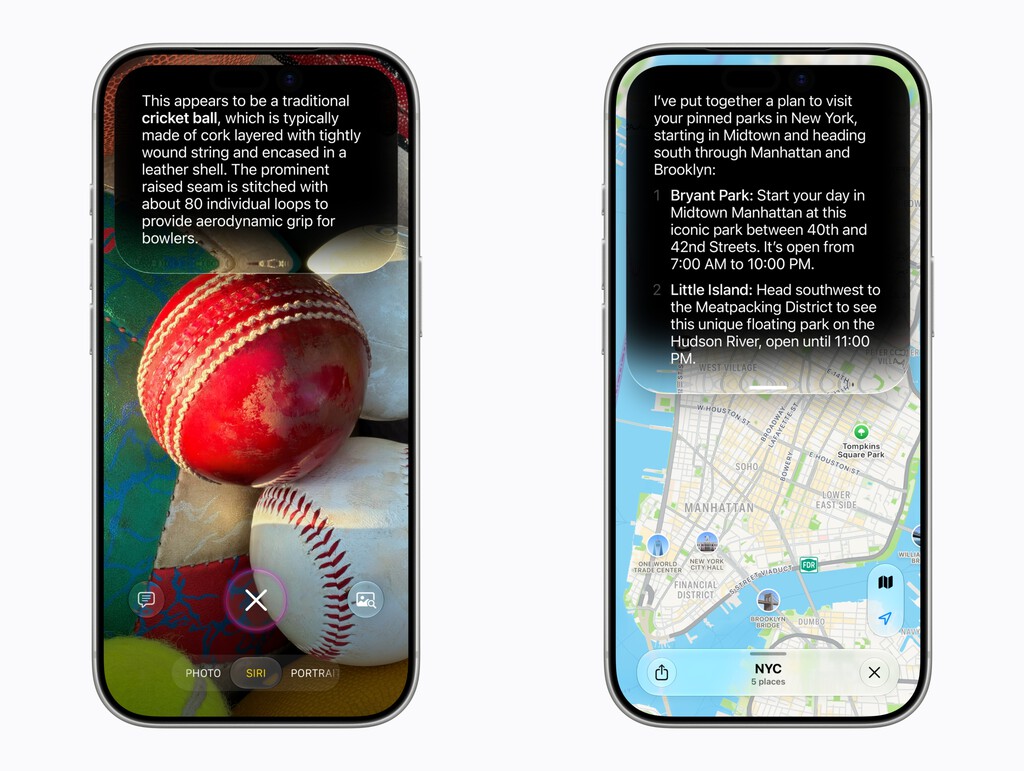
The goal is to move Siri beyond simple commands. Instead of just setting a timer, you can ask complex questions and get useful answers. Apple demoed queries like “When is the Suki Waterhouse concert in San Francisco?” and “How can I buy tickets?”—showing Siri handling real-world tasks.
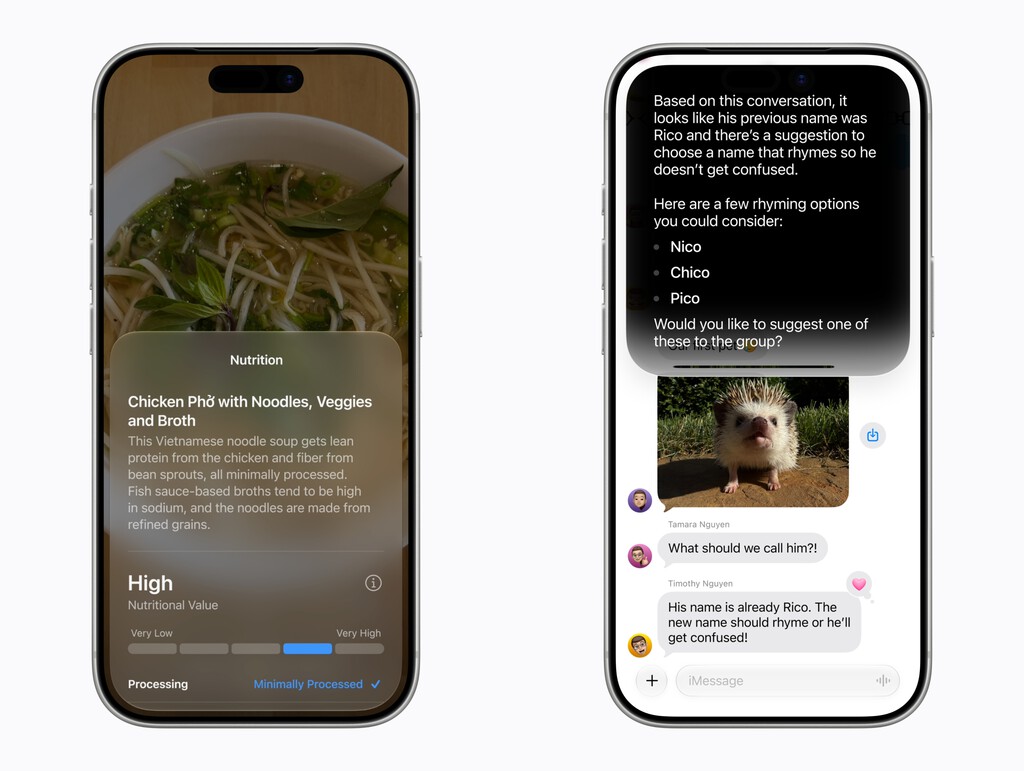
How Siri AI Works: Context, Apps, and the Web
Siri AI's biggest leap is on-screen awareness. It can see what's displayed and use that context to respond. If you're looking at a restaurant in Maps, you can ask Siri to book a table without repeating details.

The assistant also gains in-app actions. Apple says Siri can perform tasks inside apps—like sending a message, playing a specific song, or adding items to a list—without you switching apps. And with web access, it can answer questions about current events or local info.

Conversations feel more fluid, too. Siri now supports back-and-forth exchanges, so you can refine a request without starting over. This makes it feel less like a command line and more like a helper.
Beyond Siri: Camera, Photos, Liquid Glass, and Performance
While Siri steals the spotlight, iOS 27 includes several day-to-day improvements. The Camera app gets smarter processing, and Photos adds new editing tools—though Apple kept details light.
The Liquid Glass design language, introduced in iOS 26, evolves with more fluid animations and transparency effects. Under the hood, performance optimizations aim to keep older iPhones running smoothly.
These changes matter because they affect everyone, not just those who use Siri. A faster, more polished system benefits all users.
Key Takeaways from the iOS 27 Announcement
- Siri AI is the biggest update, with Apple Intelligence for context, on-screen awareness, and in-app actions.
- Siri now accesses live web knowledge and supports multi-turn conversations.
- Camera, Photos, and Liquid Glass receive notable refinements.
- Performance improvements target smoother operation across devices.
- The update signals Apple's push to make AI central to the iPhone experience.
iOS 27 vs. Previous Versions: What's Different
To see how far Siri has come, compare iOS 27 with earlier releases. The table below highlights the major shifts.
| Feature | iOS 26 and Earlier | iOS 27 |
|---|---|---|
| Siri context awareness | Limited to basic commands | Understands personal context and on-screen content |
| In-app actions | Minimal | Can perform tasks inside apps |
| Web knowledge | Static or outdated | Accesses current web information |
| Conversational ability | Single-turn | Multi-turn, more natural |
| Design | Liquid Glass (iOS 26) | Refined Liquid Glass with smoother animations |
Who Benefits Most from iOS 27?
Heavy Siri users will see the biggest change. If you've ever wanted an assistant that can handle multi-step requests, iOS 27 delivers. Professionals who juggle apps will appreciate in-app actions and context awareness.
Everyday users also gain from camera and photo improvements. And anyone with an older iPhone should benefit from performance tweaks—though Apple hasn't specified which models get the full feature set. The longer history behind the story is traced in New Siri Needs Nvidia and Google to Succeed, Not Apple Chips.
What to Watch Next for iOS 27 and Siri AI
Apple hasn't announced a release date, but expect a beta period before a fall launch. The big question is how well Siri AI performs in real life—demos are one thing, daily use is another. The background to this story is set out in Siri AI: Apple's Slow But Ambitious Personal AI Assistant. A related thread runs through Siri After 15 Years Free: Apple's Subscription Plan for AI. Earlier coverage in iOS 27 Release Date, New Features, and iPhone Compatibility shows how the argument developed.
Privacy is another area to watch. Siri's new capabilities rely on personal context, so Apple will need to reassure users about data handling. We'll also look for which iPhones support all features, as Apple Intelligence often requires newer chips. A closer look at the same subject appears in iOS 27 Launches Today, but EU Users Miss Out on Siri AI. Anyone following the wider picture can start with Siri's New AI Matches Gemini's Hands-Free iPhone Control. The same theme surfaces in iOS 27, iPadOS 27, watchOS 27 and macOS 27: Release Dates and Compatible, which takes a different angle.
Finally, developer adoption will determine how useful in-app actions become. If apps don't integrate, Siri's potential is limited. Context on how this played out before sits in iOS 27 Resizable Windows Hint at Apple Foldable iPhone. A companion piece, iOS 27 Beta Update: Supported iPhones and How to Prepare, approaches the same subject from another angle.
FAQ
What is Siri AI in iOS 27?
Siri AI is the rebuilt assistant in iOS 27, powered by Apple Intelligence. It adds context awareness, on-screen understanding, in-app actions, and web knowledge for more natural conversations.
When will iOS 27 be available?
Apple announced iOS 27 at WWDC26 but hasn't confirmed a release date. A developer beta typically arrives in June, with a public launch in the fall.
Which iPhones support iOS 27?
Apple hasn't published a device list. Given Apple Intelligence requirements, expect support for recent models, likely iPhone 15 Pro and later for full AI features.
Does iOS 27 improve battery life?
Apple mentioned performance optimizations but didn't detail battery improvements. Such tweaks often help, but real-world gains vary by device and usage.
Browse the Shop
 Acacia frida deluxe solid wood bed frame |
Bedroom bench |
Bed chest drawers |
Lingerie dresser |
Frame base |
Mirror with jewelry storage |
30 Bathroom Vanity |
Memory foam queen mattress |
Mattresses for back pain |
Nightstand set of 2 |
Grand Goldman Shop |
Civil Lawyer
Deutschland Trikot WM 2026







