

Creating an interactive packing list with Claude is a smart way to ensure you never forget essential items when traveling. Claude, an AI assistant, can generate a customized checklist with checkboxes and counters, making packing efficient and stress-free.
In this guide, we'll show you how to use Claude to build a dynamic packing list that adapts to your destination, trip duration, and activities. You'll learn two methods: letting Claude automatically generate the list based on your input, or providing your own items for Claude to organize.
Find Original Home Decor sparking conversation at Grand Goldman Shop.

Why Use an Interactive Packing List?
Traditional packing lists are static and easy to overlook. An interactive list with checkboxes and counters helps you track what you've packed and what's missing. This reduces the risk of forgetting items and makes packing more organized.

With Claude, you can create a list that not only includes items but also explains why each is necessary. For example, Claude might suggest packing a raincoat if the forecast predicts rain. This contextual advice adds value beyond a simple checklist.
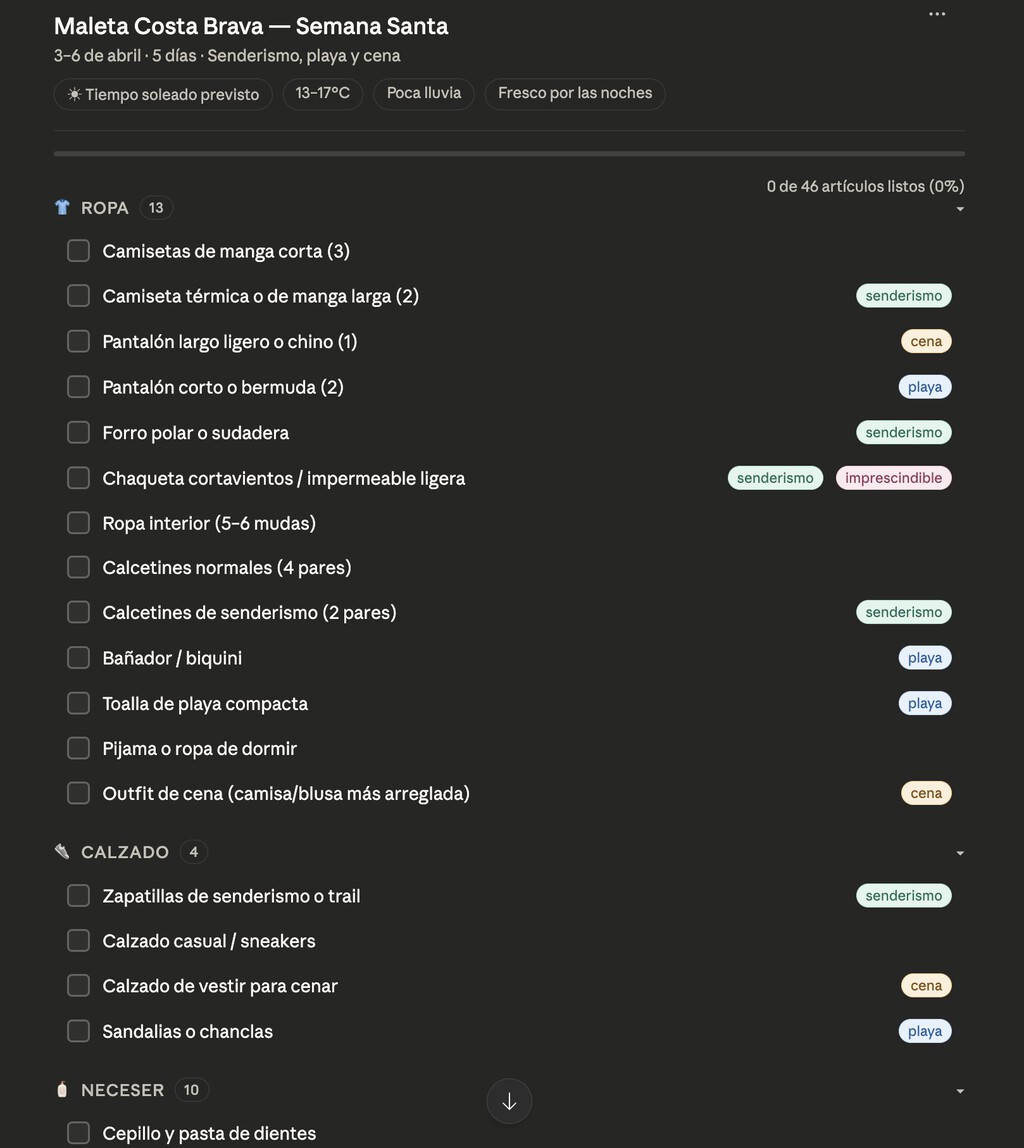
How to Create an Interactive Packing List with Claude
There are two main approaches: automatic generation and manual input. Both result in an interactive list with checkboxes and counters.
Method 1: Automatic List Generation
To have Claude generate a packing list for you, provide details about your trip: destination, duration, and planned activities. Be explicit that you want an interactive list.

Claude will then fetch weather information for your destination and dates, and use that data to tailor the list. For instance, if you're going to a beach for a week with swimming and hiking, Claude might include swimwear, hiking boots, sunscreen, and a hat.
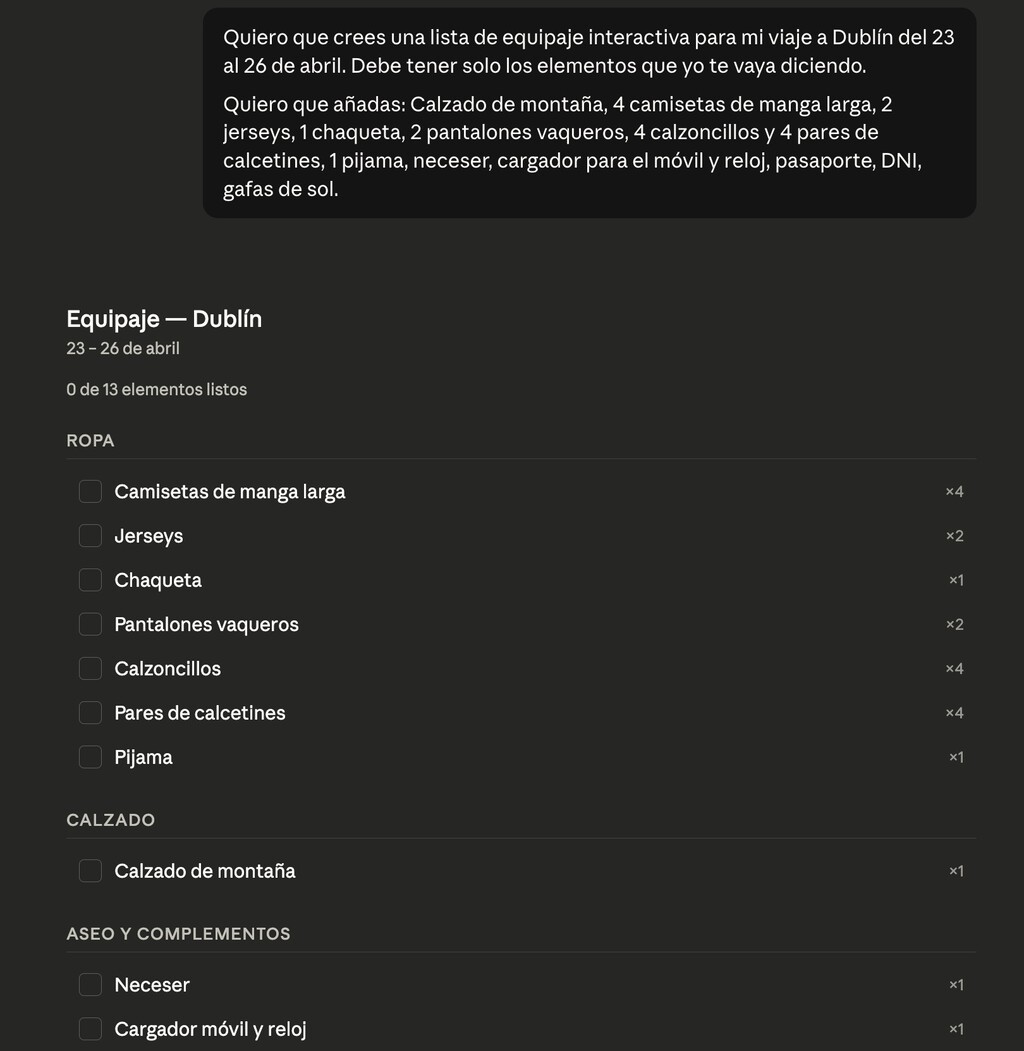
Method 2: Manual Item Input
If you prefer to dictate the items, simply tell Claude what you want to include. Claude will organize them into categories and create an interactive checklist with checkboxes and counters.
This method gives you full control over the list's contents while still benefiting from Claude's organizational capabilities.
What the Interactive List Looks Like
The generated list includes categories such as clothing, toiletries, electronics, and documents. Each item has a checkbox, and counters show how many items you've packed and how many remain.
Claude also provides a brief explanation for each item, helping you understand its relevance. For example, it might note that a power adapter is needed because of different outlet types at your destination.
Customizing Your Packing List
You can ask Claude to modify the list by adding or removing items. For instance, if you decide to skip a formal dinner, you can ask Claude to remove the dress code items. The counters will update accordingly.
Claude can also suggest alternatives if an item is not available or not needed. This flexibility makes the list truly personalized.
Benefits of Using Claude for Packing
Using Claude for packing lists saves time and reduces mental load. Instead of racking your brain for what to bring, you can rely on Claude's suggestions based on real data like weather forecasts.
Moreover, the interactive nature of the list makes packing more engaging and ensures nothing is overlooked. The counters provide a sense of progress as you check off items.
Tips for Effective Use
- Be specific: Provide detailed information about your trip to get the most accurate list.
- Review and adjust: Always review Claude's suggestions and customize as needed.
- Use counters: Keep an eye on the counters to track your progress.
- Save the list: Save or print the list for easy reference while packing.
- Update for future trips: Reuse and modify the list for future travels.
Comparison of Packing Methods
| Method | Pros | Cons |
|---|---|---|
| Traditional Paper List | Simple, no technology needed | Static, easy to forget items, no counters |
| Claude Interactive List | Customized, weather-aware, interactive checkboxes and counters | Requires AI access, initial setup time |
| Manual Digital List (e.g., notes app) | Flexible, editable | No automatic suggestions, no counters unless manually added |
FAQ
What information do I need to provide to Claude for an automatic packing list?
You need to specify your destination, trip duration, and planned activities. Claude will then fetch weather data to tailor the list.
Can I modify the list after Claude generates it?
Yes, you can ask Claude to add or remove items, and the counters will update automatically.
Is the interactive list saved for future use?
You can save or print the list. Claude does not store it, so you may want to keep a copy.
Does Claude consider airline baggage restrictions?
Claude can include reminders about restrictions if you mention them, but it's best to check with your airline.
While an interactive packing list helps you prepare for any trip, managing your finances is equally important for stress-free travel. If you're planning extended time off work, understanding how to continue contributing to social security can be crucial. Our guide on cotizar sin trabajar: cómo funciona el convenio especial con la Seguridad explains the special agreement that allows you to keep your benefits active.
For those who travel frequently for business, keeping track of expenses and obligations is key. The same guide on cotizar sin trabajar: cómo funciona el convenio especial con la Seguridad provides insights into maintaining social security coverage during unpaid leave.
And if you're considering a longer career break to travel, it's wise to plan your social security contributions ahead. The article on cotizar sin trabajar: cómo funciona el convenio especial con la Seguridad details the steps to set up a special agreement.
Even if you're just taking a short trip, knowing your options for social security can provide peace of mind. The resource on cotizar sin trabajar: cómo funciona el convenio especial con la Seguridad is a valuable reference for freelancers and employees alike.
For frequent travelers, understanding how to manage social security while abroad is essential. The guide on cotizar sin trabajar: cómo funciona el convenio especial con la Seguridad covers the nuances of voluntary contributions.
Lastly, if you're planning a sabbatical to explore the world, ensure your social security is in order. The article on cotizar sin trabajar: cómo funciona el convenio especial con la Seguridad offers practical advice to keep you covered.
Browse the Shop
 Acacia frida deluxe solid wood bed frame |
Bedroom bench |
Bed chest drawers |
Lingerie dresser |
Frame base |
Mirror with jewelry storage |
30 Bathroom Vanity |
Memory foam queen mattress |
Mattresses for back pain |
Nightstand set of 2 |
Grand Goldman Shop |
Civil Lawyer
Deutschland Trikot WM 2026







