

Smart Clerk Review: The Ultimate AI Bookkeeping Solution for Your Business
Staying on top of your finances is critical for any business, but manual bookkeeping can be a daunting and time-consuming task. Not only is it tedious, but human error can lead to discrepancies that disrupt your financial records. If you've ever wished for a smarter, faster way to manage your books, you're in the right place.
Enter Smart Clerk – an AI-powered bookkeeping tool designed to simplify your accounting process. With Smart Clerk, you can upload your bank and credit card statements, and the AI will categorize transactions, generate financial reports, and even produce profit and loss statements in seconds. Whether you're a small business owner, solopreneur, or accountant, this tool promises to save you time and eliminate the headaches associated with manual bookkeeping.
Find Original, High-end Home Decor that spark conversation at Grand Goldman Shop.
In this in-depth Smart Clerk review, I'll cover everything you need to know about this innovative platform. From its core features to how it stacks up against alternatives like QuickBooks and Xero, you'll get a comprehensive breakdown to help you decide if it's the right solution for your business.
Get Lifetime Access to Smart Clerk Today
What is Smart Clerk?
Smart Clerk is an advanced AI bookkeeping tool that automates the process of transforming bank and credit card statements into clear, organized reports. Instead of spending hours on manual data entry, you can upload your financial documents and let the AI handle the rest.
The platform is designed for accountants, small businesses, and solopreneurs who want an efficient, error-free approach to managing their finances. It integrates seamlessly with Excel, making it easy to export and share reports with your accountant during tax season.
Key Features of Smart Clerk
-
Automated Bank Statement Processing
-
AI-Powered Transaction Categorization
-
Profit and Loss Statement Generation
-
Vendor Management and Reporting
-
GDPR Compliance for Data Security
Let's dive deeper into each of these core functionalities.
How Smart Clerk Works
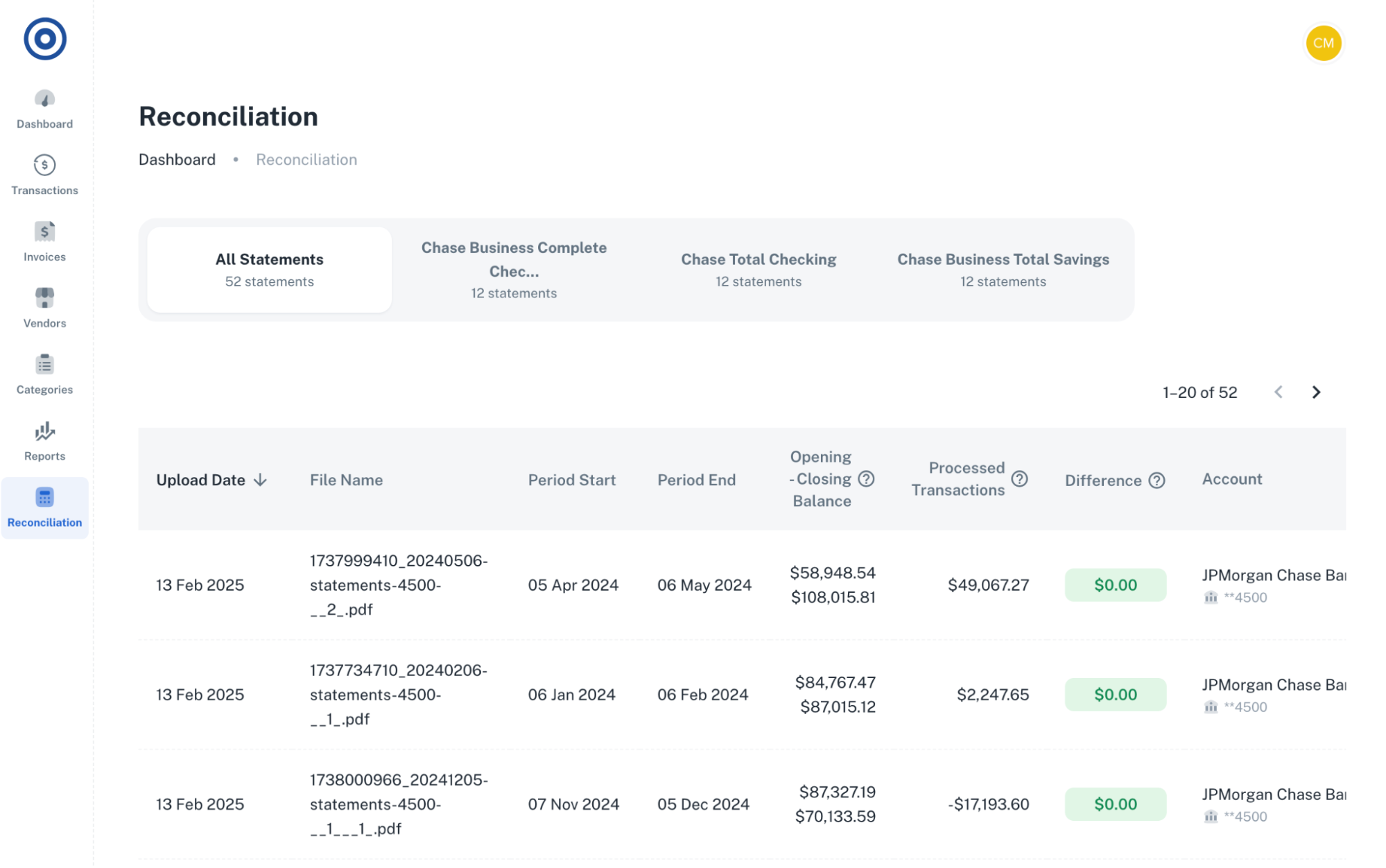
1. Upload and Process Bank Statements
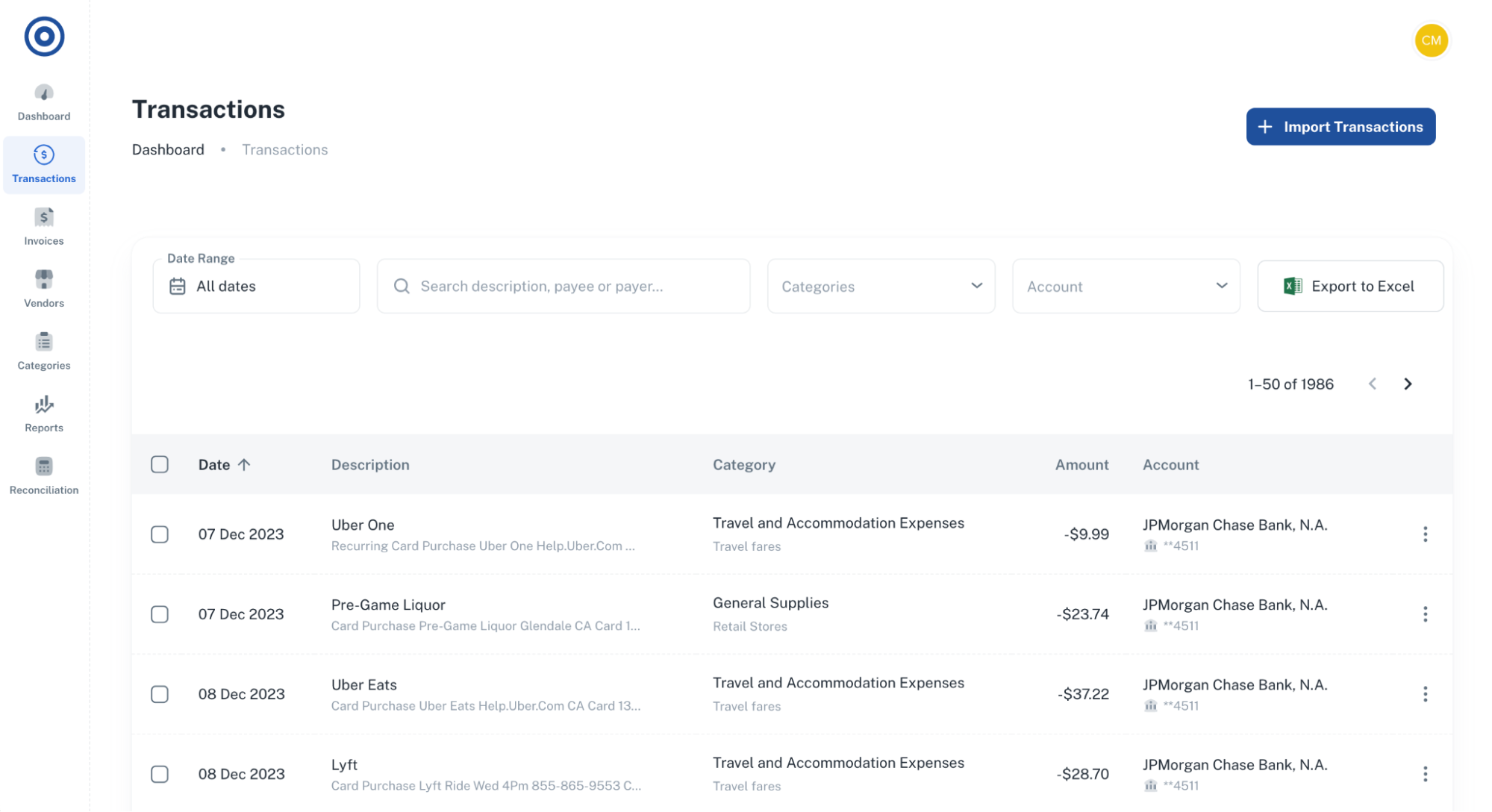
Gone are the days of manual data entry. With Smart Clerk, you can quickly import your bank and credit card statements as PDFs. The AI automatically logs and categorizes each transaction, saving you countless hours.
Additionally, the Reconciliation module helps you detect and resolve any discrepancies, ensuring your financial records are always accurate.
Why This Matters:
-
Saves time by automating data entry
-
Reduces the risk of human error
-
Ensures accurate and up-to-date financial records
Get Lifetime Access to Smart Clerk Today
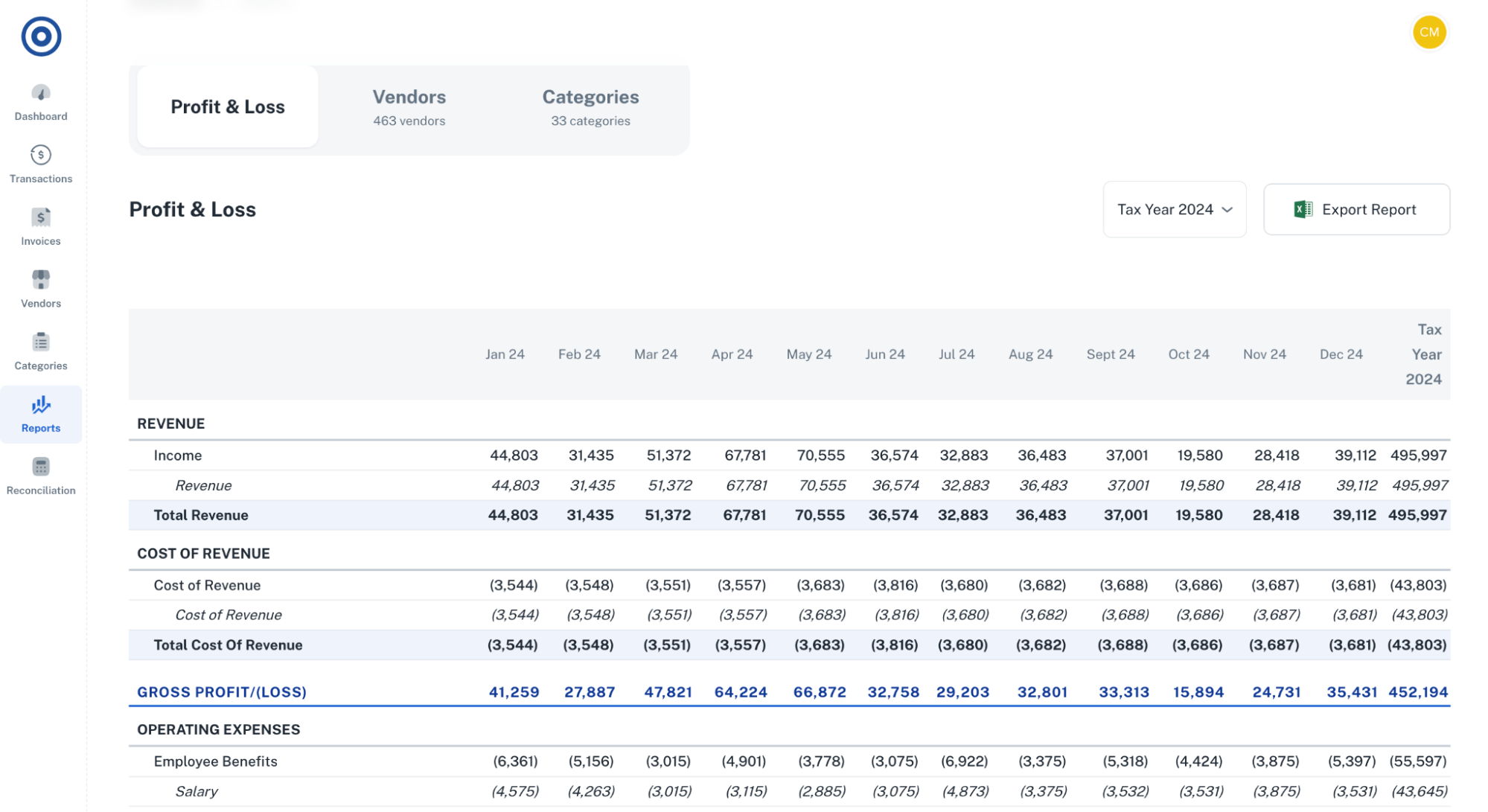
2. Generate Profit and Loss Statements
Smart Clerk makes it easy to extract financial data and create Profit and Loss (P&L) statements in seconds. With just a few clicks, you can get a comprehensive overview of your financial health.
You can also view month-by-month spending by category or vendor, which helps you identify patterns and optimize your budget.
Why This Matters:
-
Provides a clear picture of your business's financial performance
-
Simplifies tax preparation
-
Helps you track and manage expenses effectively
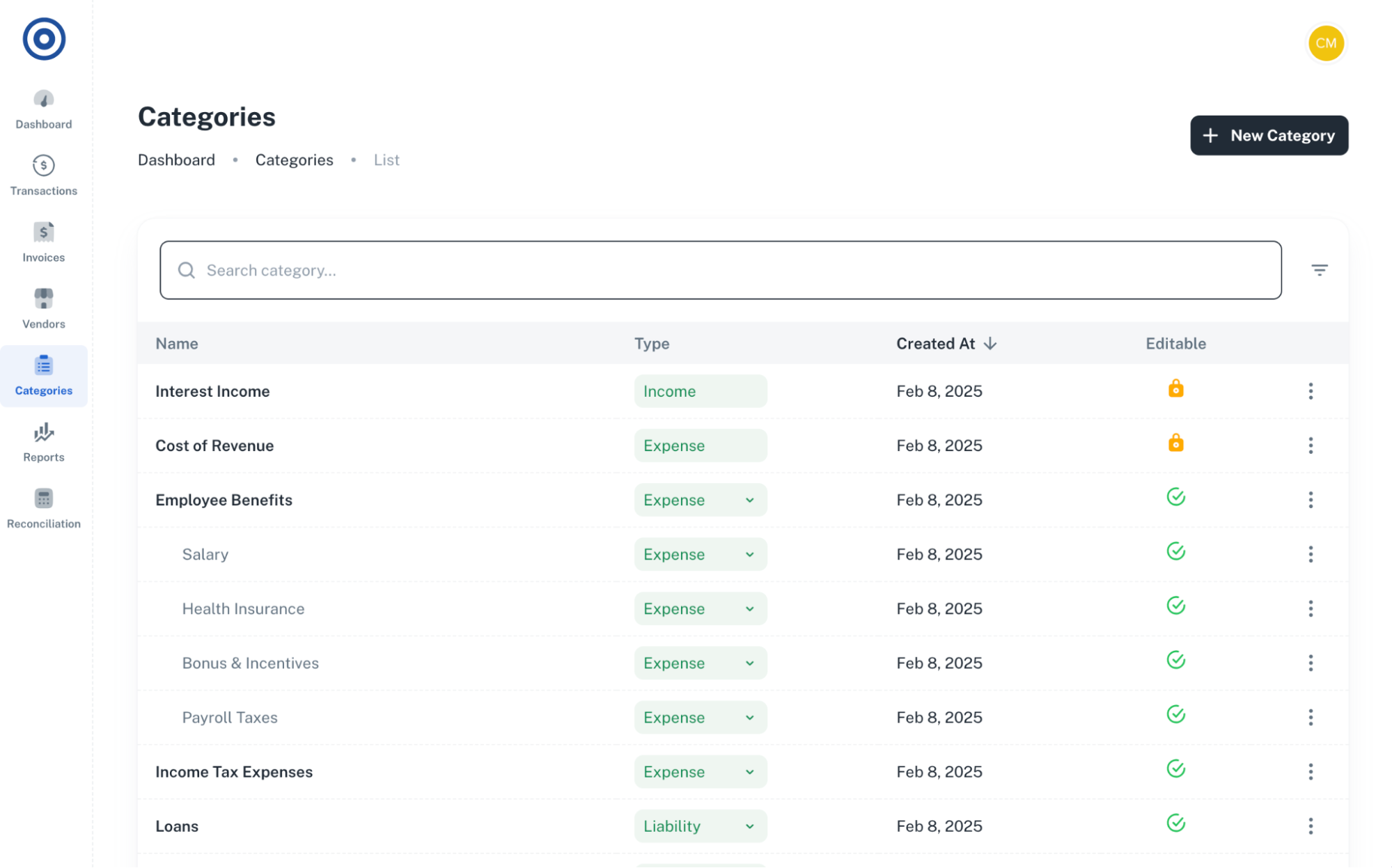
3. Automatic Transaction Categorization
One of Smart Clerk's most powerful features is its ability to automatically categorize every transaction. You can even create custom categories to align with your specific business needs.
If needed, you can adjust categories manually and set rules for the AI to follow, ensuring consistent and accurate transaction labeling.
Why This Matters:
-
Automates transaction categorization for better accuracy
-
Customizable to your unique business structure
-
Streamlines record-keeping and reporting
4. Vendor Management and Reporting
Keeping track of your vendors is crucial for understanding your spending. Smart Clerk intelligently identifies and organizes vendor details, so you can access comprehensive reports with ease.
You can also consolidate different versions of vendor names for better consistency across your financial records.
Why This Matters:
-
Provides detailed insights into vendor spending
-
Detects unusual or unexpected transactions
-
Ensures data consistency for better analysis
5. GDPR Compliance for Data Security
Data security is a top priority for any business. Smart Clerk is GDPR-compliant, ensuring that your financial information is handled securely and responsibly.
Why This Matters:
-
Protects sensitive financial data
-
Ensures compliance with privacy regulations
-
Provides peace of mind when managing confidential information
Smart Clerk vs. Traditional Accounting Tools
When comparing Smart Clerk to popular alternatives like QuickBooks, Wave Accounting, and Xero, its standout feature is the AI-driven automation. While traditional tools require more manual input and categorization, Smart Clerk reduces these tasks significantly.
| Feature | Smart Clerk | QuickBooks | Xero |
|---|---|---|---|
| AI-Powered Automation | Yes | Limited | Limited |
| Bank Statement Upload | Yes (PDF Support) | Yes (CSV Only) | Yes (CSV Only) |
| Automatic Categorization | Yes | Manual/Rule-Based | Manual/Rule-Based |
| Vendor Management | Yes | Basic | Basic |
| GDPR Compliance | Yes | Yes | Yes |
| Cost | One-time Fee | Monthly Fee | Monthly Fee |
Who is Smart Clerk Best For?
Smart Clerk is an excellent solution for:
-
Small Business Owners: Simplify your bookkeeping and free up time for growth.
-
Solopreneurs: Automate your financial tracking without needing an accountant.
-
Accountants: Speed up data entry and reduce human error.
If you handle high volumes of financial data and want an easy-to-use, automated solution, Smart Clerk could be a game-changer.
Pros and Cons of Smart Clerk
Pros
-
Fast and accurate bank statement processing
-
Automated profit and loss statement generation
-
Customizable transaction categories
-
Vendor tracking and reporting
-
GDPR-compliant for secure data handling
-
One-time payment model
Cons
-
Limited integrations outside Excel
-
May not replace comprehensive accounting platforms for complex needs
Get Lifetime Access to Smart Clerk Today
Final Verdict: Is Smart Clerk Right for You?
If you're tired of manual bookkeeping and want to streamline your financial processes, Smart Clerk is a powerful and efficient solution. Its AI-powered automation takes the hassle out of data entry, ensures accurate records, and simplifies financial reporting.
Whether you're a small business owner, solopreneur, or accountant, Smart Clerk offers a cost-effective and time-saving way to manage your books.
Ready to take control of your bookkeeping? Get lifetime access to Smart Clerk today and master your finances with ease!
Browse the Shop
 Acacia frida deluxe solid wood bed frame |
Bedroom bench |
Bed chest drawers |
Lingerie dresser |
Frame base |
Mirror with jewelry storage |
30 Bathroom Vanity |
Memory foam queen mattress |
Mattresses for back pain |
Nightstand set of 2 |
Grand Goldman Shop |
Civil Lawyer
Deutschland Trikot WM 2026
Acacia frida deluxe solid wood bed frame |
Bedroom bench |
Bed chest drawers |
Lingerie dresser |
Frame base |
Mirror with jewelry storage |
30 Bathroom Vanity |
Memory foam queen mattress |
Mattresses for back pain |
Nightstand set of 2 |
Grand Goldman Shop |
Civil Lawyer
Deutschland Trikot WM 2026










