

Check real-time traffic conditions before and after the solar eclipse to avoid massive jams, as thousands of people will hit the roads simultaneously to witness this rare event. The total solar eclipse happening tomorrow will draw crowds to specific viewing locations at a precise time, creating predictable bottlenecks on highways and rural routes alike.
Whether you're using a phone or a computer, four well-known services can give you the edge: the DGT's official traffic map, Google Maps, Apple Maps, and Waze. Each offers unique features that can help you navigate the chaos and find clearer routes.
Find Original Home Decor sparking conversation at Grand Goldman Shop.

Why Traffic Spikes Around the Eclipse
A total solar eclipse is a once-in-a-lifetime event for many, and the path of totality often crosses popular travel corridors. People will converge on prime viewing spots hours before the eclipse and leave immediately after, creating two distinct rush hours. In Spain, the DGT has warned of heavy traffic on key roads leading to observation points.
Unlike a typical holiday rush, eclipse traffic is highly concentrated in time and space. The event lasts only a few minutes, but the influx and exodus can stretch over several hours. Planning ahead with real-time tools is essential to avoid being stuck in gridlock.

How to Use the DGT's Official Traffic Map
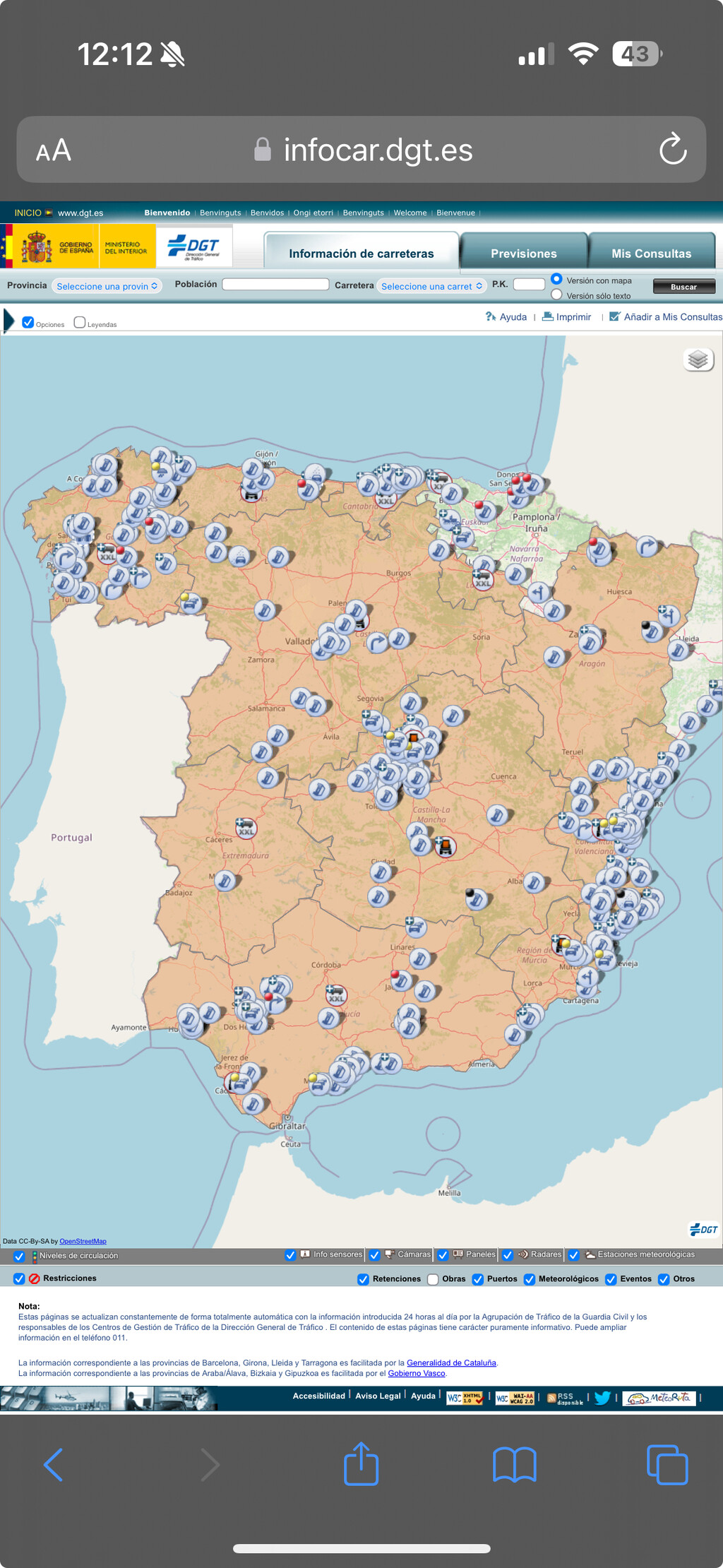
The DGT's traffic map at infocar.dgt.es/etraffic provides a comprehensive view of road conditions across Spain. When you open the site, you'll see a nationwide map that you can zoom and pan. It displays real-time incidents, including accidents, roadworks, and congestion.

The map uses a color-coded system: red indicates slow traffic, while green shows fluid movement. Icons mark specific incidents; clicking on one opens a pop-up with details such as the exact location and the time the incident started. This official data is particularly useful for major highways and arterial roads.

Key Features of the DGT Map
- Nationwide coverage of Spanish roads, including rural routes.
- Real-time incident reports from traffic authorities.
- Color-coded traffic flow for quick assessment.
- Detailed pop-ups with timestamps and descriptions.
- Accessible on both desktop and mobile browsers.
Using Google Maps for Eclipse Traffic
Google Maps is perhaps the most familiar tool for drivers. Its real-time traffic layer shows congestion with green, yellow, orange, and red lines. You can also use it for navigation, and it will automatically reroute you around jams if a faster path exists.
One advantage of Google Maps is its ability to show traffic trends at different times of day. You can check typical traffic patterns to anticipate when roads might be busiest. However, keep in mind that during unusual events like an eclipse, historical data may not reflect actual conditions, so rely on the live layer.
Apple Maps and Waze: Alternative Options
Apple Maps has improved significantly in recent years, offering real-time traffic updates and incident reporting. It integrates with Siri for hands-free operation, which can be handy when you're driving. Waze, on the other hand, is community-driven, with users reporting accidents, police traps, and other hazards in real time.
Waze also features a route-sharing option, so you can coordinate with friends or family. Its algorithms often find creative detours through side streets, but be cautious: during major events, those side streets can become just as congested as main roads. The background to this story is set out in Spain's DGT Warns: Total Solar Eclipse Traffic Chaos on August 12. A related thread runs through August 2027 Total Solar Eclipse in Spain: Viewing Guide. Earlier coverage in Solar Eclipse Communal Magic: Cornwall's Skyward Moment shows how the argument developed.
Comparison of Traffic Services
| Service | Real-Time Traffic | Incident Reports | Rerouting | Platforms |
|---|---|---|---|---|
| DGT | Yes (color-coded) | Official | No | Web |
| Google Maps | Yes | User + official | Yes | Web, iOS, Android |
| Apple Maps | Yes | User + official | Yes | iOS, macOS |
| Waze | Yes | User-driven | Yes | iOS, Android |
Best Practices for Eclipse Day Travel
Start monitoring traffic hours before the eclipse. If you're heading to a viewing spot, aim to arrive early and stay put until the roads clear. After the event, wait at least an hour before leaving to let the initial surge pass. Use multiple apps to cross-check information; sometimes one service may lag or miss an incident. A closer look at the same subject appears in Solar Eclipse in Cornwall: A Magical Communal Experience. Anyone following the wider picture can start with Spain's New Traffic Rules Let Motorcyclists Use the Shoulder in Traffic Jams. The same theme surfaces in Waze brings a feature that will make you forget about Google Maps, which takes a different angle.
Also, consider alternative routes that avoid major highways. Smaller roads might be less congested, but they can also become parking lots if everyone has the same idea. The DGT map is particularly useful for identifying which secondary roads are affected. Context on how this played out before sits in Solar Eclipse Viewing Tips from Real Observers. A companion piece, UK Solar Eclipse 2026: Best Viewing Spots Revealed, approaches the same subject from another angle.
FAQ
What is the best app for real-time traffic during the eclipse?
There's no single best app; it depends on your needs. The DGT map provides official data, while Google Maps and Waze offer dynamic rerouting. Using a combination gives you the most comprehensive picture.
How often is the DGT traffic map updated?
The DGT map updates in real time, with incident reports typically refreshed every few minutes. However, during major events, there might be slight delays in data propagation.
Can I use these services offline?
Most require an internet connection for real-time updates. Google Maps allows you to download offline maps, but traffic data won't be live. It's best to have a mobile data plan or connect to Wi-Fi before you leave.
What should I do if I encounter a traffic jam after the eclipse?
Stay calm and follow detours suggested by your navigation app. If traffic is at a standstill, be patient and avoid aggressive driving. Keep an eye on the DGT map for updates on clearing times.
Browse the Shop
 Acacia frida deluxe solid wood bed frame |
Bedroom bench |
Bed chest drawers |
Lingerie dresser |
Frame base |
Mirror with jewelry storage |
30 Bathroom Vanity |
Memory foam queen mattress |
Mattresses for back pain |
Nightstand set of 2 |
Grand Goldman Shop |
Civil Lawyer
Deutschland Trikot WM 2026
Acacia frida deluxe solid wood bed frame |
Bedroom bench |
Bed chest drawers |
Lingerie dresser |
Frame base |
Mirror with jewelry storage |
30 Bathroom Vanity |
Memory foam queen mattress |
Mattresses for back pain |
Nightstand set of 2 |
Grand Goldman Shop |
Civil Lawyer
Deutschland Trikot WM 2026







