

The Stream Deck Neo is not just for streamers; it's a powerful productivity gadget that can save you time daily. Many people dismiss it as a tool only for live streaming, but this compact device offers customizable keys that streamline tasks for anyone working at a computer.
In this review, we'll explore how the Stream Deck Neo can optimize your workflow, whether you're in an office or working from home. We'll cover its features, practical uses, and why it might be the productivity boost you've been missing.
Find Original Home Decor sparking conversation at Grand Goldman Shop.

What is the Stream Deck Neo?
The Stream Deck Neo is a compact panel with eight customizable keys and two touch points, made by Elgato. It connects to your Mac or PC and allows you to assign specific actions to each button, from opening apps to executing complex macros.
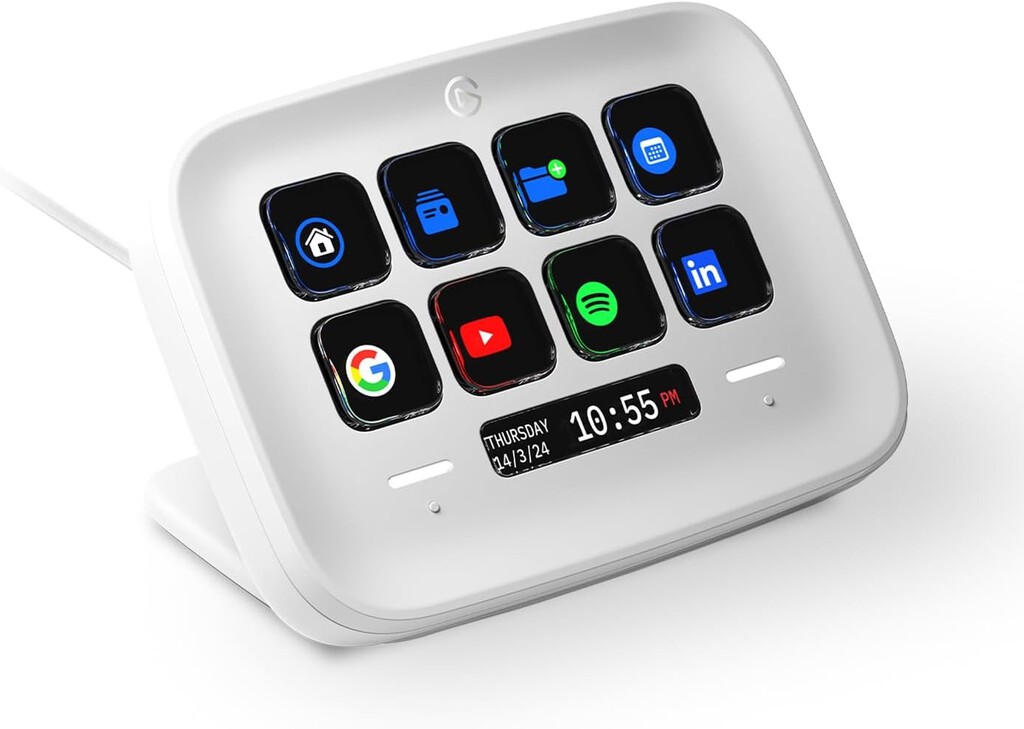
Unlike traditional keyboards, the Stream Deck provides visual feedback with customizable icons, making it easy to remember what each key does. The touch points add another layer of interactivity, allowing you to switch between profiles or trigger additional functions.
Why the Stream Deck Neo Matters for Productivity
In today's fast-paced work environment, switching between tasks can eat up significant time. The Stream Deck Neo addresses this by putting your most-used actions just a press away. Instead of navigating through menus or remembering keyboard shortcuts, you can execute tasks instantly.
This is especially useful for repetitive actions, such as opening specific folders, sending canned responses, or controlling media playback. By reducing friction, the Stream Deck Neo helps you stay focused and maintain momentum throughout the day.
Key Features and Benefits
- Eight customizable keys: Assign any action, from launching apps to running scripts.
- Two touch points: Switch profiles or trigger additional commands with a tap.
- Easy setup: Intuitive software lets you drag and drop actions onto keys.
- Visual feedback: Custom icons help you identify keys at a glance.
- Cross-platform compatibility: Works with both Mac and PC.
Practical Uses for Everyday Work
Beyond streaming, the Stream Deck Neo shines in everyday work scenarios. For example, you can set up keys to open your email client, calendar, and task manager with a single press. Or create a profile for video editing with shortcuts for cut, trim, and export.
If you work with spreadsheets, you can assign keys to insert common formulas or navigate between sheets. For presentations, you can control slides and timer functions without touching your keyboard. The possibilities are endless, limited only by your imagination.
Stream Deck Neo vs. Other Models
Elgato offers several Stream Deck models, each with different features and price points. Here's a quick comparison to help you decide.
| Model | Keys | Touch Points | Price (approx.) |
|---|---|---|---|
| Stream Deck Neo | 8 | 2 | €84.99 |
| Stream Deck MK.2 | 15 | 0 | €149.99 |
| Stream Deck XL | 32 | 0 | €249.99 |
| Stream Deck Pedal | 3 (pedals) | 0 | €89.99 |
The Neo is the most affordable option with touch points, making it a great entry point for productivity enthusiasts. If you need more keys, the MK.2 or XL might be better, but they come at a higher cost. The background to this story is set out in Stream Deck for Productivity: More Than Just a Streaming Tool. A related thread runs through Stream Deck MK.2 White: Save Time Daily and Now Cheaper. Earlier coverage in MediaMarkt Drops Stream Deck Neo to Outlet Price for Productivity shows how the argument developed.
Who Should Consider the Stream Deck Neo?
The Stream Deck Neo is ideal for professionals who spend hours at their computer and perform repetitive tasks. It's also great for creatives like video editors, graphic designers, and writers who want quick access to tools and commands. A closer look at the same subject appears in Corsair Nightsword v2 Wireless SD: Gaming Mouse With Stream Deck. Anyone following the wider picture can start with Apple AirTag: The Travel Gadget That Saves Your Vacation. The same theme surfaces in Best Corsair Deals Today: Headset, Stream Deck and RAM Savings, which takes a different angle.
Even if you're not a streamer, if you find yourself constantly switching between apps or struggling to remember shortcuts, the Stream Deck Neo can simplify your workflow. It's a small investment that can yield significant time savings. Context on how this played out before sits in Prime Day Corsair and Elgato Deals: Mice, Keyboards, Stream Decks, and Chairs. A companion piece, Content Creator Election: Streamers Challenge TV Networks for Midterms, approaches the same subject from another angle.
FAQ
Is the Stream Deck Neo only for streamers?
No, the Stream Deck Neo is a versatile productivity tool that can be used by anyone who wants to streamline their computer tasks. It's especially useful for professionals, creatives, and anyone who performs repetitive actions.
Can I use the Stream Deck Neo with both Mac and PC?
Yes, the Stream Deck Neo is compatible with both Mac and PC. You just need to install the Elgato software, which is available for both platforms.
How many actions can I assign to the Stream Deck Neo?
With eight customizable keys and two touch points, you can assign a wide range of actions. Additionally, you can create multiple profiles to switch between different sets of actions, effectively expanding the number of available commands.
Is the Stream Deck Neo worth the price?
At around €84.99, the Stream Deck Neo offers excellent value for those who want to boost productivity. If you frequently perform repetitive tasks or struggle with workflow efficiency, it can quickly pay for itself in time saved.
In conclusion, the Stream Deck Neo is a surprisingly versatile gadget that can benefit anyone looking to optimize their daily computer use. Whether you're a streamer or not, it's worth considering as a productivity tool.
Browse the Shop
 Acacia frida deluxe solid wood bed frame |
Bedroom bench |
Bed chest drawers |
Lingerie dresser |
Frame base |
Mirror with jewelry storage |
30 Bathroom Vanity |
Memory foam queen mattress |
Mattresses for back pain |
Nightstand set of 2 |
Grand Goldman Shop |
Civil Lawyer
Deutschland Trikot WM 2026







