

If you've noticed a green dot appearing on some WhatsApp contacts' profile photos, you're not alone. This new WhatsApp green dot is a status indicator that shows when someone is actively using the app. Currently rolling out to beta testers on Android and iOS, it's designed to let you know if a contact is available before you message them. But what does it mean for your privacy, and can you avoid it? Here's everything you need to know.
What Is the WhatsApp Green Dot?
The green dot is a real-time activity indicator. It appears when a user has WhatsApp open and is actively using the app, and disappears when they leave or lock their phone. You'll only see it in the contact info screen—when you tap on a contact's profile photo to view their details. The dot sits at the bottom of the circular profile picture.
Find Original Home Decor sparking conversation at Grand Goldman Shop.

This feature is similar to the online status in other messaging apps, but it's more subtle. It doesn't show a timestamp or "last seen" info; it simply indicates current activity. The goal is to help users gauge whether someone is likely to respond quickly.
Why Does the Green Dot Matter?
For many, the green dot is a convenient way to know if a friend or colleague is available for a quick chat. However, it also raises privacy concerns. Not everyone wants others to know when they're online. The green dot could reveal your activity patterns, potentially leading to unwanted attention or pressure to respond immediately.
Moreover, the feature is currently limited to beta versions, but it's expected to roll out to all users soon. As it becomes more widespread, understanding how to control it will be crucial for maintaining your privacy.
How to Avoid the Green Dot on Your Profile
WhatsApp hasn't officially announced a way to disable the green dot, but there are a few workarounds you can try to keep your activity private. Here are some practical steps:
- Turn off read receipts: While this doesn't directly affect the green dot, it reduces the overall visibility of your activity.
- Use WhatsApp Web or Desktop: The green dot currently only appears in the mobile app, so using WhatsApp on your computer might not trigger it.
- Disable background app refresh: This can prevent WhatsApp from running in the background, but it may also delay notifications.
- Stay on stable versions: The green dot is a beta feature; if you're not on the beta program, you won't see it yet.
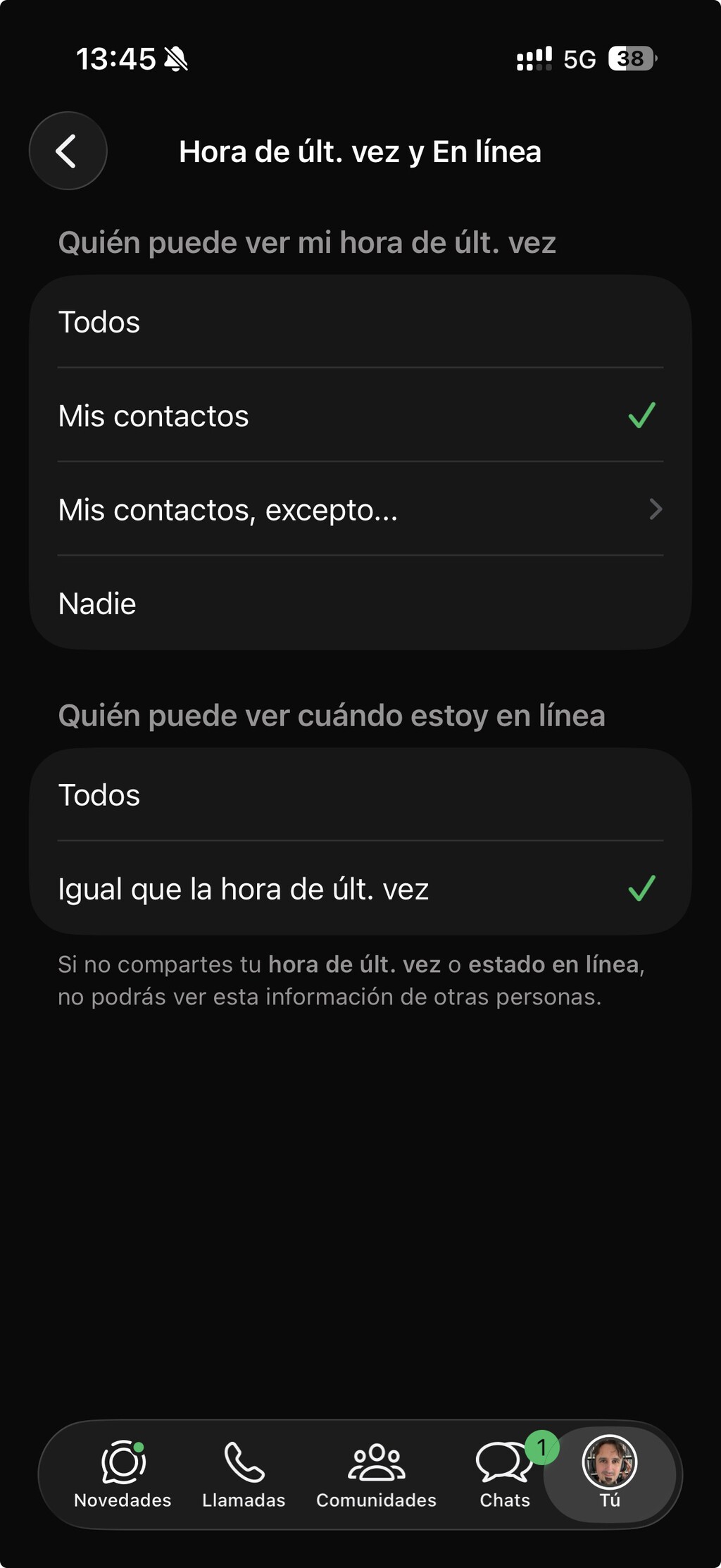
- Check privacy settings: Regularly review WhatsApp's privacy settings for any new options related to activity status.
Keep in mind that these are temporary solutions. WhatsApp may introduce an official toggle in the future, so stay tuned for updates.
Green Dot vs. Other WhatsApp Status Indicators
WhatsApp already has several status indicators, such as "online" and "last seen." The green dot is different because it's more discreet and only visible in the contact info screen. Here's how it compares:
| Indicator | Where It Appears | Real-Time | Can Be Disabled? |
|---|---|---|---|
| Green Dot | Contact info screen | Yes | No (as of now) |
| Online Status | Chat header | Yes | Yes (via privacy settings) |
| Last Seen | Chat header and contact info | No (timestamp) | Yes (via privacy settings) |
| Read Receipts | Message ticks | No | Yes (but disables both sending and receiving) |
As you can see, the green dot is unique in that it currently lacks a disable option. This puts the onus on users to find workarounds until WhatsApp provides more control. The background to this story is set out in Roblox Privacy Overhaul: eSafety Forces Adult Contact Restrictions. A related thread runs through Justin Langer Open to England Job Despite No ECB Contact. Earlier coverage in Justin Langer on England Job: No ECB Contact Yet, But Open to shows how the argument developed.
What to Watch For Next
WhatsApp is likely to expand the green dot feature to all users in the coming months. The company may also add a privacy setting to turn it off, given user feedback. In the meantime, keep an eye on beta updates and official announcements. If privacy is a major concern, consider adjusting your overall WhatsApp usage habits, such as disabling online status and read receipts. A closer look at the same subject appears in WhatsApp Blue Ticks: Reclaim Your Peace and Privacy Now. Anyone following the wider picture can start with Denmark Wolf Encounter Advice: Stand Still, Make Eye Contact. The same theme surfaces in Trending: latest articles, which takes a different angle.
Remember, the green dot is just one of many features WhatsApp uses to enhance communication. By staying informed, you can make choices that align with your comfort level. Context on how this played out before sits in How to Tell If Someone Blocked You on WhatsApp: Key Signs. A companion piece, How to Tell If Someone Is Spying on Your WhatsApp via WhatsApp Web, approaches the same subject from another angle.
FAQ
What does the green dot on WhatsApp mean?
The green dot is a real-time indicator that shows when a contact is actively using WhatsApp. It appears only in the contact info screen, at the bottom of their profile photo.
Can I turn off the green dot?
Currently, there is no official setting to disable the green dot. However, you can try workarounds like using WhatsApp Web or disabling background app refresh to minimize its appearance.
Is the green dot available to everyone?
No, the green dot is currently in beta testing on Android and iOS. It is expected to roll out to all users in the future.
Does the green dot show if I'm online on WhatsApp Web?
The green dot is currently only visible in the mobile app. Using WhatsApp Web or Desktop does not trigger the green dot indicator.
Browse the Shop
 Acacia frida deluxe solid wood bed frame |
Bedroom bench |
Bed chest drawers |
Lingerie dresser |
Frame base |
Mirror with jewelry storage |
30 Bathroom Vanity |
Memory foam queen mattress |
Mattresses for back pain |
Nightstand set of 2 |
Grand Goldman Shop |
Civil Lawyer
Deutschland Trikot WM 2026







