

Google now allows apps created with AI in Google AI Studio to be published directly to a private corner of Google Play, without requiring a developer account. This move lowers the barrier for anyone experimenting with AI-generated apps to get them onto their Android devices natively.
Previously, publishing an app to Google Play required a developer account with a one-time $25 fee and public listing. Many users who tinkered with AI coding tools resorted to web apps instead of native Android apps. Google's new approach aims to change that by letting users publish apps privately using their regular Google account.
Find Original, High-end Home Decor that spark conversation at Grand Goldman Shop.
How Google Play's Private AI App Publishing Works
According to Google's official blog, starting this week, anyone who creates an Android app with AI can send it directly from Google AI Studio to their own private space in the Play Store. The process uses your standard Google account, so no developer account is needed.
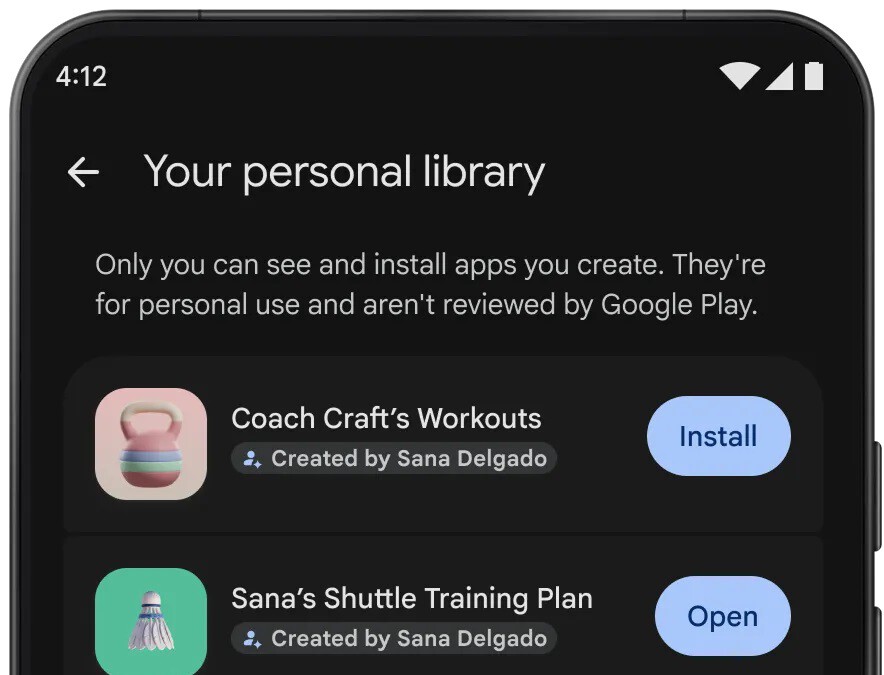
Once you've built your app in AI Studio, the tool lets you publish it to your device through Google Play. The app lands in a "Personal Library" section of the store, visible only to you. This means you can install and use your AI-created app on your Android devices without going through the public app review process.
What You Need to Get Started
To take advantage of this feature, you need a Google account and access to Google AI Studio. You don't need to pay the $25 developer registration fee or submit your app for public review. The app is published privately, so only you can see and install it.
This is particularly useful for those who use AI to generate simple utilities, prototypes, or personal tools. Instead of running them as web apps, you can now have them as native Android apps in your personal library.
Why Google Is Opening Up Play Store to AI Experiments
Google's motivation is clear: by removing barriers, it hopes to attract more users to experiment with AI app creation and potentially convert them into future developers. The company wants to capture the growing trend of "vibe-coding"—where users describe what they want and AI generates the code.
Currently, many of these experimental apps end up as web apps because publishing to Google Play is seen as too cumbersome. By offering a private publishing option, Google keeps these users within its ecosystem and familiarizes them with the Play Store publishing process.
In the long run, this could lead some users to eventually publish their apps publicly, which would require a developer account. So while the initial publishing is free and private, it serves as a gateway to the traditional developer pipeline.
Benefits of Private AI App Publishing on Google Play
- No developer account required: Publish apps without paying the $25 fee or going through public review.
- Native Android experience: Run your AI-created apps as native apps instead of web apps.
- Personal Library: Your apps are stored privately and only visible to you.
- Easy publishing: Send apps directly from Google AI Studio to your device via Google Play.
- Path to public release: Start privately and later choose to publish publicly if you wish.
How This Compares to Traditional App Publishing
To understand the significance of this change, consider the differences between the new private publishing method and the traditional route.
| Aspect | Traditional Publishing | New Private Publishing |
|---|---|---|
| Developer account | Required ($25 one-time fee) | Not required |
| Visibility | Public on Google Play | Private (Personal Library) |
| Review process | Yes, Google reviews the app | No public review |
| Publishing method | Manual upload via Play Console | Direct from Google AI Studio |
| Target audience | All users | Only you |
This table highlights how the new option simplifies the process for personal use while maintaining the traditional path for those who want to reach a wider audience. The longer history behind the story is traced in Google Play Now Lets You Publish AI-Built Apps Privately. More on the surrounding debate is collected in Amazon Alexa Tablets: Google Play, Alexa+ and a Pro Model.
What This Means for AI App Creators
For hobbyists and curious users, this lowers the friction to try out AI-generated apps on their phones. It also encourages more experimentation with AI in app development, potentially leading to more polished apps in the future. The background to this story is set out in Yosemite Land Transfer to Private Developer Sparks Controversy. A related thread runs through Australia's New Law Lets Users Opt Out of Social Media Algorithms. Earlier coverage in Frontly Review: The Truth About Generating Web Apps with AI shows how the argument developed.
For Google, it's a way to keep users engaged with its AI tools and Play Store ecosystem. By making it easy to publish privately, Google hopes to foster a community of AI app creators who might eventually become paying developers. A closer look at the same subject appears in Fraudulent Research Paper Mills Exposed: Pay-to-Publish Science Scam. Anyone following the wider picture can start with Yasmin David: Glorious Nature Paintings of a Private Artist. The same theme surfaces in AI Dating Apps: Can Artificial Intelligence Solve Online, which takes a different angle.
It's also a strategic move against competitors like Apple, which has stricter app publishing rules. Google's more open approach could attract developers who want to experiment without committing to a full developer account. Context on how this played out before sits in Technology: latest articles. A companion piece, Chinese Developers Now Earn 52% of App Store Revenue Abroad, approaches the same subject from another angle.
FAQ
Do I need a developer account to publish an AI-generated app on Google Play?
No, you don't need a developer account for private publishing. You can use your regular Google account to publish apps created with Google AI Studio directly to your Personal Library on Google Play.
Can other people see or download my private AI app?
No, apps published privately are only visible to you in your Personal Library. They are not listed publicly on Google Play, so other users cannot see or download them.
What is Google AI Studio and how does it relate to app publishing?
Google AI Studio is a tool for building AI-powered apps. With this new feature, you can publish apps directly from AI Studio to your private space on Google Play, streamlining the process for personal use.
Can I later make my private app public on Google Play?
Yes, if you decide to publish your app publicly, you'll need to go through the traditional process, which includes having a developer account and submitting your app for review. The private publishing option serves as a stepping stone.
Browse the Shop
 Acacia frida deluxe solid wood bed frame |
Bedroom bench |
Bed chest drawers |
Lingerie dresser |
Frame base |
Mirror with jewelry storage |
30 Bathroom Vanity |
Memory foam queen mattress |
Mattresses for back pain |
Nightstand set of 2 |
Grand Goldman Shop |
Civil Lawyer
Deutschland Trikot WM 2026
Acacia frida deluxe solid wood bed frame |
Bedroom bench |
Bed chest drawers |
Lingerie dresser |
Frame base |
Mirror with jewelry storage |
30 Bathroom Vanity |
Memory foam queen mattress |
Mattresses for back pain |
Nightstand set of 2 |
Grand Goldman Shop |
Civil Lawyer
Deutschland Trikot WM 2026










