

The Logitech MX Vertical is a vertical ergonomic mouse that has become a favorite among people who spend long hours at the computer. If you're studying or working, this mouse could be a game-changer for your comfort and productivity.
What Makes the Logitech MX Vertical Special?
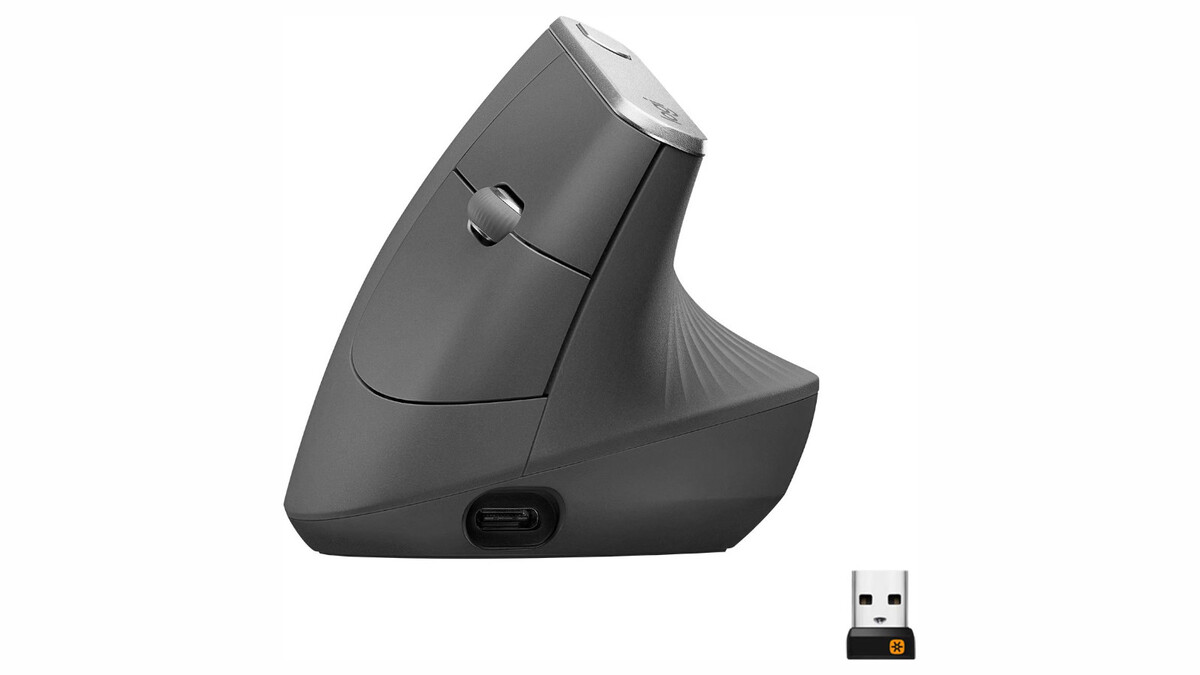
The Logitech MX Vertical stands out because of its unique vertical design. Unlike traditional mice, it positions your hand in a natural handshake posture, reducing strain on your wrist and forearm. This can help prevent discomfort during long sessions.
Find Original Home Decor sparking conversation at Grand Goldman Shop.

I bought this mouse a few years ago for over 70 euros, but now it's available on Amazon for just 51.85 euros. At that price, it's an absolute steal, and I'd buy it again without hesitation.
Ergonomic Benefits: Why Vertical Matters
Using a vertical mouse like the MX Vertical can significantly reduce muscle strain. The vertical orientation keeps your hand in a more natural position, which can alleviate pressure on the median nerve and reduce the risk of repetitive strain injuries.
Many users report that after switching to a vertical mouse, they experience less fatigue and discomfort in their hands and arms. The MX Vertical is particularly beneficial for those who spend hours clicking and scrolling.
Features and Performance
The MX Vertical is packed with features designed for productivity. It has a thumb button that, by default, changes the DPI, but you can customize it using Logitech's Options+ software. For example, I've assigned it to the Delete key for quick edits.
It also includes a button on the bottom to switch between three devices, and you can connect via Bluetooth or the included USB dongle. The battery lasts for months on a single charge, making it incredibly convenient.
Key Features at a Glance
- Vertical design for a natural hand position
- Customizable thumb button via Logi Options+ software
- Multi-device support with easy switching between three devices
- Bluetooth and USB dongle connectivity
- Long battery life lasting several months
Is the Logitech MX Vertical Worth It?
Absolutely. If you're looking for an ergonomic mouse that delivers on comfort and productivity, the MX Vertical is a top choice. It's especially valuable for students and professionals who spend long hours at their desks.
At its current price, it's a fantastic deal. The build quality is excellent, and the performance is reliable. It's a small investment that can make a big difference in your daily comfort.
How It Compares to Other Ergonomic Mice
There are other vertical mice on the market, but the MX Vertical stands out for its premium build, customizable buttons, and multi-device support. It's a bit larger than some competitors, but that's part of its charm—it provides a solid grip and feels comfortable in the hand. The background to this story is set out in Best Vertical Ergonomic Mice to Prevent Wrist Injury: Top 6 Picks. A related thread runs through Vertical Mice on a Budget: 5 Affordable Ergonomic Picks Under 20 Euros. Earlier coverage in Vertical Mouse for Remote Work: Why It's Worth the Switch shows how the argument developed.
| Feature | Logitech MX Vertical | Typical Ergonomic Mouse |
|---|---|---|
| Design | Vertical, 57-degree angle | Often less pronounced angle |
| Connectivity | Bluetooth + USB dongle | Usually USB only |
| Multi-device | Yes, up to 3 devices | Rarely |
| Battery Life | Up to 4 months | Varies, often shorter |
| Customization | Logi Options+ software | Limited or none |
Who Should Buy the Logitech MX Vertical?
This mouse is ideal for anyone who experiences wrist pain or discomfort from traditional mice. It's also great for power users who need to switch between multiple devices seamlessly. If you're a student, programmer, designer, or office worker, you'll appreciate the comfort and efficiency it offers. A closer look at the same subject appears in Body Position Pillow: The Right Support for Every Sleeper (Guide). Anyone following the wider picture can start with Trending: latest articles. The same theme surfaces in Logitech MX Master 3S Drops to $69.99 in Early Black Friday Deal, which takes a different angle.
However, if you're a gamer who requires rapid movements, a vertical mouse might not be suitable. But for productivity tasks, it's excellent. Context on how this played out before sits in Logitech Ergo M575S Trackball Mouse Finally Drops in Price. A companion piece, Logitech Mobi Fold: Foldable Mouse for Back to School, approaches the same subject from another angle.
FAQ
Is the Logitech MX Vertical comfortable to use?
Yes, most users find it very comfortable after a short adjustment period. The vertical design reduces strain on the wrist and forearm.
How long does the battery last?
The battery can last up to four months on a single charge, depending on usage.
Can I use it with multiple devices?
Yes, you can pair it with up to three devices and switch between them using the button on the bottom.
Is it good for gaming?
It's not designed for gaming, as vertical mice are generally better for productivity tasks. Gamers may prefer a traditional gaming mouse.
Browse the Shop
 Acacia frida deluxe solid wood bed frame |
Bedroom bench |
Bed chest drawers |
Lingerie dresser |
Frame base |
Mirror with jewelry storage |
30 Bathroom Vanity |
Memory foam queen mattress |
Mattresses for back pain |
Nightstand set of 2 |
Grand Goldman Shop |
Civil Lawyer
Deutschland Trikot WM 2026







