

If you're preparing to file your 2025 Spanish tax return (Renta 2025), obtaining a digital certificate is one of the smartest moves you can make. This certificate lets you access your tax data, download your draft, and submit your return without stepping into an office. In this guide, we'll walk you through the two main methods to get your certificate from your PC or mobile, so you can handle everything online.
What Is a Digital Certificate and Why Do You Need It?
A digital certificate is an electronic ID that proves your identity online. In Spain, the FNMT digital certificate is the most common type, issued by the Fábrica Nacional de Moneda y Timbre. It allows you to sign documents and interact with government agencies securely.
Find Original Home Decor sparking conversation at Grand Goldman Shop.

For your 2025 tax return, having a digital certificate means you can log into the Tax Agency's website, view your fiscal data, and even file your return. Without it, you'd have to request a reference number by mail or visit an office in person—both slower and more cumbersome.

How to Request Your Digital Certificate from Your Mobile
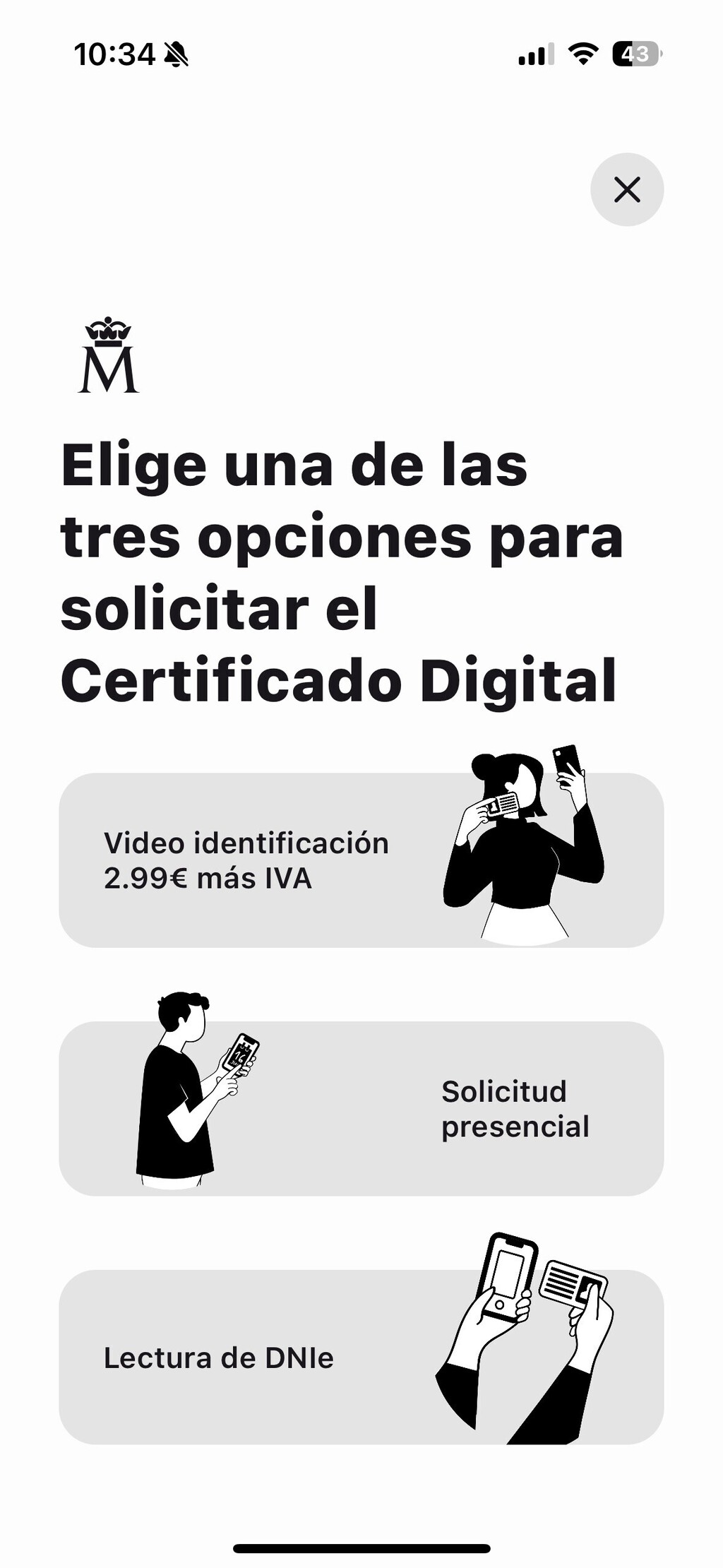
The fastest way to get your certificate is through the official FNMT Digital Certificate app, available for both Android and iPhone. Here's how to do it:
- Download the app from Google Play or the App Store.
- Open the app and log in.
- Tap on the blue “Request Digital Certificate” button at the top of the screen.
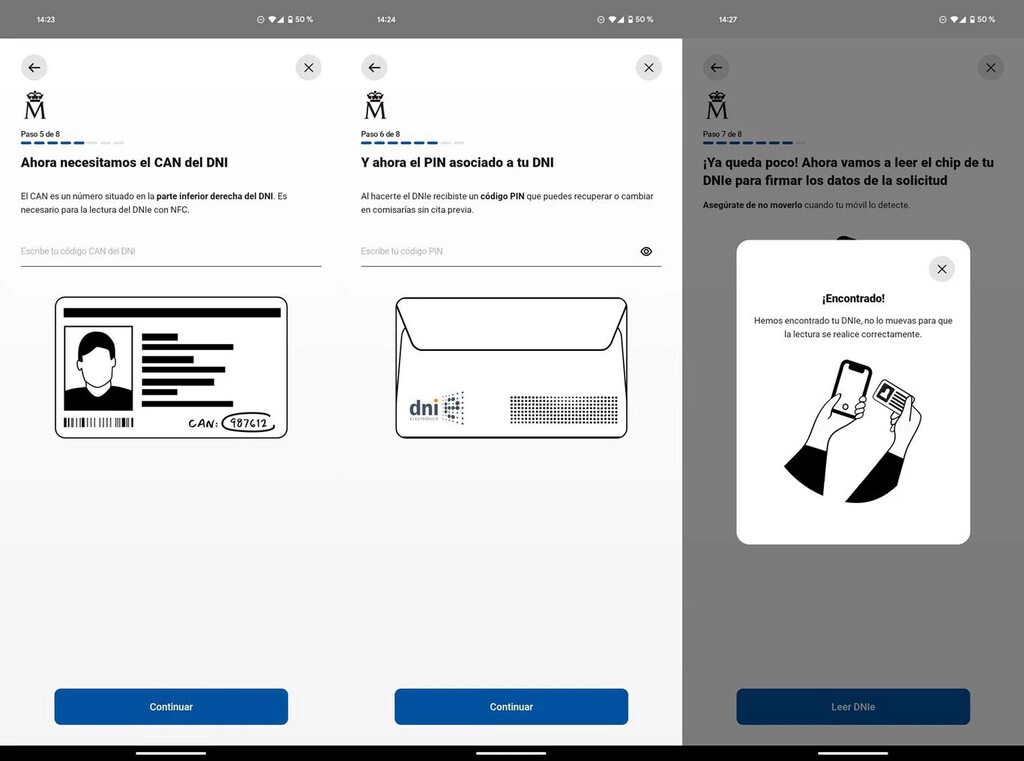
- Choose from three options: reading your DNI (the quickest), using a video identification (costs €2.99), or booking an in-person appointment.
- Follow the prompts to complete the request. The DNI method is free and takes just minutes.
Once your request is processed, you'll receive instructions to download and install your certificate on your device. The whole process can be done from your phone without a computer.
How to Request Your Digital Certificate from Your PC
If you prefer using a computer, you can also request your certificate through the FNMT website. Here's the step-by-step:

- Go to the FNMT website and find the section for requesting a digital certificate.
- Fill in your personal details (name, DNI, email).
- You'll receive a verification code via email or SMS.
- Visit a registration office (often a Tax Agency office or Social Security office) with your DNI and the code to verify your identity.
- After verification, download and install your certificate using the instructions provided.
This method requires an in-person visit, but it's straightforward and ensures your identity is confirmed. The certificate can then be installed on your PC and used for all online tax procedures. The background to this story is set out in Renta 2025 Guide: Key Dates and Steps to Prepare for Filing. A related thread runs through Renta 2025 Tax Data: How to Check Yours Before Filing in 2026. Earlier coverage in Cheap DNI Electronic Reader for Tax Season Without Digital Certificate shows how the argument developed.
Key Takeaways for Getting Your Digital Certificate
- Mobile app is fastest: Use the FNMT app and read your DNI to get your certificate in minutes.
- Video option costs €2.99: If you don't have a DNI reader, this is a quick alternative.
- PC method requires office visit: You'll need to verify your identity in person, but it's free.
- Certificate works for all tax tasks: From checking data to filing your return.
- Install it on multiple devices: You can use the same certificate on your phone and computer.
Comparison of Request Methods
| Method | Cost | Time Required | In-Person Visit |
|---|---|---|---|
| Mobile app with DNI | Free | Minutes | No |
| Mobile app with video | €2.99 | Minutes | No |
| Mobile app with appointment | Free | Days (due to appointment) | Yes |
| PC online request | Free | Days (due to office visit) | Yes |
Using Your Certificate for the 2025 Tax Return
Once you have your digital certificate installed, you can use it to access the Tax Agency's online services. For the 2025 tax return, you'll be able to view your draft (borrador) and modify it if needed. The certificate also lets you check your personal and fiscal data, which is useful for verifying that everything is correct before filing. A closer look at the same subject appears in Spain Tax Return 2025: Key Dates for 2026 Filing Campaign. Anyone following the wider picture can start with Renta 2025 by Phone: Key Dates and How to Book Your Appointment. The same theme surfaces in Spain's Tax Agency Warns Against ChatGPT for Tax Returns, which takes a different angle.
Remember that the tax return for 2025 is filed in 2026, so having your certificate ready now will save you time later. You can also use it for other procedures, like checking your Social Security contributions or signing contracts online. Context on how this played out before sits in Deduct Your Home Insurance on Spain's 2025 Tax Return: Key Rules. A companion piece, Renta 2025: Four Key Changes for Your 2026 Tax Return, approaches the same subject from another angle.
Frequently Asked Questions
How long does it take to get a digital certificate?
With the mobile app and DNI reading, you can get your certificate in minutes. The PC method requires an office visit, so it may take a few days depending on appointment availability.
Can I use my digital certificate on multiple devices?
Yes, you can install the same certificate on multiple devices, such as your phone and computer. Just follow the export/import process provided by the FNMT.
Is the digital certificate free?
The certificate itself is free. However, the video identification option in the mobile app costs €2.99. The DNI reading method and the PC method are free.
What if I lose my digital certificate?
If you lose your certificate, you'll need to request a new one. It's a good idea to back up your certificate file and keep it in a safe place.
Browse the Shop
 Acacia frida deluxe solid wood bed frame |
Bedroom bench |
Bed chest drawers |
Lingerie dresser |
Frame base |
Mirror with jewelry storage |
30 Bathroom Vanity |
Memory foam queen mattress |
Mattresses for back pain |
Nightstand set of 2 |
Grand Goldman Shop |
Civil Lawyer
Deutschland Trikot WM 2026







