

WhatsApp usernames are a new way to identify yourself on the app without handing out your phone number. The feature is gradually rolling out, and you can already reserve your unique username even though it isn't fully usable yet.
This guide explains what WhatsApp usernames are, why they matter for your privacy, and how to reserve yours step by step. We'll also cover what to watch for as the rollout continues.
Find Original Home Decor sparking conversation at Grand Goldman Shop.

What Are WhatsApp Usernames?
A WhatsApp username is a unique identifier that other people can use to find you on the app. Think of it like a handle: no two users can have the same one, so it becomes your personal address on WhatsApp.
The key difference from your phone number is that a username doesn't reveal personal contact details. Your number stays private while people can still reach you.
Why WhatsApp Usernames Matter for Privacy
Until now, the only way someone could contact you on WhatsApp was to have your phone number. That's a fairly personal piece of information, and sharing it can be risky.
With a username, you add a layer of privacy. You can let someone message you without ever giving them your number, which is especially useful for buying and selling online, joining groups, or meeting new people.
The Problem With Sharing Your Number
Your phone number is tied to your identity in many ways. It can be used for account recovery, two-factor authentication, and even to find you on other platforms.
Handing it out freely increases the risk of spam, unwanted contact, and even harassment. A username limits that exposure while keeping you reachable.
How to Reserve Your WhatsApp Username
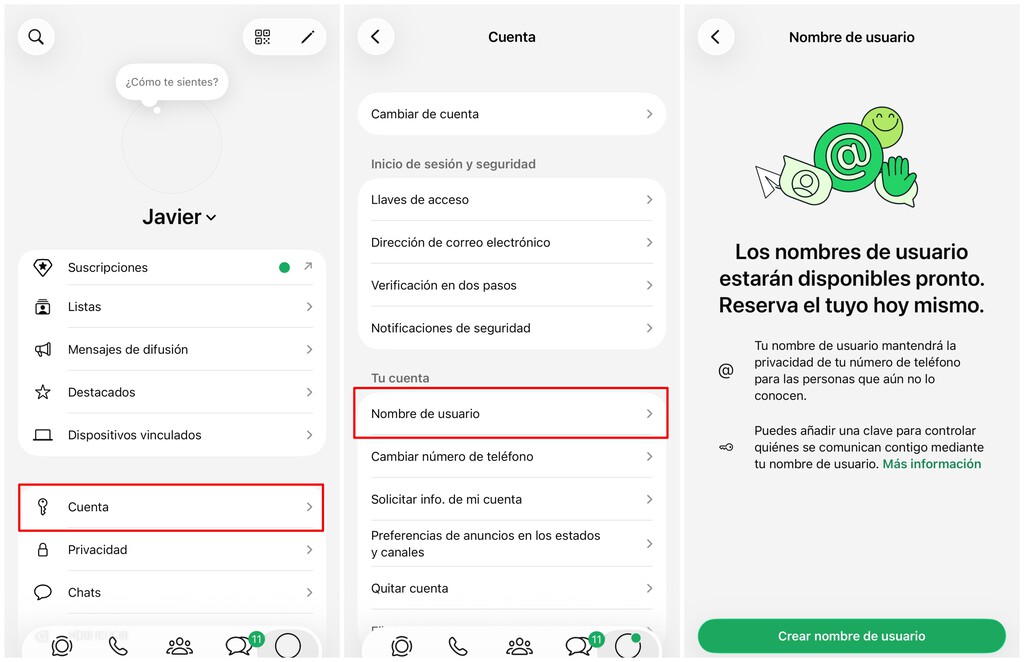
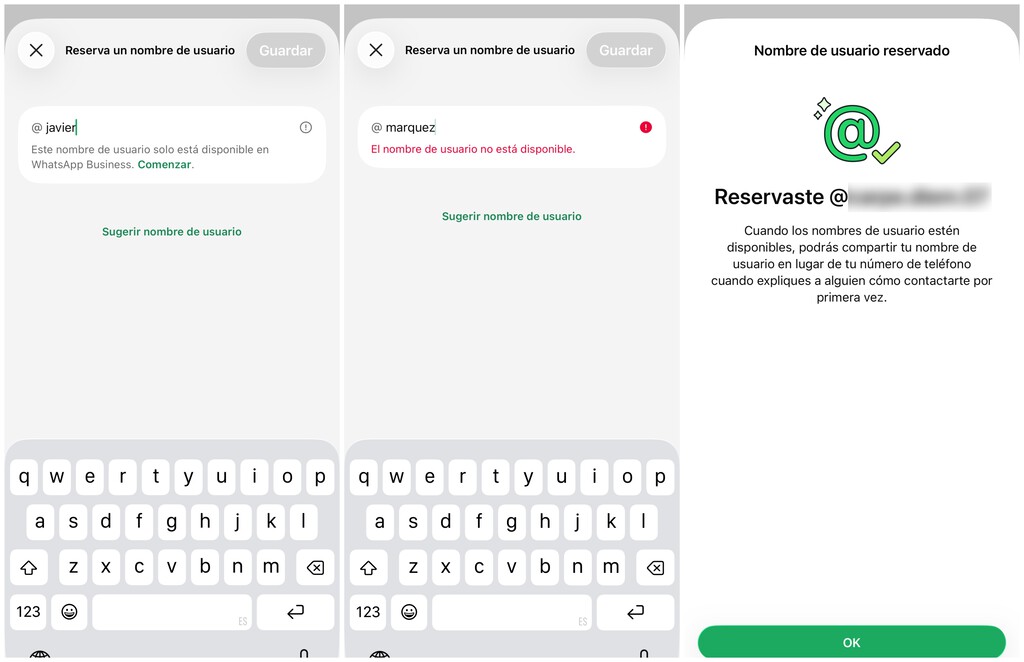
Reserving a username is simple, but availability is rolling out gradually. Not everyone will see the option right away, so don't worry if it's not there yet.
When the feature appears in your app, you'll be able to claim a unique username. It's a good idea to act early if you want a specific handle, since usernames are first-come, first-served.
- Check for the feature: Look for a username option in your WhatsApp settings, likely under your profile.
- Choose carefully: Pick a username that's easy to remember and reflects you, since it will be unique.
- Act early: Popular usernames may be taken quickly once the rollout expands.
- Keep your number private: Once active, you can share your username instead of your phone number.
What to Expect as the Rollout Continues
WhatsApp is deploying username reservation gradually, so the option will reach users in stages. Even if you can reserve a username now, the ability to actually use it for messaging isn't live yet.
This staged approach gives WhatsApp time to test the system and avoid issues like username conflicts or abuse. Expect more details on how usernames will work in chats as the feature matures.
Usernames vs. Phone Numbers: Key Differences
Understanding how usernames compare to phone numbers helps you see why this change matters. The table below summarizes the main differences.
| Feature | Phone Number | Username |
|---|---|---|
| Uniqueness | Unique per person | Unique per person |
| Privacy | Reveals personal contact info | Does not reveal phone number |
| Ease of sharing | Shared widely, hard to change | Share only when needed |
| Availability | Already in use | Rolling out gradually |
Who Is Affected by This Change?
Everyone who uses WhatsApp will eventually be affected, from casual chatters to businesses and community groups. The biggest impact will be for people who frequently share their number with strangers.
Businesses that use WhatsApp for customer support may also benefit, since they can offer a username instead of a public phone line. That could reduce spam and streamline contact. The background to this story is set out in WhatsApp Blue Ticks: Reclaim Your Peace and Privacy Now. A related thread runs through DIY Boiler Cover. Earlier coverage in Trending: latest articles shows how the argument developed.
What to Watch Next
Keep an eye on WhatsApp's official announcements for when usernames become fully functional. The reservation step is just the beginning. A closer look at the same subject appears in How to Tell If Someone Blocked You on WhatsApp: Key Signs. Anyone following the wider picture can start with Best Cloud Storage for Privacy, Capacity, and Value Compared. The same theme surfaces in WhatsApp Green Dot Status: What It Is and How to Hide, which takes a different angle.
Also watch for how usernames interact with existing features like groups, calls, and business accounts. Those details will determine how useful the feature really is. Context on how this played out before sits in Why Sharing ChatGPT or Claude Passwords Is a Privacy Risk.
FAQ
Can I use my WhatsApp username right now?
No, usernames are not yet usable for messaging. You can reserve one, but the actual functionality is still rolling out gradually.
Will my phone number still be visible if I use a username?
No, the point of a username is to let people contact you without seeing your phone number. Your number stays private.
How do I reserve a WhatsApp username?
Look for the username option in your WhatsApp settings. If it's available, you can claim a unique username. Availability is rolling out in stages.
Can two people have the same WhatsApp username?
No, usernames are unique. Once someone claims a username, no one else can use it.
Browse the Shop
 Acacia frida deluxe solid wood bed frame |
Bedroom bench |
Bed chest drawers |
Lingerie dresser |
Frame base |
Mirror with jewelry storage |
30 Bathroom Vanity |
Memory foam queen mattress |
Mattresses for back pain |
Nightstand set of 2 |
Grand Goldman Shop |
Civil Lawyer
Deutschland Trikot WM 2026







