

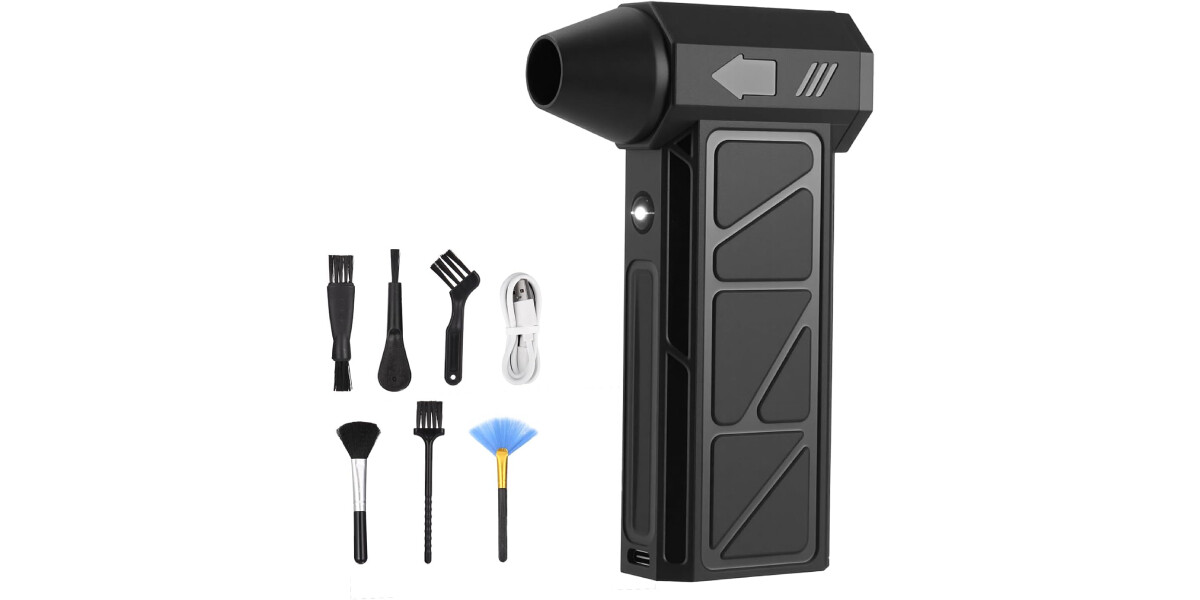
An electric air blower for PC cleaning has just landed on Amazon at a budget-friendly 18.04 euros, offering a reusable alternative to disposable compressed air cans. This turbo blower promises to make dust removal from keyboards and computer towers effortless, addressing a common frustration for anyone who works or games on a desktop setup.
Keeping your workspace free of dust is more than a cosmetic concern. Crumbs lodged between keys, grime building up inside keyboards, and layers of dust blocking PC vents can affect hygiene, performance, and even component cooling. Traditional solutions like canned air are effective but generate waste and run out quickly. This electric blower aims to change that.
Find Original, High-end Home Decor that spark conversation at Grand Goldman Shop.
Why Dust Buildup Is a Real Problem for Your PC
Dust is the silent enemy of any computer. It accumulates inside the case, coating fans, heatsinks, and circuit boards. Over time, this buildup restricts airflow, causing components to run hotter and potentially throttle performance. In extreme cases, overheating can lead to hardware damage or reduced lifespan.
Keyboards are equally vulnerable. Crumbs, hair, and dust particles settle between keys, creating a breeding ground for bacteria and interfering with key responsiveness. Regular cleaning is essential, but many people put it off because traditional methods are messy or inconvenient.
What Makes This Electric Air Blower Stand Out
Unlike disposable air sprays, this electric blower uses a high-speed motor to generate a continuous, precise airflow. It's designed to expel dirt from hard-to-reach crevices without risking damage to sensitive electronics. The device offers multiple power levels, so you can adjust the force based on the surface—from a delicate mechanical keyboard to the motherboard inside your PC.
The blower is rechargeable via USB-C, eliminating the need for constant battery replacements. Its ergonomic design makes it comfortable to hold during extended cleaning sessions. Additionally, it comes with a kit of nozzles and brush heads tailored for different tasks: fine nozzles for concentrated air in narrow gaps, and brushes for loosening stubborn dust.
Key Features at a Glance
- Rechargeable battery with USB-C charging for convenience and portability.
- Variable power settings to match airflow intensity to delicate or robust surfaces.
- Multiple nozzles and brush attachments for versatile cleaning across keyboards, vents, and electronics.
- Eco-friendly alternative to disposable compressed air cans, reducing waste and long-term costs.
- Ergonomic design for comfortable handheld use during extended cleaning.
How It Compares to Traditional Compressed Air
Disposable air cans have long been the go-to for quick dust removal, but they come with drawbacks. They can emit propellants, get cold during use, and lose pressure as they empty. Moreover, the cans themselves contribute to plastic and metal waste. An electric blower, by contrast, provides consistent airflow and can be reused indefinitely, making it a more sustainable and cost-effective choice over time.
| Feature | Electric Air Blower | Disposable Air Spray |
|---|---|---|
| Cost | ~18 euros (one-time) | ~5-10 euros per can (recurring) |
| Reusability | Yes, rechargeable | No, single-use |
| Power adjustment | Multiple levels | Fixed (decreases as can empties) |
| Attachments | Nozzles and brushes included | Usually none |
| Environmental impact | Low waste | High waste (cans) |
Who Should Consider This Electric Air Blower?
This device is ideal for anyone who regularly cleans keyboards, desktop PCs, or other electronics. Gamers, office workers, and DIY enthusiasts will appreciate the convenience and power. It's also a smart choice for those looking to reduce disposable waste and save money in the long run.
If you've been struggling with dusty vents or sticky keys, this blower offers a practical solution. Its compact size and cordless operation mean you can use it anywhere, from your home office to a workshop. Anyone following the wider picture can start with How to Edit Photos for Free in Google Gemini Using Nano Banana.
Tips for Effective PC and Keyboard Cleaning
To get the most out of your electric blower, start with the lowest power setting and work your way up. Use the brush attachment to loosen dust before blasting it away. For keyboards, remove keycaps if possible to reach deeper debris. Always power off and unplug your PC before cleaning internal components. The background to this story is set out in Trending: latest articles. A related thread runs through New UK Rules: Prison Privileges Lost for Skipping Sentencing.
Regular maintenance—once a month for keyboards and every few months for PC interiors—can prevent dust buildup and extend the life of your devices. With this affordable tool, there's no excuse to let dust take over. Earlier coverage in The History Boys Returns to West End After Two Decades shows how the argument developed. A closer look at the same subject appears in Chancellor Backs Entrepreneurs as Budget Priority Amid Business.
FAQ
Is an electric air blower safe for cleaning computer components?
Yes, when used properly. The blower generates air without moisture or propellants, so it won't damage sensitive electronics. However, always hold fans in place to prevent them from spinning excessively, and avoid directing air too close to delicate parts.
How long does the battery last on a single charge?
The battery life depends on the power setting and usage duration. Typically, you can expect enough charge for several cleaning sessions. Recharging via USB-C is quick and convenient.
Can this blower replace canned air entirely?
For most household and office cleaning tasks, yes. It provides consistent airflow and comes with attachments for various surfaces. However, for extremely tight spaces or professional cleanrooms, canned air might still have niche uses.
What's included in the kit?
The package includes the electric blower, multiple nozzles, brush heads, and a USB-C charging cable. Everything you need for effective cleaning is in the box.
Browse the Shop
 Acacia frida deluxe solid wood bed frame |
Bedroom bench |
Bed chest drawers |
Lingerie dresser |
Frame base |
Mirror with jewelry storage |
30 Bathroom Vanity |
Memory foam queen mattress |
Mattresses for back pain |
Nightstand set of 2 |
Grand Goldman Shop |
Civil Lawyer
Deutschland Trikot WM 2026
Acacia frida deluxe solid wood bed frame |
Bedroom bench |
Bed chest drawers |
Lingerie dresser |
Frame base |
Mirror with jewelry storage |
30 Bathroom Vanity |
Memory foam queen mattress |
Mattresses for back pain |
Nightstand set of 2 |
Grand Goldman Shop |
Civil Lawyer
Deutschland Trikot WM 2026










