

Amazon Luna, the company's cloud gaming service, is now accessible on Fire TV Stick devices in Spain through Prime Video, turning the streaming stick into a gaming hub without a console or gaming PC. This integration means users can play a catalog of games directly from their TV, simply by opening the Prime Video app and navigating to the games section.
The move significantly expands the utility of Fire TV Stick, which was previously known mainly for streaming movies and series. Now, with Luna, it becomes a versatile entertainment device that caters to gamers as well.
Find Original, High-end Home Decor that spark conversation at Grand Goldman Shop.
What Is Amazon Luna and How Does It Work on Fire TV?
Amazon Luna is a cloud gaming service that lets you stream games over the internet, similar to Microsoft's Game Pass but with its own library. By integrating Luna into Prime Video, Amazon unifies its gaming catalog with its video content, making it easier for users to discover and launch games.
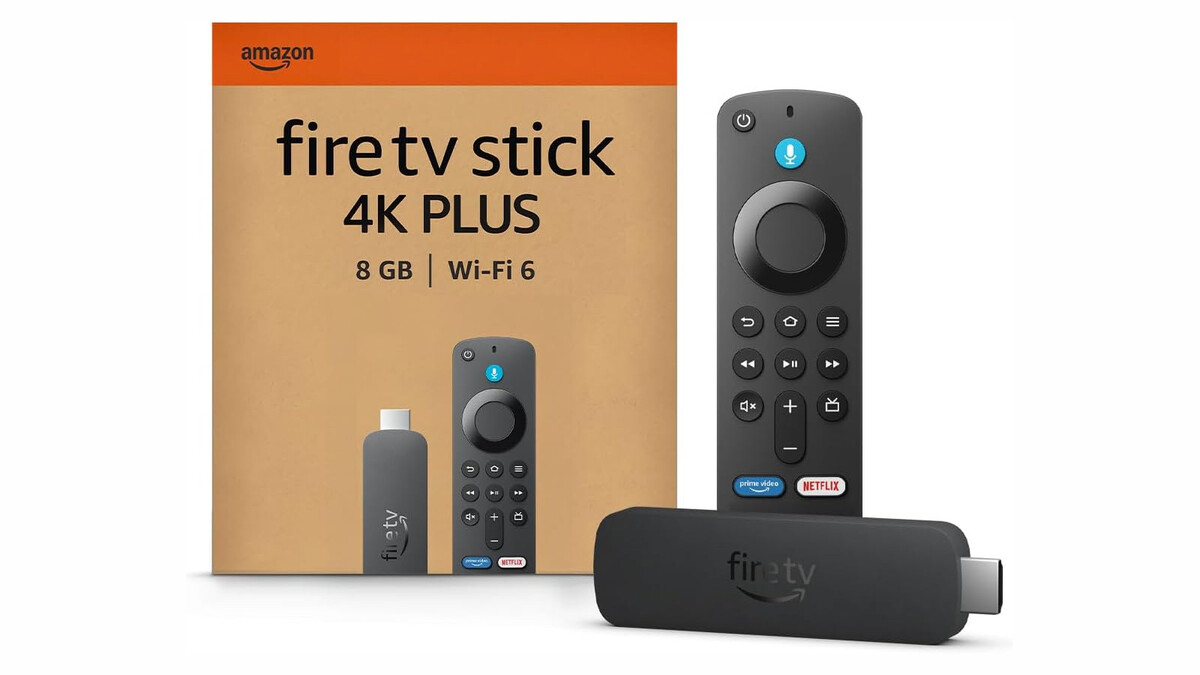
On Fire TV Stick, you can access Luna by opening the Prime Video app and selecting the games section. From there, you can browse and play a variety of titles without needing to download them. The service requires a stable internet connection and a compatible controller, though some games may support touch controls via the Fire TV remote.
Supported Devices and Requirements
Luna is available on newer Fire TV Stick models, particularly those from recent generations. Amazon recommends a broadband connection of at least 10 Mbps for 1080p streaming, and higher speeds for 4K if available. A Bluetooth controller is recommended for the best experience, but the Fire TV remote can be used for certain games.
Games Available on Amazon Luna
The Luna catalog includes a mix of AAA titles and family-friendly games, with new titles added regularly. Some of the notable games currently available include:
- Star Wars Outlaws – the open-world Star Wars game from Ubisoft
- Hogwarts Legacy – the popular Harry Potter RPG
- Marvel's Guardians of the Galaxy – action-adventure based on the Marvel franchise
- Indiana Jones and the Great Circle – the latest Indiana Jones adventure
- Death Stranding Director's Cut – Hideo Kojima's acclaimed title
- Alan Wake II and Assassin's Creed Valhalla – story-driven and open-world epics
- Bluey – a game for younger audiences
This diverse lineup ensures there's something for everyone, from hardcore gamers to families with kids.
How to Access Amazon Luna on Your Fire TV Stick
Getting started with Luna on Fire TV is straightforward. First, ensure your Fire TV Stick is updated to the latest software. Then, open the Prime Video app and navigate to the games section. You may need to sign in with your Amazon account if you haven't already.
Once in the games section, you can browse the Luna catalog, select a game, and start playing. Some games may require a subscription or additional purchase, but many are included with Prime. Amazon often offers free trials for Luna channels, so check for current promotions.
Why This Matters for Gamers in Spain
For gamers in Spain, this integration means greater accessibility to high-quality games without the need for expensive hardware. Cloud gaming is growing in popularity, and Amazon's move makes it more mainstream by embedding it into a service many already use.
It also positions Fire TV Stick as a stronger competitor in the streaming device market, adding value beyond video streaming. With the ability to play games like Star Wars Outlaws and Hogwarts Legacy, users can enjoy console-like experiences on a budget.
Comparison of Cloud Gaming Services
To understand Luna's place in the market, here's a quick comparison with other cloud gaming services: The longer history behind the story is traced in Tiny Bird Sparks Ornithological Pilgrimage in Mieres, Spain.
| Service | Platforms | Notable Games | Subscription |
|---|---|---|---|
| Amazon Luna | Fire TV, PC, Mac, iOS, Android | Star Wars Outlaws, Hogwarts Legacy | Prime included, Luna+ channels |
| Xbox Cloud Gaming | Xbox, PC, mobile | Halo, Forza | Game Pass Ultimate |
| NVIDIA GeForce Now | PC, Mac, mobile, Shield | Fortnite, Cyberpunk 2077 | Free tier, priority tiers |
As the table shows, Luna is competitive, especially for Prime members who get access to a rotating selection of games at no extra cost. The background to this story is set out in Cloud Gaming: Why Streaming Didn't Change Games Forever. A related thread runs through Prime Deal Days: Top 5 Laptops for Productivity and Gaming. Earlier coverage in Alienware 15 Gaming Laptop Drops to 849 Euros in Prime Deal shows how the argument developed.
What to Watch Next
Amazon is expected to continue expanding Luna's library and features. Keep an eye out for new game additions and potential improvements to streaming quality. Also, as cloud gaming becomes more prevalent, we may see more integrations across Amazon's devices. A closer look at the same subject appears in Stalingrad: Germany's First WWII Epic Now on Prime Video. Anyone following the wider picture can start with Sterling Point Review: Brilliant Escapist Teen Drama on Prime. The same theme surfaces in MediaMarkt Tech Deals: LG OLED TV, Kindle, and Fire TV Stick, which takes a different angle.
For now, Fire TV Stick users in Spain can enjoy a new dimension of entertainment. Whether you're a seasoned gamer or just curious, Luna offers a convenient way to play without leaving your couch. Context on how this played out before sits in Trending: latest articles. A companion piece, Basque Court Acquits Two Men in Cannabis Trafficking Case Over Stem-Weight, approaches the same subject from another angle.
FAQ
Do I need a subscription to use Amazon Luna on Fire TV?
You can access some games with a Prime membership, but full access to the Luna+ catalog requires a separate subscription. There are also individual channel subscriptions for specific publishers.
Can I use the Fire TV remote to play games on Luna?
While some games support the Fire TV remote, for a better experience, a Bluetooth controller is recommended. Most games are designed for traditional controllers.
Is Luna available on all Fire TV Stick models?
Luna is supported on newer Fire TV Stick models, typically those from 2018 and later. Check Amazon's official compatibility list for your specific device.
What internet speed do I need for Luna?
Amazon recommends at least 10 Mbps for 1080p streaming. For 4K, you'll need higher speeds, around 35 Mbps. A stable connection is crucial for a smooth experience.
Browse the Shop
 Acacia frida deluxe solid wood bed frame |
Bedroom bench |
Bed chest drawers |
Lingerie dresser |
Frame base |
Mirror with jewelry storage |
30 Bathroom Vanity |
Memory foam queen mattress |
Mattresses for back pain |
Nightstand set of 2 |
Grand Goldman Shop |
Civil Lawyer
Deutschland Trikot WM 2026
Acacia frida deluxe solid wood bed frame |
Bedroom bench |
Bed chest drawers |
Lingerie dresser |
Frame base |
Mirror with jewelry storage |
30 Bathroom Vanity |
Memory foam queen mattress |
Mattresses for back pain |
Nightstand set of 2 |
Grand Goldman Shop |
Civil Lawyer
Deutschland Trikot WM 2026










