

Creating a resume from your LinkedIn profile using AI and saving it directly to Google Drive is possible with a clever workaround. LinkedIn blocks bots, so AI tools can't read your profile directly. But with a simple trick, you can generate a polished resume and save it to Drive in one click. Here's how.
Why LinkedIn Blocks AI and How to Bypass It
LinkedIn intentionally blocks automated access to protect user data. This means that if you try to give an AI like ChatGPT, Gemini, or Claude a link to your LinkedIn profile, it won't be able to read the content. The AI will either return an error or generate a generic response without your details.
Find Original Home Decor sparking conversation at Grand Goldman Shop.

To bypass this, you need to manually provide your LinkedIn data to the AI. The easiest way is to save your profile as a PDF. This PDF can then be uploaded to the AI, which can extract the information and use it to create your resume.
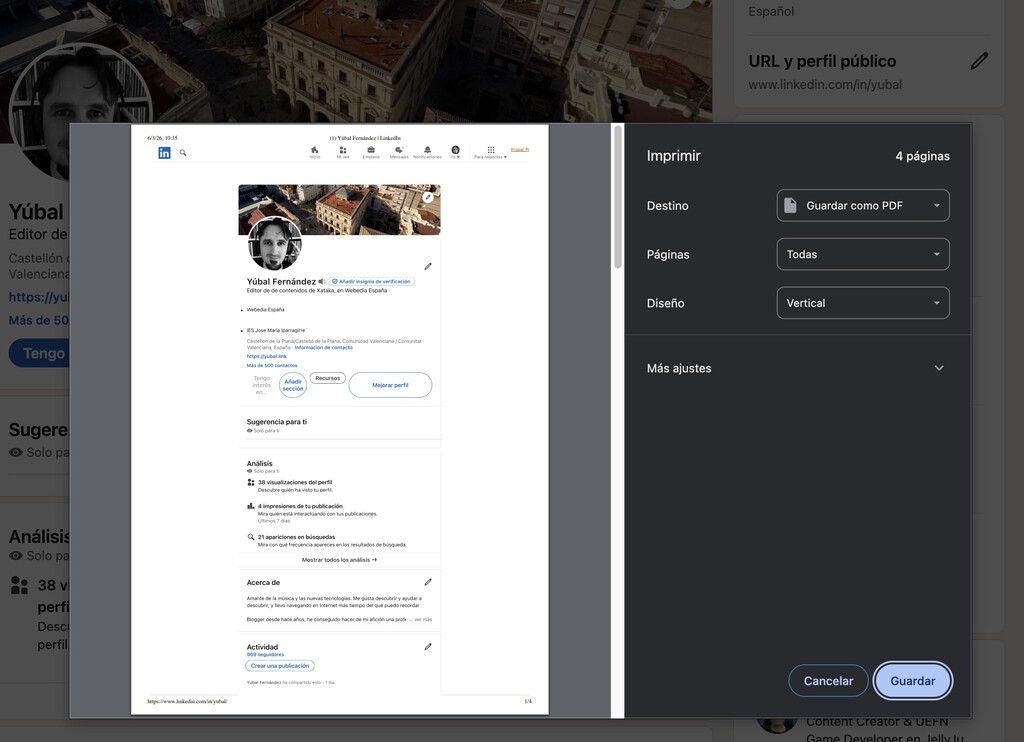
Step-by-Step: Save Your LinkedIn Profile as PDF
First, open your LinkedIn profile in a web browser. Use the print function: press Ctrl + P (Windows) or Cmd + P (Mac). In the print dialog, select Save as PDF as the destination. This will download your profile as a PDF file.
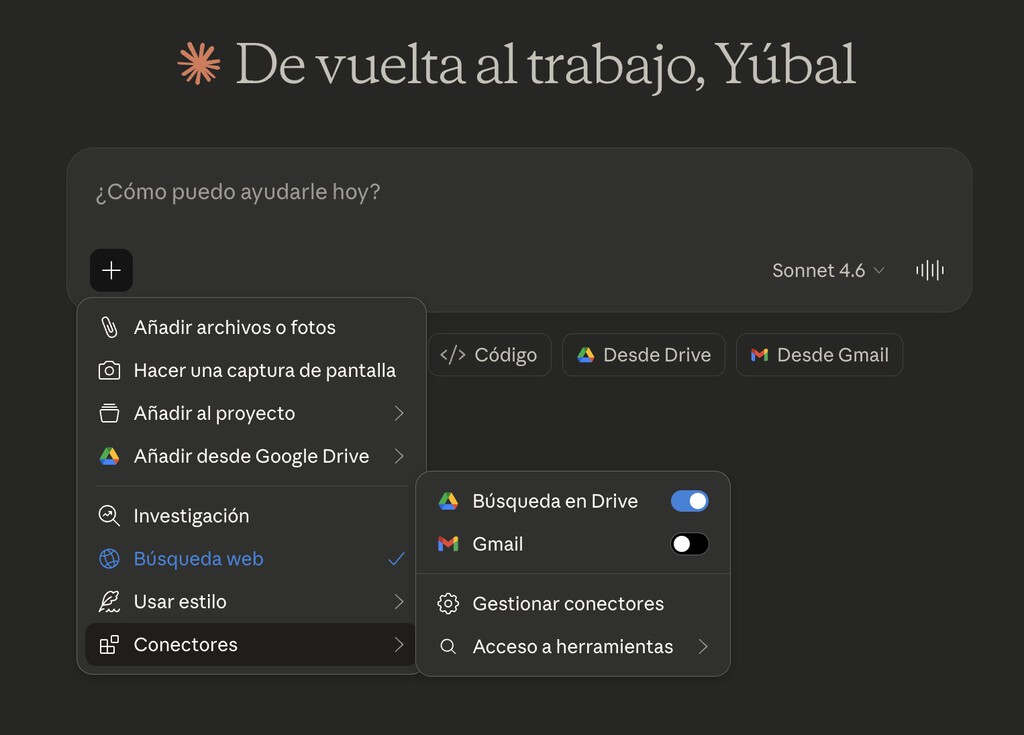
Make sure to include not just your main profile, but also any sections like experience, education, and skills. You can do this by scrolling through your profile before printing, or by using the LinkedIn "Save to PDF" feature if available. The goal is to capture all relevant information.

Choosing the Right AI: Why Claude Stands Out
Not all AI tools are created equal. While ChatGPT and Gemini can generate text, they lack the ability to directly create and save a file to Google Drive. Claude, on the other hand, has integrated features that allow it to generate a document and save it directly to your Drive with a single click.
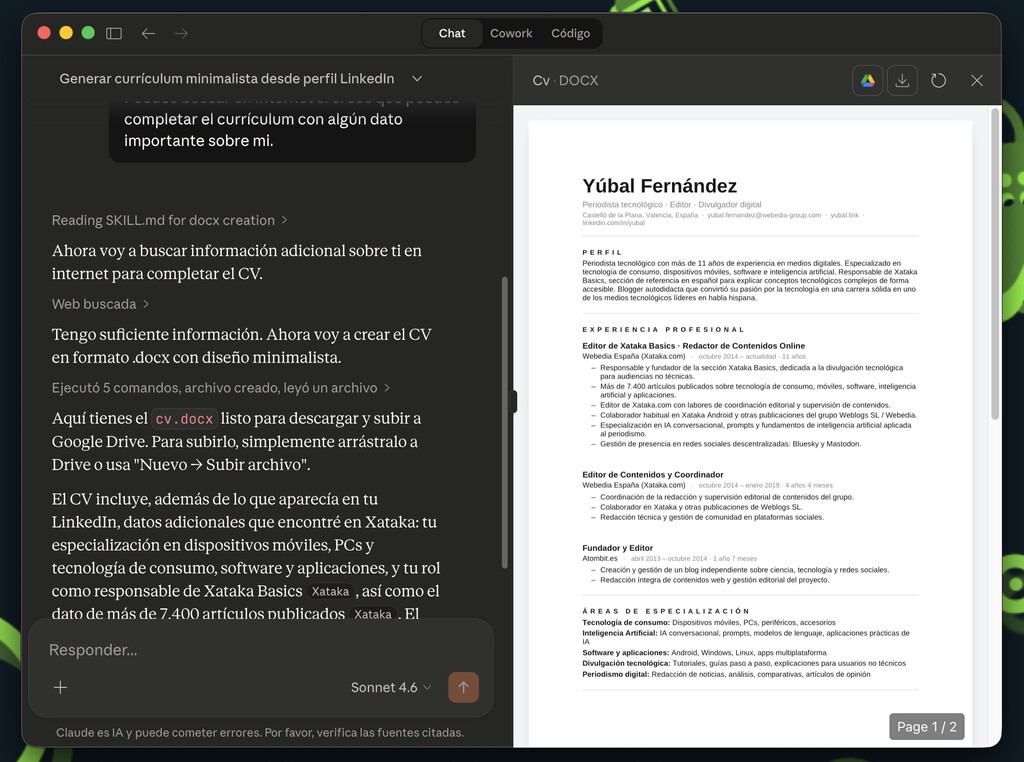
Claude's ability to handle file creation and integration with Google Drive makes it the ideal choice for this task. It can take the PDF content, format it into a professional resume, and save it as a Google Doc or PDF in your Drive.
Using Claude to Generate Your Resume
Once you have your LinkedIn profile as a PDF, upload it to Claude. Then, give Claude a prompt like: "Create a professional resume based on the information in this PDF. Format it with clear sections for contact info, summary, experience, education, and skills. Save the resume as a Google Doc in my Drive."
Claude will process the PDF, extract the relevant details, and generate a well-structured resume. It will then save the file directly to your Google Drive. You can then access it, make any edits, and download it as a PDF if needed. The background to this story is set out in Create and Improve Your Resume with AI: A Step-by-Step Guide. A related thread runs through AI Content Creation Is Creating New Gatekeepers on the Internet. Earlier coverage in Creating a Coming-of-Age Ritual for Your Daughter: A Guide shows how the argument developed.
Key Benefits of This Approach
- Time-saving: Automates the resume creation process from your existing LinkedIn data.
- Professional formatting: AI ensures a clean, modern layout.
- Direct saving: No need to copy-paste; the file goes straight to Drive.
- Customizable: You can tweak the resume after generation.
- Cost-effective: Uses free or low-cost AI tools.
Comparison of AI Tools for Resume Creation
| Feature | Claude | ChatGPT | Gemini |
|---|---|---|---|
| Reads PDF input | Yes | Yes | Yes |
| Generates formatted resume | Yes | Yes | Yes |
| Saves directly to Google Drive | Yes | No | No |
| One-click export | Yes | No | No |
Tips for a Standout Resume
While AI can generate a resume, you should still review and personalize it. Highlight achievements with quantifiable results, tailor the summary to the job you're applying for, and ensure there are no errors. Use keywords from the job description to pass applicant tracking systems (ATS). A closer look at the same subject appears in Anthropic's Claude AI Accessed Georgia Voter Data in US. Anyone following the wider picture can start with EU Return Hubs Risk Creating a Human Rights Black Hole. The same theme surfaces in Europe’s Return Hubs Risk Creating a Human Rights Black Hole, which takes a different angle.
Also, consider the length: keep it to one page if you have less than 10 years of experience, and two pages max otherwise. Use a clean, professional font and consistent formatting. Context on how this played out before sits in Ben Stokes Test Return Possible Says Rob Key for Ashes. A companion piece, Claude Code: AI Programming Tool for Your Terminal Explained, approaches the same subject from another angle.
FAQ
Can I use ChatGPT to create a resume from LinkedIn?
Yes, ChatGPT can generate a resume from your LinkedIn data, but it cannot save it directly to Google Drive. You'll need to copy the text and save it manually.
Is it safe to upload my LinkedIn PDF to Claude?
Claude's privacy policy ensures your data is not used for training without consent. However, avoid uploading sensitive information like your address or phone number if not necessary.
How do I save the resume to Google Drive with Claude?
After generating the resume, Claude will provide a button to save directly to Google Drive. You may need to connect your Google account first.
What if my LinkedIn profile is too long for a PDF?
You can save specific sections as separate PDFs or use the print settings to select only relevant pages. Alternatively, copy and paste the text into a document and upload that.
Browse the Shop
 Acacia frida deluxe solid wood bed frame |
Bedroom bench |
Bed chest drawers |
Lingerie dresser |
Frame base |
Mirror with jewelry storage |
30 Bathroom Vanity |
Memory foam queen mattress |
Mattresses for back pain |
Nightstand set of 2 |
Grand Goldman Shop |
Civil Lawyer
Deutschland Trikot WM 2026







