

Linking Apple Music or Spotify to TikTok is a straightforward process that lets you save the music you discover in videos directly to your preferred streaming service. Once connected, the chosen service becomes TikTok's default for music actions, streamlining how you capture and enjoy new tracks.
The integration works seamlessly: while browsing TikTok, if a video features a song, an indicator shows the track name. Tapping it opens the song in your linked music app, where you can listen, save, or add it to playlists. This eliminates the need to manually search for songs later.
Find Original Home Decor sparking conversation at Grand Goldman Shop.

Why Link Your Music Streaming Service to TikTok?
Connecting your streaming account enhances your TikTok experience by making music discovery effortless. Instead of Shazam-ing or searching for songs, you can instantly access them in your library. This is especially useful for viral sounds and trending tracks that often dominate the platform.
Moreover, linking saves time and reduces friction. You can build playlists based on TikTok trends, explore artists you find in videos, and keep your music collection up to date with the latest hits. It's a bridge between social discovery and personal enjoyment.
Step-by-Step Guide to Linking Apple Music or Spotify
Follow these steps to connect your music service to TikTok. The process is similar for both Apple Music and Spotify, with minor differences in the authorization screens.

1. Access TikTok Settings
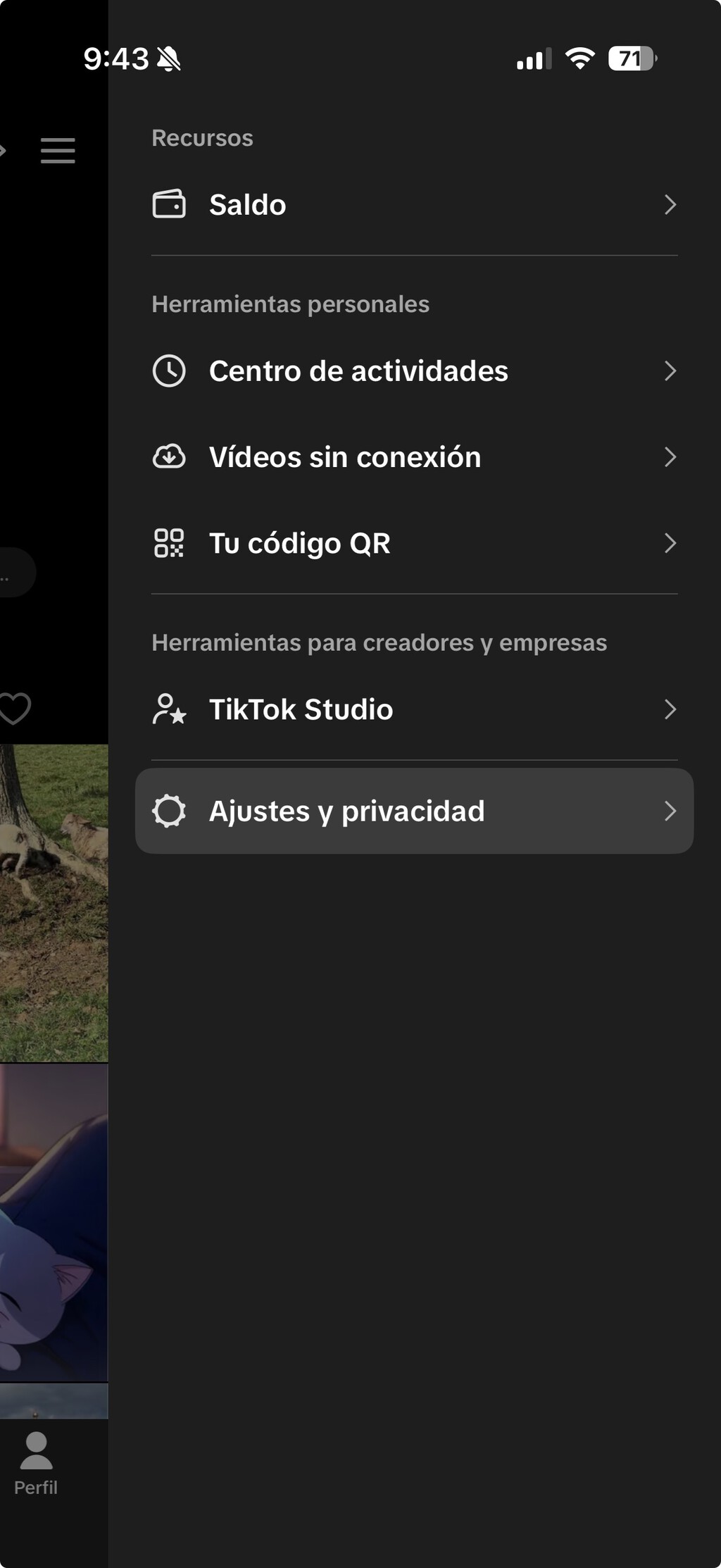
Open the TikTok app and tap the profile icon in the bottom right corner. Then, tap the three-line menu icon in the top right to open the side panel. Select Settings and privacy to enter the configuration menu.
2. Navigate to Music Settings
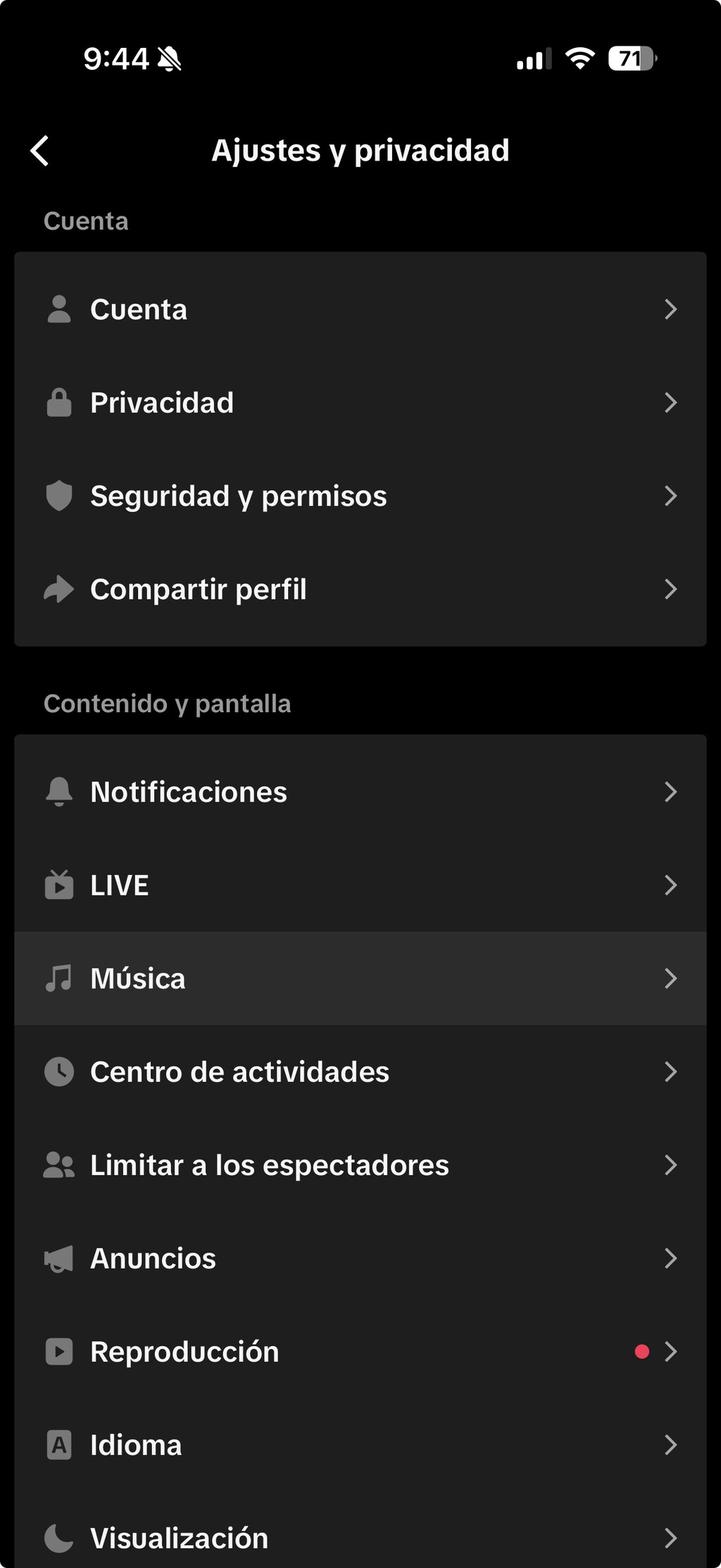
Within Settings and privacy, scroll down and tap Content and display. Then, select Music. This section controls how TikTok interacts with music services.
3. Link Your Music App
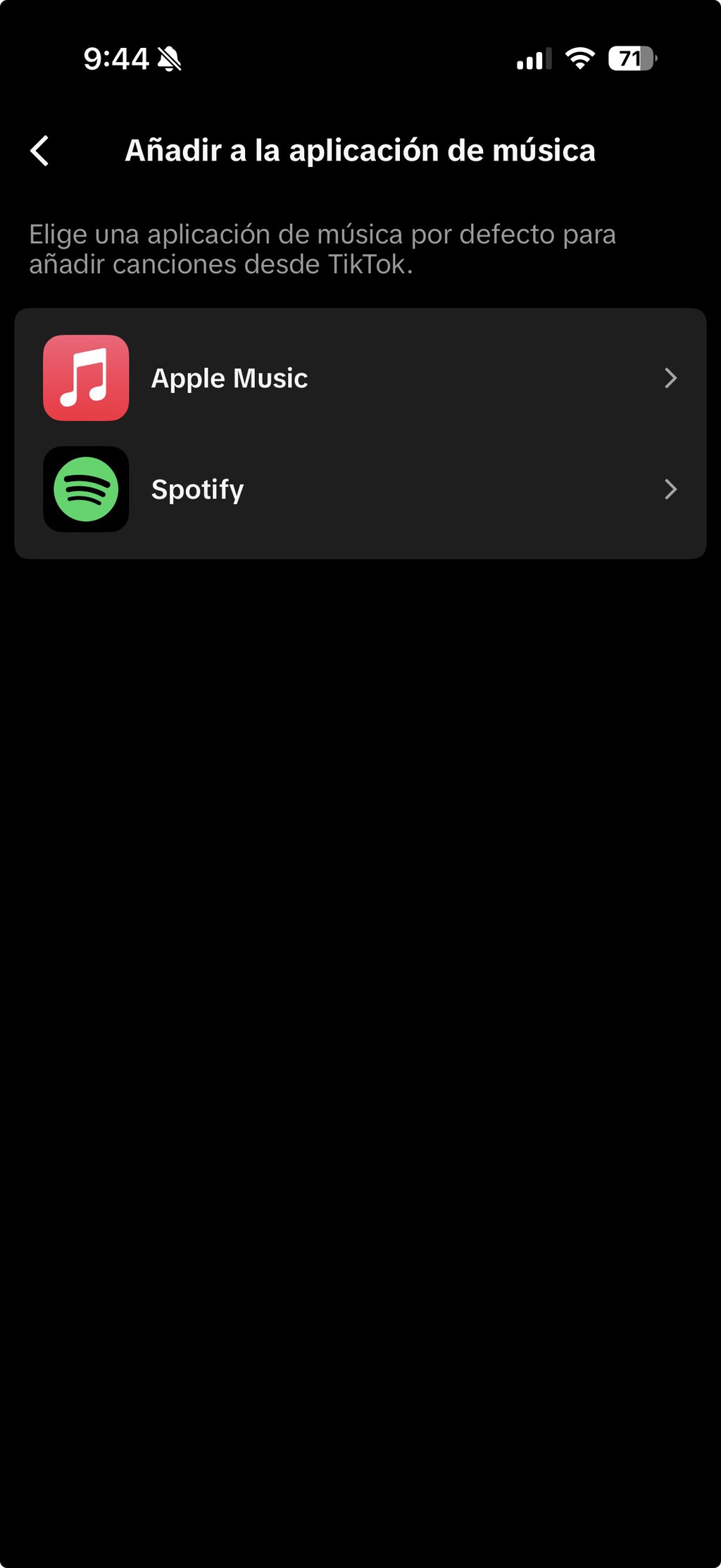
Under the Music menu, find the option Add to music app and tap Link. You'll see a list of available music services. Choose either Apple Music or Spotify, depending on your preference.
4. Authorize the Connection
You'll be redirected to the chosen service's app or website. Log in if prompted, and grant TikTok permission to access your account. The permissions typically include viewing your account data and adding songs to your library. Once you accept, the services are linked.
What Happens After Linking?
After linking, TikTok will use your selected service as the default for music actions. When you tap on a song in a video, it will open directly in Apple Music or Spotify. You can then easily add the song to your library or playlists.
Note that TikTok may access some data from your music account, such as your library and listening history, to personalize recommendations. However, it does not post anything without your consent.
Benefits of Linking Music Services
- Instant access: Save songs from TikTok videos with a single tap.
- Playlist building: Quickly add trending tracks to your music library.
- Personalized discovery: Get better music recommendations based on your listening habits.
- Time-saving: No more manual searching for songs you hear on TikTok.
- Seamless integration: Enjoy a unified experience between social media and music streaming.
Comparison: Apple Music vs. Spotify for TikTok Integration
Both services offer similar integration with TikTok, but there are subtle differences in features and user experience. The table below highlights key aspects to help you choose.
| Feature | Apple Music | Spotify |
|---|---|---|
| Link process | Via Settings > Music > Add to music app | Via Settings > Music > Add to music app |
| Authorization | Requires Apple ID login | Requires Spotify account login |
| Data shared with TikTok | Account info, library access | Account info, library access |
| Song saving | Adds to Apple Music library | Adds to Spotify library |
| Platform availability | iOS, Android (via Apple Music app) | iOS, Android, web |
Both options are robust, but your choice may depend on which service you already use. Apple Music integrates deeply with Apple's ecosystem, while Spotify offers extensive cross-platform support and social features. The background to this story is set out in TikTok Music Discovery Meets Apple Music Play Full Song. A related thread runs through Spotify Outage: Streaming Giant Down, Then Back Online.
Tips for Managing Linked Accounts
Once linked, you can unlink or change the default service at any time through the same settings menu. It's a good practice to review permissions periodically to ensure you're comfortable with the data shared. Earlier coverage in Spotify Outage: Streaming Service Down for Hours, Now Restored shows how the argument developed. A closer look at the same subject appears in Cantacronache's Secret Mission to Save Spanish Resistance Songs.
Also, keep your music app updated to avoid compatibility issues. If you encounter problems, try unlinking and relinking the accounts. Anyone following the wider picture can start with Spotify 'Tus Años en Modo Fiesta': How to Access Your Wrapped Stats. The same theme surfaces in AI Music Floods Spotify: Real Artists Pay the Price, which takes a different angle.
FAQ
Can I link both Apple Music and Spotify to TikTok at the same time?
No, TikTok allows only one default music service at a time. You can switch between them by repeating the linking process and selecting the other service.
What data does TikTok access when I link my music account?
TikTok may access your account information, music library, and listening history to personalize recommendations and enable song saving. It does not post on your behalf without permission.
How do I unlink my music service from TikTok?
Go to Settings and privacy > Content and display > Music > Add to music app, and tap on the linked service to manage or unlink it. Follow the prompts to disconnect.
Why can't I see the option to link a music service?
Ensure your TikTok app is updated to the latest version. The feature may not be available in all regions or on all devices. Check TikTok's support pages for availability.
Linking your music service is just one way to enhance your TikTok experience. For those interested in the financial aspects of social media and digital content, understanding how to manage subscriptions and earnings is crucial. Many creators and users alike seek ways to optimize their digital presence, and resources like cotizar sin trabajar: cómo funciona el convenio especial con la Seguridad can provide valuable insights into social security contributions when not working, which is relevant for freelancers and creators.
As you explore the intersection of social media and music, consider how digital tools can streamline your life. Whether you're a content creator or a casual user, staying informed about integrations and data privacy is key. The link between social platforms and financial planning might seem distant, but for those navigating self-employment, understanding options like the convenio especial with Social Security can be beneficial.
Finally, always review permissions and privacy settings to ensure your data is handled securely. By following this guide, you can enjoy a seamless music discovery experience on TikTok and keep your library fresh with the latest hits.
Browse the Shop
 Acacia frida deluxe solid wood bed frame |
Bedroom bench |
Bed chest drawers |
Lingerie dresser |
Frame base |
Mirror with jewelry storage |
30 Bathroom Vanity |
Memory foam queen mattress |
Mattresses for back pain |
Nightstand set of 2 |
Grand Goldman Shop |
Civil Lawyer
Deutschland Trikot WM 2026







