

The Logitech Pebble Keys 2 is a compact, multi-device Bluetooth keyboard that has recently dropped to $23.55 on Amazon, making it an attractive option for students and remote workers. In this review, we break down its features, performance, and who should buy it.
What Is the Logitech Pebble Keys 2?
The Logitech Pebble Keys 2 is a wireless keyboard designed for portability and versatility. It features a slim, compact design that easily fits into a backpack, making it ideal for taking to class, a coworking space, or simply using at home.
Find Original Home Decor sparking conversation at Grand Goldman Shop.

Unlike traditional keyboards, the Pebble Keys 2 connects via Bluetooth and can pair with up to three devices simultaneously. This means you can switch between your laptop, tablet, and even your smart TV with the press of a button.
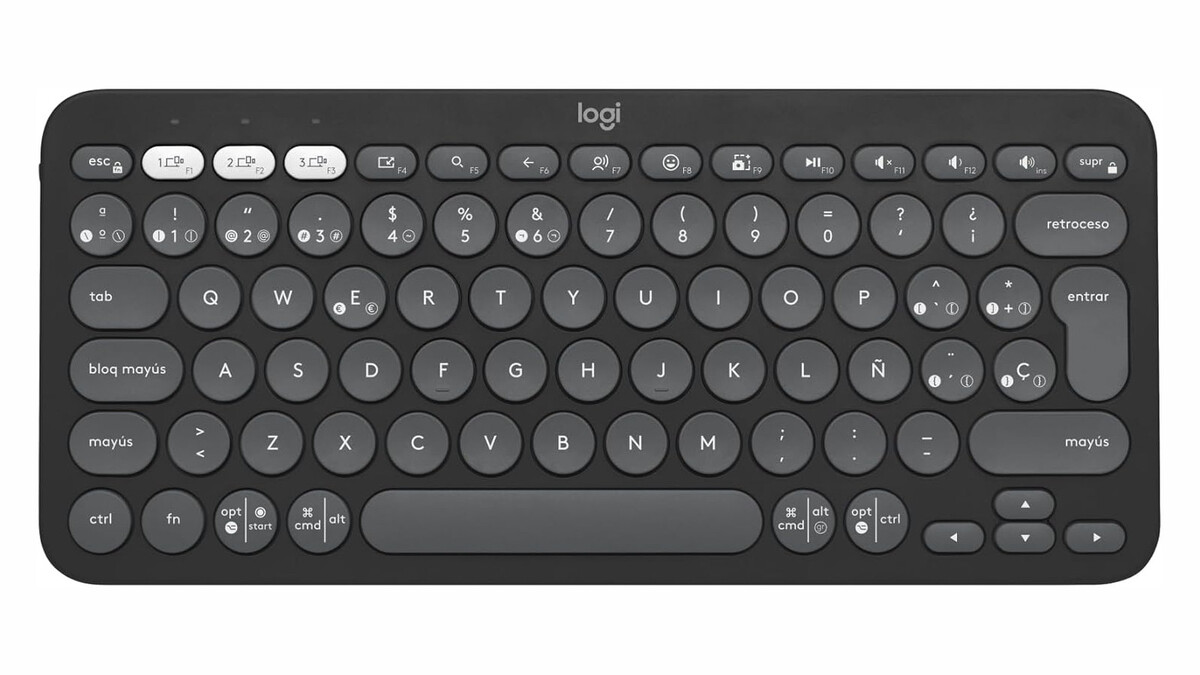
Key Features and Benefits
- Compact and lightweight: Easy to carry anywhere.
- Multi-device connectivity: Pair with up to three devices and switch between them seamlessly.
- Bluetooth wireless: No dongle required; works with computers, tablets, and TVs.
- Customizable Fn keys: 10 Fn keys can be configured with macros via Logi Options+ software.
- Long battery life: Powered by batteries that last up to three years.
Design and Comfort
The Pebble Keys 2 has a minimalist aesthetic with rounded keys that are comfortable to type on. The keys have a short travel distance, which may take some getting used to if you're coming from a mechanical keyboard, but most users will find it pleasant for everyday typing.
The compact layout omits the numeric keypad, which saves space but may be a drawback for those who frequently enter numbers. However, the function keys are easily accessible, and the overall build quality feels solid despite the keyboard's lightweight plastic construction.
Performance and Connectivity
Setting up the Pebble Keys 2 is straightforward: simply press and hold one of the three Bluetooth buttons until it enters pairing mode, then select it on your device. We tested it with a Windows laptop, an iPad, and a Samsung smart TV, and switching between them was quick and reliable.
Typing on the Pebble Keys 2 is quiet, making it suitable for shared spaces. The scissor-switch mechanism provides a decent tactile response, though it's not as crisp as higher-end keyboards. The Fn keys can be customized using Logitech's Logi Options+ software, allowing you to assign shortcuts for specific apps or workflows.
Battery Life
Logitech claims up to three years of battery life, thanks to the keyboard's energy-efficient Bluetooth technology. The Pebble Keys 2 runs on two AAA batteries (included), and there's an on/off switch to conserve power when not in use. While we haven't tested it for three years, early signs suggest the battery life is indeed impressive.
Who Should Buy the Logitech Pebble Keys 2?
This keyboard is ideal for:
- Students: Lightweight and portable for taking notes in class or at the library.
- Remote workers: Easy to switch between work laptop and personal devices.
- Smart TV users: A comfortable alternative to on-screen keyboards for searching apps.
- Travelers: Compact enough to slip into a bag without adding bulk.
However, if you need a numeric keypad or prefer a more tactile typing experience, you might want to look elsewhere. The background to this story is set out in Corsair K65 Plus Wireless Prime Day Deal: Compact Gaming Keyboard. A related thread runs through Keychron K3 Review: The Compact Keyboard I Always Recommend. Earlier coverage in Corsair K70 Core TKL Review: Compact Mechanical Keyboard for Travel shows how the argument developed.
Comparison with Other Keyboards
| Feature | Logitech Pebble Keys 2 | Logitech K380 | Apple Magic Keyboard |
|---|---|---|---|
| Price | $23.55 | $29.99 | $99.00 |
| Multi-device | 3 devices | 3 devices | 1 device |
| Battery Life | Up to 3 years | Up to 2 years | 1 month (rechargeable) |
| Compatibility | Windows, macOS, iPadOS, Android, TV | Windows, macOS, iPadOS, Android, TV | macOS, iPadOS |
Verdict
At $23.55, the Logitech Pebble Keys 2 offers excellent value for anyone seeking a portable, multi-device keyboard. Its ability to connect to a smart TV is a standout feature, and the long battery life adds to its appeal. While it may not satisfy power users who require a numeric keypad or mechanical switches, it's a solid choice for casual users and students. A closer look at the same subject appears in Trending: latest articles. Anyone following the wider picture can start with Action's 8-in-1 Charging Station: 200W for Just 19.99 Euros. The same theme surfaces in Lidl's Budget Smart Tracker Beats AirTag on Price and Compatibility, which takes a different angle.
If you're in the market for an affordable, reliable keyboard that works across multiple devices, the Pebble Keys 2 is worth considering. Context on how this played out before sits in Lidl's $8.99 Smart Tag: Never Lose Your Wallet or Keys Again.
FAQ
Can the Logitech Pebble Keys 2 connect to a smart TV?
Yes, the Pebble Keys 2 can connect to any Bluetooth-enabled smart TV, allowing you to navigate apps and search for content more comfortably than using the on-screen keyboard.
How many devices can the Pebble Keys 2 pair with?
It can pair with up to three devices simultaneously, and you can switch between them using the dedicated Bluetooth buttons.
Does the Pebble Keys 2 require a USB receiver?
No, it connects via Bluetooth only, so there's no need for a USB dongle. This makes it ideal for tablets and TVs that may not have USB ports.
What is the battery life of the Logitech Pebble Keys 2?
Logitech claims up to three years of battery life, depending on usage. It runs on two AAA batteries, which are included.
Browse the Shop
 Acacia frida deluxe solid wood bed frame |
Bedroom bench |
Bed chest drawers |
Lingerie dresser |
Frame base |
Mirror with jewelry storage |
30 Bathroom Vanity |
Memory foam queen mattress |
Mattresses for back pain |
Nightstand set of 2 |
Grand Goldman Shop |
Civil Lawyer
Deutschland Trikot WM 2026







