

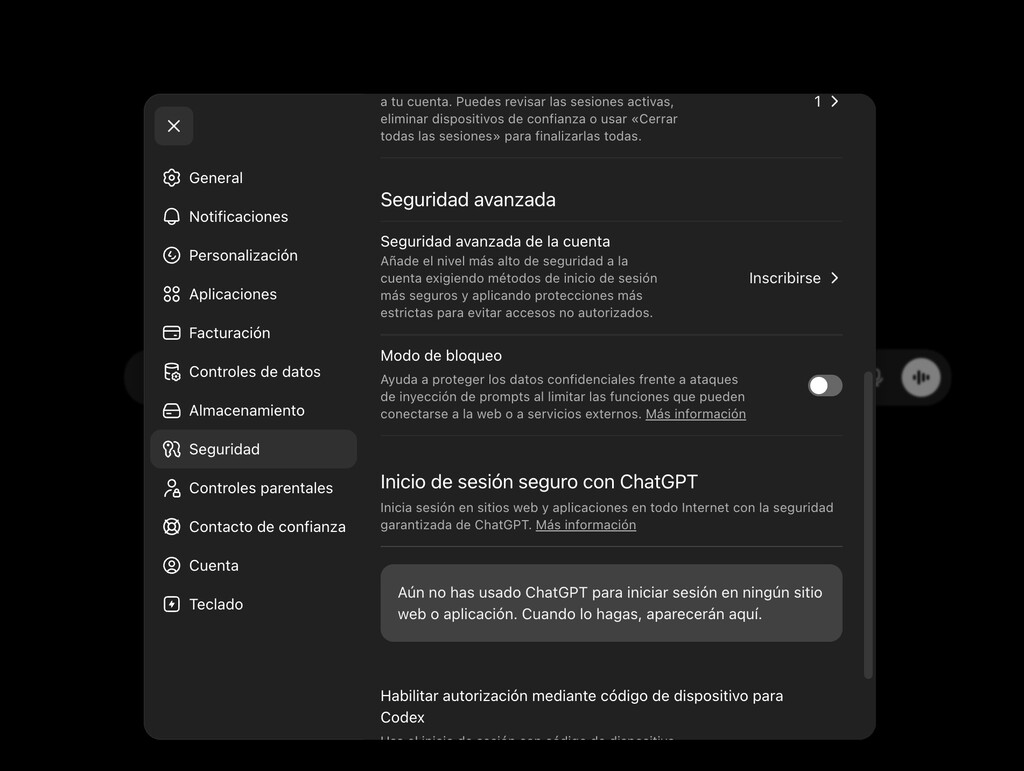
ChatGPT Lockdown Mode is a new security feature designed to protect organizations from prompt injection attacks and other threats that could compromise sensitive data. In this article, we explain what it is, how it works, who can use it, and how to activate it.
What Is ChatGPT Lockdown Mode?
Lockdown Mode is a security setting for ChatGPT that severely restricts the AI's ability to interact with external content, thereby reducing the risk of data exfiltration and other malicious activities. It is specifically aimed at organizations that handle confidential information and want to prevent attackers from exploiting AI vulnerabilities.
Find Original Home Decor sparking conversation at Grand Goldman Shop.

Why Lockdown Mode Matters: The Threat of Prompt Injection
Prompt injection is a technique where an attacker hides instructions within a file or website. When the AI processes that content, it unknowingly executes the hidden commands, potentially sending sensitive data to the attacker. This can have serious consequences for businesses.
For example, if you use ChatGPT to review contracts or analyze customer data, a malicious document could contain hidden instructions that cause the AI to leak information. Lockdown Mode mitigates this risk by limiting what the AI can do.
Who Can Use Lockdown Mode?
Lockdown Mode is available to organizations using ChatGPT Enterprise, ChatGPT Team, and ChatGPT Edu. It is not available for individual users on the free or Plus plans. Administrators can enable it for their entire workspace or for specific users.
How to Activate Lockdown Mode
If you are an administrator for an eligible plan, follow these steps to enable Lockdown Mode: The background to this story is set out in UK AI Security: Ukraine Battlefield Data to Protect Sites. A related thread runs through Prompt Injection Defense: How Context Bombing Stops AI Hackers. Earlier coverage in AI Browsers Fail Security Test: What It Means for Business shows how the argument developed.
- Log in to your ChatGPT admin console.
- Navigate to the Settings or Security section.
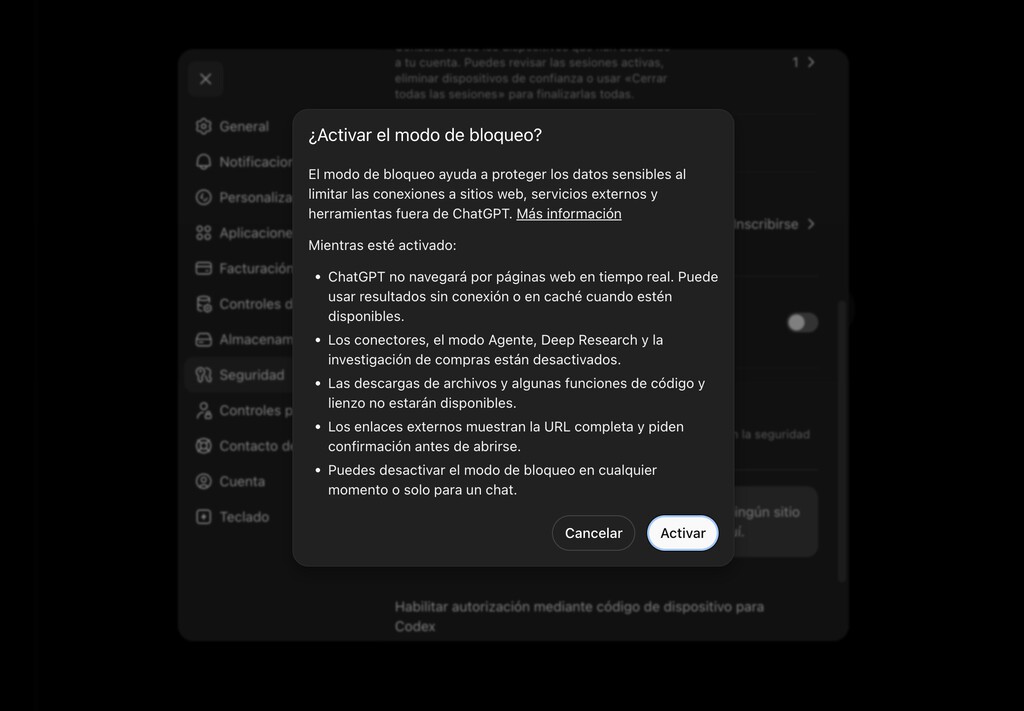
- Locate the Lockdown Mode option and toggle it on.
- Confirm your selection and review any additional settings.
- Communicate the change to your team and ensure they understand the implications.
What Changes When Lockdown Mode Is Enabled?
When Lockdown Mode is active, ChatGPT's functionality is significantly limited. For instance, it may not be able to browse the web, access external files, or use plugins. This reduces the attack surface but also means some features your team relies on may be unavailable. A closer look at the same subject appears in Trending: latest articles. Anyone following the wider picture can start with Aldi's $15 Smart Security Camera: Affordable Home Protection. The same theme surfaces in Kutxabank Fires Employee for Snooping on Client Salaries, which takes a different angle.
It's important to weigh the security benefits against the loss of functionality. For organizations with strict data protection requirements, the trade-off is often worth it. Context on how this played out before sits in Cockpit Security Lockdown: Should Doors Stay Locked From Inside. A companion piece, ChatGPT Lockdown Mode: What It Is and How to Activate, approaches the same subject from another angle.
Comparison of ChatGPT Plans and Lockdown Mode Availability
| Plan | Lockdown Mode Available? | Key Features |
|---|---|---|
| Free | No | Basic access, limited features |
| Plus | No | Advanced models, priority access |
| Team | Yes | Collaboration tools, admin controls |
| Enterprise | Yes | Enhanced security, dedicated support |
| Edu | Yes | Educational features, admin controls |
Frequently Asked Questions
What is prompt injection?
Prompt injection is a security exploit where an attacker inserts hidden instructions into content that an AI processes. The AI then executes those instructions, potentially compromising data or system integrity.
Can individual users enable Lockdown Mode?
No, Lockdown Mode is only available for organizational accounts (Team, Enterprise, Edu) and must be enabled by an administrator.
Does Lockdown Mode affect ChatGPT's performance?
Lockdown Mode restricts certain features like web browsing and file access, which may limit some functionalities. However, core conversational abilities remain intact.
Is Lockdown Mode available in all countries?
Availability may vary by region. Check with your organization's admin or OpenAI's documentation for the latest information.
Lockdown Mode is a crucial tool for organizations looking to harness AI while minimizing security risks. By understanding its capabilities and limitations, you can make informed decisions about its implementation.
Browse the Shop
 Acacia frida deluxe solid wood bed frame |
Bedroom bench |
Bed chest drawers |
Lingerie dresser |
Frame base |
Mirror with jewelry storage |
30 Bathroom Vanity |
Memory foam queen mattress |
Mattresses for back pain |
Nightstand set of 2 |
Grand Goldman Shop |
Civil Lawyer
Deutschland Trikot WM 2026







