

WhatsApp Web is a convenient tool that lets you access your WhatsApp chats from any computer browser without entering your phone number or password. However, this convenience comes with risks. If you forget to log out, or if someone links your WhatsApp to their computer without your knowledge, they could spy on your conversations. Knowing how to tell if someone is spying on your WhatsApp via WhatsApp Web is essential to protect your privacy.
Why WhatsApp Web Can Be a Security Risk
WhatsApp Web was designed for ease of use, but it can be exploited if you're not careful. When you link your phone to WhatsApp Web, you essentially create a mirror of your chats on that computer. If you use a public or shared computer and forget to log out, anyone can access your messages.
Find Original Home Decor sparking conversation at Grand Goldman Shop.

More concerning is the possibility that someone deliberately links your WhatsApp to their device without your consent. This could be a jealous partner, a nosy colleague, or a malicious actor who gains physical access to your phone. In either case, it's crucial to detect and stop such spying.
How to Detect If Someone Is Spying on Your WhatsApp
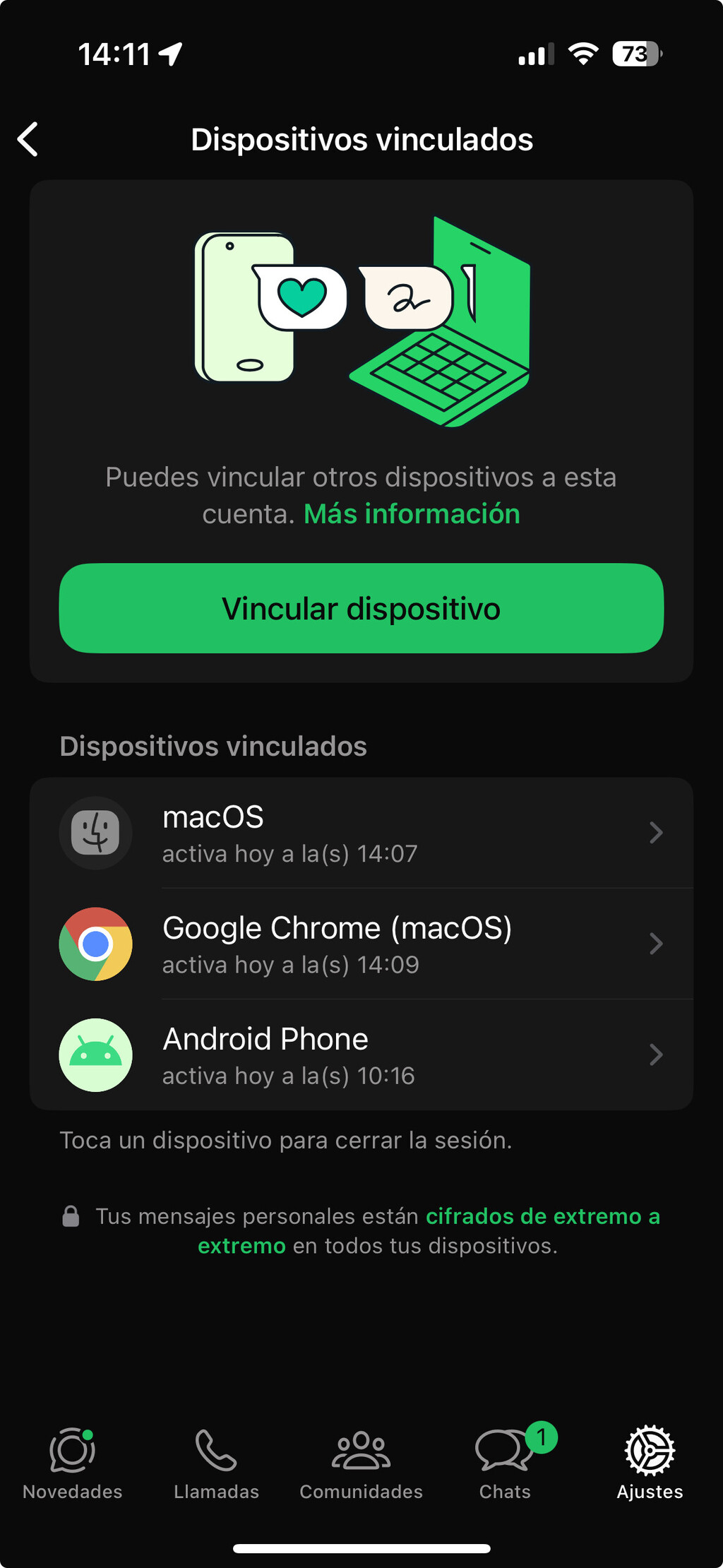
There are several signs that someone might be accessing your WhatsApp through WhatsApp Web. The most effective method is to check your linked devices. WhatsApp keeps a record of all devices linked to your account, so you can see if there's an unfamiliar computer.

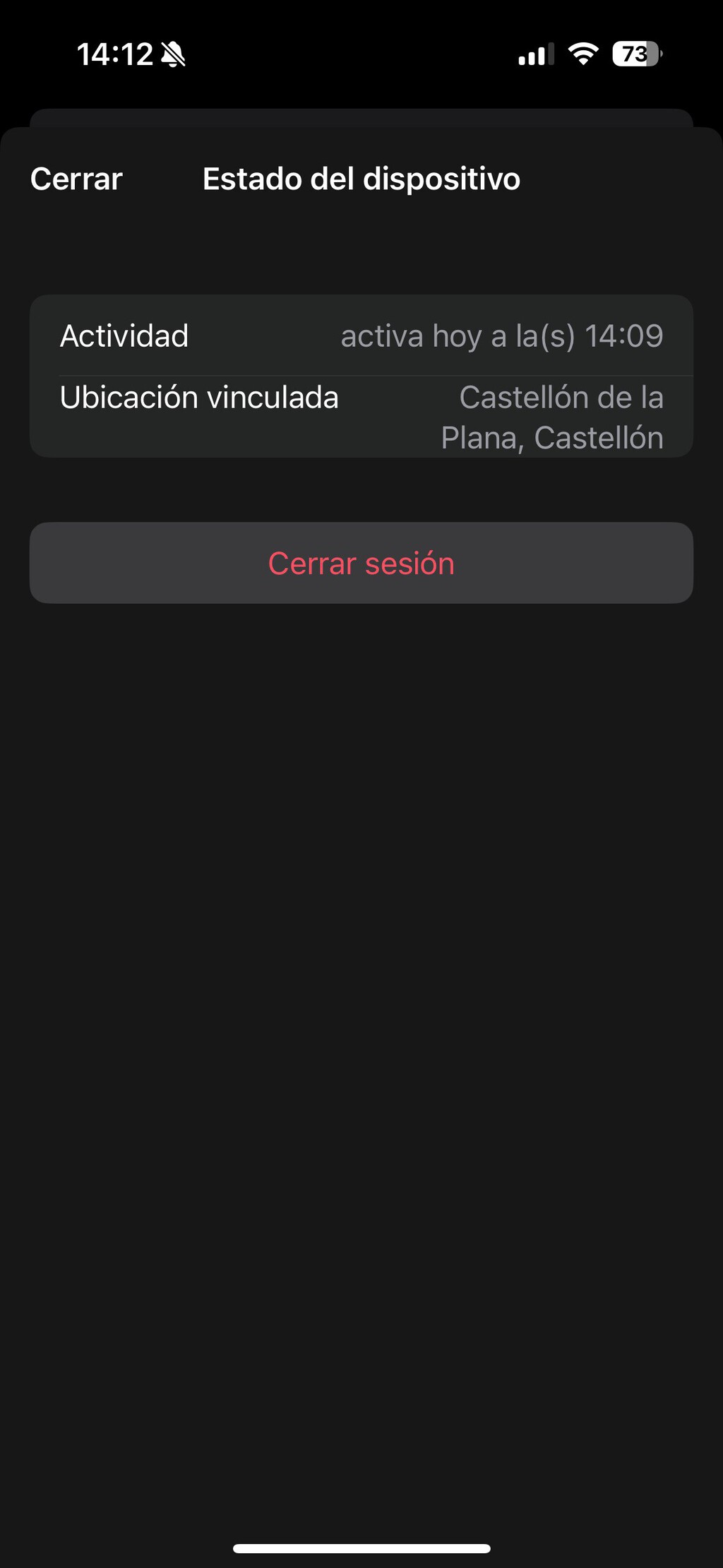
To check linked devices, open WhatsApp on your phone, go to Settings (or the three-dot menu on Android), and tap Linked Devices. There, you'll see a list of all devices currently linked to your account, along with the last time they were active. If you notice a device you don't recognize, it's a red flag.
Another sign is receiving notifications when a device is linked. WhatsApp sends a notification to your phone whenever a new device is linked. If you ever get such a notification when you haven't linked a device yourself, someone else may be trying to spy on you.
Also, pay attention to your chat activity. If you see replies to messages you never sent, or read receipts for messages you haven't opened, someone else might be using your account. Similarly, if your phone's battery drains faster than usual or your data usage spikes, it could indicate that your WhatsApp is being mirrored to another device. The longer history behind the story is traced in How to Recover Your WhatsApp Account: Hacked, Suspended, or Lost.
What to Do If You Suspect Spying
If you find a suspicious linked device, don't panic. You can immediately log out of that device from the Linked Devices menu. Tap on the device and select Log Out. This will disconnect the device and prevent further access. The background to this story is set out in Company Charges Nonsensical Convenience Fee, Customer Makes Things Even Less Convenient. A related thread runs through Young Mugger Comes To Rob The Convenience Store When An Old Lady Mistakes Him As An Employee. Earlier coverage in Hackers Cracked Tesla's Code - How They Turned Cars into Spying Devices shows how the argument developed.
After logging out, consider enabling two-step verification for added security. This feature requires a PIN when registering your phone number with WhatsApp, making it harder for someone to link your account without your knowledge. You can enable it in Settings > Account > Two-Step Verification. A closer look at the same subject appears in Smart TV Fatigue: Why Users Are Fed Up With Spying and Updates. Anyone following the wider picture can start with Trending: latest articles. The same theme surfaces in Surfshark One Price Drop: Premium VPN Protection at Starter Cost, which takes a different angle.
Also, regularly review your linked devices. Make it a habit to check every few weeks, especially if you use WhatsApp Web on shared computers. And always remember to log out of WhatsApp Web when you're done using it on a public computer. Context on how this played out before sits in Meta Glasses 2025: Are You Wearing Them? Tell Us. A companion piece, Internxt Zero-Knowledge Encryption: Secure Your Cloud Data, approaches the same subject from another angle.
Key Takeaways
- Check Linked Devices regularly to spot unauthorized access.
- Enable two-step verification to add an extra layer of security.
- Pay attention to WhatsApp notifications about new linked devices.
- Watch for unusual chat activity or battery/data usage.
- Always log out of WhatsApp Web on shared computers.
Comparison of Signs of Spying
| Sign | What It Means | Action |
|---|---|---|
| Unknown device in Linked Devices | Someone has linked your WhatsApp to their computer | Log out that device immediately |
| Notification of new linked device | Someone linked a device without your knowledge | Check linked devices and log out unfamiliar ones |
| Replies to messages you didn't send | Someone else is using your account | Change your WhatsApp settings and enable two-step verification |
| Increased battery or data usage | Your phone is mirroring chats to another device | Investigate linked devices and log out suspicious ones |
FAQ
How can I see if someone is using my WhatsApp Web?
Go to WhatsApp Settings > Linked Devices. There you'll see all devices currently linked to your account. If you see a device you don't recognize, someone may be spying on you.
Will I be notified if someone links their computer to my WhatsApp?
Yes, WhatsApp sends a notification to your phone whenever a new device is linked. If you receive such a notification without linking a device yourself, someone else may be trying to access your account.
What should I do if I find an unknown linked device?
Immediately log out that device from the Linked Devices menu. Then, enable two-step verification and consider changing your WhatsApp settings to enhance security.
Can someone spy on my WhatsApp without physical access to my phone?
No, to link a device via WhatsApp Web, someone needs to scan a QR code using your phone. So they must have physical access to your phone at least once. After that, they can access your chats remotely until you log them out.
Browse the Shop
 Acacia frida deluxe solid wood bed frame |
Bedroom bench |
Bed chest drawers |
Lingerie dresser |
Frame base |
Mirror with jewelry storage |
30 Bathroom Vanity |
Memory foam queen mattress |
Mattresses for back pain |
Nightstand set of 2 |
Grand Goldman Shop |
Civil Lawyer
Deutschland Trikot WM 2026
Acacia frida deluxe solid wood bed frame |
Bedroom bench |
Bed chest drawers |
Lingerie dresser |
Frame base |
Mirror with jewelry storage |
30 Bathroom Vanity |
Memory foam queen mattress |
Mattresses for back pain |
Nightstand set of 2 |
Grand Goldman Shop |
Civil Lawyer
Deutschland Trikot WM 2026







