

The Stream Deck is often pigeonholed as a gadget for streamers, but it's actually a powerful productivity tool that can transform your workflow. I bought the Stream Deck Neo a few months ago, and now I find it hard to go a day without using it.
These devices pair with their own app, where you can explore a huge range of options. It's worth spending hours discovering what it offers until you find the key to adapting it to your work or study sessions.
Find Original Home Decor sparking conversation at Grand Goldman Shop.

Why Stream Deck Is More Than a Streaming Device
At first glance, Stream Deck seems designed for live streaming—quick scene switches, sound effects, and alerts. But its real strength lies in customization. Each button can trigger a sequence of actions, from opening apps to running scripts.
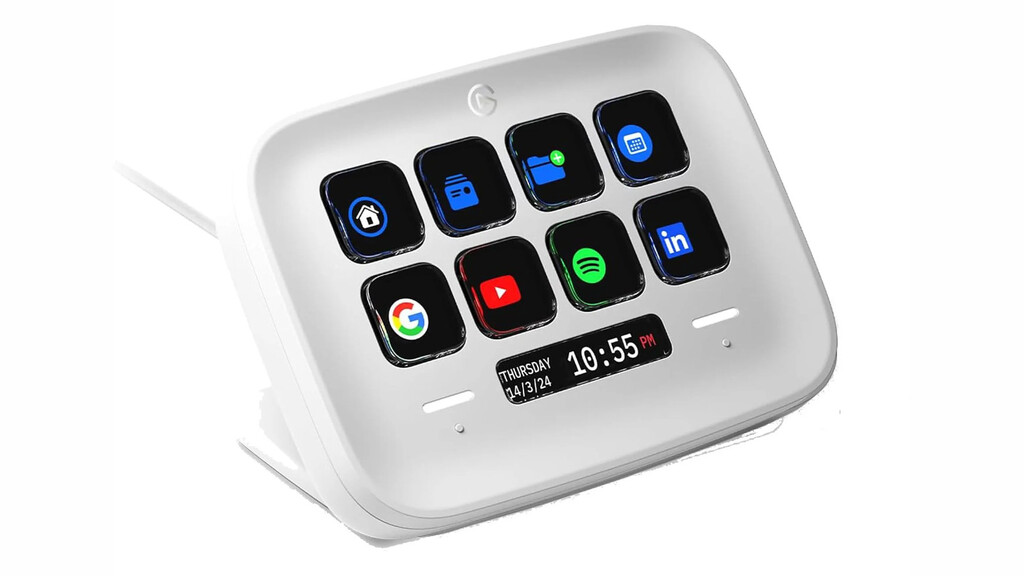
For me, the turning point was realizing that I could automate repetitive tasks. Instead of opening each work app individually, I press one button and everything launches. That alone saves minutes every day.
How I Use Stream Deck for Work
So far, I've only filled one page of the many customizable profiles on the Stream Deck Neo. I've set up buttons to open or close all my work applications at once, and another to type a long text with a single press.
But it goes deeper: you can open specific websites in your preferred browser (even if it's not the default), or open multiple templates in an image editor without doing it one by one. These automation capabilities make it a versatile tool for any desk job.
Basic but Useful Actions
Of course, there are basic actions like setting timers (great for productivity or taking breaks), opening a single app, or playing sounds. These might seem simple, but they add up to a smoother workday.
For example, a timer button helps me stick to the Pomodoro technique without reaching for my phone. And playing a sound can signal the end of a focus session.
Key Benefits of Using Stream Deck for Productivity
- Automate repetitive tasks: Open multiple apps or run scripts with one press.
- Reduce context switching: Keep your focus by avoiding manual app switching.
- Customizable profiles: Create different layouts for work, study, or leisure.
- Physical controls: Tactile buttons are faster and more satisfying than keyboard shortcuts.
- Integration with many tools: Supports web browsers, editors, and more via plugins.
Stream Deck Models Compared
Elgato offers several Stream Deck models, each with different features. Here's a quick comparison to help you choose.
| Model | Keys | Key Type | Price Range | Best For |
|---|---|---|---|---|
| Stream Deck Neo | 8 | LCD | Budget | Beginners, basic productivity |
| Stream Deck MK.2 | 15 | LCD | Mid-range | General productivity and streaming |
| Stream Deck XL | 32 | LCD | High-end | Power users, complex workflows |
| Stream Deck Pedal | 3 | Pedal | Mid-range | Hands-free control |
The Neo is a great entry point, but if you need more buttons, the MK.2 or XL might be better. The Pedal is ideal for tasks where your hands are busy.
Getting Started with Stream Deck
To make the most of your Stream Deck, start by installing the companion app and exploring the plugin store. There are plugins for popular apps like Zoom, Photoshop, and even system controls.
Then, think about your daily routines. What tasks do you repeat often? Create buttons for those. You'll be surprised how quickly you adapt. The background to this story is set out in Corsair Nightsword v2 Wireless SD: Gaming Mouse With Stream Deck. A related thread runs through Start a new table by spending a few cents with this practical tutorial!. Earlier coverage in UK Public Service Broadcasters Fight for Survival Against US Streamers shows how the argument developed.
Tips for Maximizing Productivity
Organize your buttons by context: one profile for work, one for study, one for leisure. Use folders to group related actions and avoid clutter. A closer look at the same subject appears in How packaging automation builds more reliable production workflows. Anyone following the wider picture can start with Microbreaks at Work: Science Reveals Real Productivity Impact. The same theme surfaces in Trending: latest articles, which takes a different angle.
Also, consider using multi-actions to chain commands. For instance, a single button could open your email, Slack, and calendar, then start a timer. Context on how this played out before sits in How modern businesses can build smarter, more efficient environments. A companion piece, How Enterprise File Sharing Improves Collaboration Across Large, approaches the same subject from another angle.
FAQ
Can Stream Deck be used for productivity?
Absolutely. Stream Deck is highly customizable and can automate many tasks, from opening apps to running scripts. It's a versatile tool for any workflow.
What are the best Stream Deck models for productivity?
The Stream Deck MK.2 and XL are popular for productivity due to their larger number of keys. The Neo is a budget-friendly option for beginners.
Do I need to be a streamer to use Stream Deck?
No, Stream Deck is useful for anyone who wants to streamline their computer tasks. It's especially helpful for professionals, students, and creatives.
How long does it take to set up Stream Deck for productivity?
Setup is quick, but customizing to your needs can take some time. Spend an hour exploring plugins and creating buttons for your common tasks.
In conclusion, the Stream Deck is a hidden gem for productivity. With a bit of setup, it can save you time and reduce friction in your daily work. Give it a try—you might wonder how you ever lived without it.
Browse the Shop
 Acacia frida deluxe solid wood bed frame |
Bedroom bench |
Bed chest drawers |
Lingerie dresser |
Frame base |
Mirror with jewelry storage |
30 Bathroom Vanity |
Memory foam queen mattress |
Mattresses for back pain |
Nightstand set of 2 |
Grand Goldman Shop |
Civil Lawyer
Deutschland Trikot WM 2026
Acacia frida deluxe solid wood bed frame |
Bedroom bench |
Bed chest drawers |
Lingerie dresser |
Frame base |
Mirror with jewelry storage |
30 Bathroom Vanity |
Memory foam queen mattress |
Mattresses for back pain |
Nightstand set of 2 |
Grand Goldman Shop |
Civil Lawyer
Deutschland Trikot WM 2026







