

After years of using full-size keyboards, I switched to compact models around the 60% form factor, and the Keychron K3 has become my go-to recommendation for anyone who types for a living. It's not a gaming keyboard, and that's exactly why I love it.
My journey started with a mechanical Razer gaming keyboard with clicky switches and lots of RGB. While satisfying for gaming, it wasn't ideal for work: too noisy, long key travel that tired my fingers, and no wireless. So I switched to the Keychron K3, and I couldn't be happier.
Find Original Home Decor sparking conversation at Grand Goldman Shop.

Why I Switched to a Compact Keyboard
Even TKL (tenkeyless) keyboards started feeling too big for my desk. I wanted something that freed up space for my mouse and allowed a more natural typing position. The 60% layout of the Keychron K3 was a perfect fit.
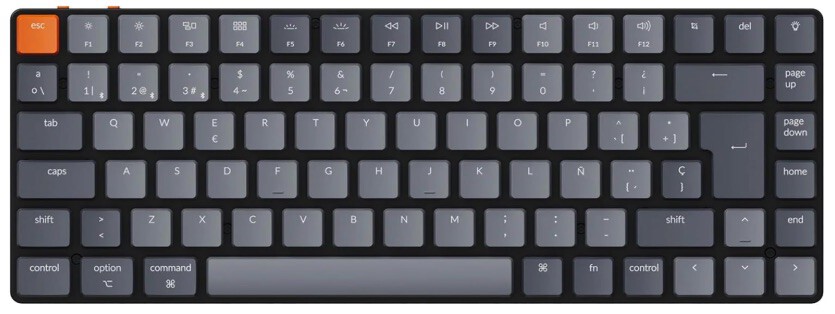
But it wasn't just about size. The K3 offers a low-profile design that reduces finger fatigue during long typing sessions. The switches are quieter than my old Razer, making it office-friendly.
Key Features of the Keychron K3
The Keychron K3 is a 75% low-profile mechanical keyboard that's available in three versions: white backlight, RGB backlight, and hot-swappable. I chose the white backlight version because I don't need RGB for work.
It connects via Bluetooth to up to three devices and also has a wired USB-C mode. The battery lasts for weeks depending on usage. The keycaps are ABS or PBT depending on the version, and the layout is Mac-friendly with dedicated function keys.
- Compact 75% layout saves desk space while retaining arrow keys and function row.
- Low-profile Gateron switches reduce finger travel and fatigue.
- Wireless Bluetooth 5.1 with multi-device pairing.
- White or RGB backlight options to suit your preference.
- Mac and Windows compatibility with included keycaps.
Keychron K3 vs. Traditional Gaming Keyboards
Here's how the Keychron K3 compares to a typical mechanical gaming keyboard like my old Razer:
| Feature | Keychron K3 | Typical Gaming Keyboard |
|---|---|---|
| Layout | 75% compact | Full-size or TKL |
| Switch Type | Low-profile mechanical | Standard mechanical |
| Noise Level | Quieter, office-friendly | Louder, clicky |
| Connectivity | Bluetooth + USB-C | Wired only (often) |
| Backlight | White or RGB | RGB |
| Price | ~€100 | Varies, often higher |
Who Is the Keychron K3 For?
The K3 is ideal for writers, programmers, students, and office workers who type for hours and want a reliable, comfortable keyboard. It's not designed for competitive gaming, but it handles everyday tasks flawlessly. Context on how this played out before sits in Keychron K3 Review: The Compact Keyboard I Always Recommend. A companion piece, Logitech Pebble Keys 2 Review: Compact Multi-Device Keyboard, approaches the same subject from another angle.
If you're coming from a full-size keyboard, the adjustment period is short. The 75% layout retains the arrow keys and function row, so you don't lose essential keys. The background to this story is set out in Trending: latest articles. A related thread runs through Google Pixel 10 Pro Price Drop: The Compact Android Phone to Buy Now.
Potential Drawbacks
No keyboard is perfect. The low-profile switches might not appeal to those who prefer a deeper key travel. Also, the ABS keycaps on the base model can develop shine over time. Earlier coverage in Sylvester Stallone Says No Glory in War After Rambo Years shows how the argument developed. A closer look at the same subject appears in CMF Headphone Pro: 100-Hour Battery and ANC for Just $49.99.
And if you're a heavy gamer, you might miss the macro keys and rapid response of dedicated gaming boards. But for productivity, the K3 excels. Anyone following the wider picture can start with Honor Magic 9 Pro Max: Chinese Brands Bet Big on Silicon-Carbon Batteries. The same theme surfaces in NASA Dropped Five Pieces of Space Junk on Mars: A Breakthrough Impact, which takes a different angle.
FAQ
Is the Keychron K3 good for programming?
Yes, the Keychron K3 is excellent for programming. Its compact layout reduces mouse travel, and the low-profile switches are comfortable for long coding sessions. The Mac-friendly key layout is a bonus for developers.
Can I use the Keychron K3 with multiple devices?
Absolutely. The K3 can pair with up to three devices via Bluetooth and switch between them with a key combination. It also supports wired USB-C connection.
Does the Keychron K3 have RGB lighting?
The Keychron K3 comes in three versions: white backlight, RGB backlight, and hot-swappable. The RGB version offers customizable lighting, while the white backlight version is more subdued for office use.
Is the Keychron K3 worth the price?
At around €100, the Keychron K3 offers great value for a wireless mechanical keyboard with a premium build and multi-device support. It's a solid investment for anyone who types daily.
After years of use, the Keychron K3 remains my top recommendation for a compact, versatile keyboard without RGB. It's reliable, comfortable, and perfect for work.
Browse the Shop
 Acacia frida deluxe solid wood bed frame |
Bedroom bench |
Bed chest drawers |
Lingerie dresser |
Frame base |
Mirror with jewelry storage |
30 Bathroom Vanity |
Memory foam queen mattress |
Mattresses for back pain |
Nightstand set of 2 |
Grand Goldman Shop |
Civil Lawyer
Deutschland Trikot WM 2026







